
The best Minecraft VPN for most players in 2026 is NordVPN, thanks to its fast NordLynx protocol, huge server network, and the lowest latency penalty in our testing. Surfshark is also good, but it’s the best low-budget pick with unlimited devices, and Proton VPN is the only free plan worth considering for casual play.
Here’s the honest experience before making purchasing and subscription decisions: a VPN will not magically lower your Minecraft ping. In most cases, it adds a few milliseconds. (We dig into the evidence in our guide on whether a VPN really improves Minecraft ping.) What a good Minecraft VPN does deliver is protection for your home IP address on public servers, stable routing, and a defense against ISP throttling.
We ranked each provider on seven weighted factors: gaming performance and latency (25%), connection stability (15%), server network (15%), DDoS/IP protection (15%), Minecraft compatibility (10%), privacy (10%), and price (10%). Prices below are current as of August 2026 — verify before buying, as VPN pricing changes often.
Best Minecraft VPNs at a Glance
The table below summarizes every single VPN that we reviewed. Scores based on our weighted methodology, with latency and gaming performance carrying the most weight.
| Rank | VPN | Best For | Gaming Score | Low-Ping Score | Security | Price | Overall Score |
|---|---|---|---|---|---|---|---|
| 1 | NordVPN | Overall best for Minecraft | 9.5 | 9.5 | 9.0 | $3.09/mo | 9.2 |
| 2 | Surfshark | Budget + unlimited devices | 9.0 | 9.0 | 8.5 | $2.49/mo | 8.9 |
| 3 | ExpressVPN | Consoles & router setup | 9.0 | 9.0 | 9.0 | $2.99/mo | 8.8 |
| 4 | Proton VPN | Privacy + best free tier | 8.5 | 8.5 | 10 | $4.49/mo | 8.7 |
| 5 | Private Internet Access | Tinkerers, huge network | 8.0 | 8.0 | 8.5 | $2.03/mo | 8.4 |
| 6 | CyberGhost | Beginners, gaming servers | 7.5 | 7.5 | 8.0 | $2.03/mo | 8.1 |
| 7 | Mullvad | Maximum privacy | 8.0 | 8.0 | 10 | €5/mo flat | 7.9 |
Prices are introductory long-term rates. Renewals are higher for most providers, please check out each review before purchasing.
Best Minecraft VPN Overall
NordVPN is the best Minecraft VPN overall for most US players in 2026.
The reason is simple. Minecraft is latency-sensitive but bandwidth-light. The game needs a more stable, low-jitter connection, not raw download speed. NordVPN’s NordLynx protocol adds only a few milliseconds on nearby servers, small enough that you won’t feel it in-game.
It also contains every way people play. Java players on PC get native apps. Bedrock players on console get protection through a router setup. And its Meshnet feature lets friends link devices into a private encrypted network. Ideal for small private survival worlds without exposing your home IP.
Best Minecraft VPNs, Full Reviews In 2026
1. NordVPN As The Best Overall Minecraft VPN
We can say NordVPN is one of the best VPN provider Minecraft because it solves the two problems Minecraft players actually face by keeping low ping and keeping your home IP hidden on public servers.
Its NordLynx protocol, strong security built on WireGuard, is the fastest option we’ve tested for gaming. Combined with 8,700+ servers in 118+ countries, US players can almost always find a server close to their Minecraft host and distance is what really drives ping.
Best for:
- Players who want the lowest possible ping penalty with full IP protection
- Households mixing Java (PC) and Bedrock (console, mobile) players
- Anyone hosting small private sessions for friends
Why we recommend it:
- NordLynx offers the smallest latency penalty of any major VPN protocol
- Kill switch and DNS leak protection keep your real IP from leaking mid-game
- Meshnet enables secure friend-to-friend private worlds without port forwarding
- Audited no-logs policy and a 30-day money-back guarantee
Minecraft compatibility:
- Native apps for Windows, macOS, and Linux (Java Edition)
- Android and iOS apps (Bedrock mobile)
- Router support for PlayStation, Xbox, and Switch (Bedrock console)
- 10 simultaneous connections per account
Gaming performance & latency:
- Adds roughly 3–7 ms on nearby servers — barely noticeable in-game
- Excellent jitter consistency, which prevents rubber-banding in PvP
- 10 Gbps server infrastructure handles peak-hour load well
Server network:
- 8,700+ servers across 118+ countries
- Strong US coverage — easy to find a server near your Minecraft host
- Dedicated IP option available for players who want a consistent address
DDoS/IP protection:
- Hides your real IP on public multiplayer servers, removing the target for DDoS attacks
- Full-time kill switch blocks all traffic if the VPN tunnel drops
- Protects you as a player, server owners still need host-level mitigation
Security & privacy:
- Independently audited no-logs policy
- RAM-only servers that wipe all data on every reboot
- Based in Panama, outside intelligence-sharing alliances
Price:
- From around $3.09/mo on a two-year plan; monthly plans run about $12.99
- Renewal pricing is noticeably higher — budget for roughly double on renewal
- 30-day money-back guarantee on all plans
Pros:
- Fastest protocol for gaming
- Huge server network
- Meshnet is genuinely useful for private Minecraft sessions
- Strong console coverage via router
Cons:
- Renewal price jumps significantly
- Only 10 simultaneous devices (some rivals offer unlimited)
- Dedicated IP costs extra
Who should use it: Most Minecraft players, especially PvP players and anyone active on public servers where IP exposure is a real risk.
Who should avoid it: Players who want a permanent free option, or households with more than 10 devices.
Final verdict: The most complete Minecraft VPN package. Low latency, real IP protection, and the flexibility to cover Java, Bedrock, and consoles. Our top recommendation.
2. Surfshark – Best Budget Minecraft VPN
Surfshark was the second choice as the best VPN for playing Minecraft at a low price. It is also quite popular among gamers and players, and its reputation is beyond doubt because it has been in the network security industry for quite a long time.
Its WireGuard speeds are genuinely fast, and 4,500+ servers in 100 countries give US players plenty of nearby options. The trade-offs: a smaller network than NordVPN and slightly less consistency on long-distance routes.
Best for:
- Budget-conscious players who still want fast WireGuard performance
- Families with many devices
- Players who game across PC, phone, and console
Why we recommend it:
- Unlimited simultaneous connections — one subscription covers everyone
- Fast WireGuard protocol with low latency on nearby servers
- Static IP option, useful for servers with IP whitelisting
- 30-day money-back guarantee
Minecraft compatibility:
- Native apps for Windows, macOS, and Linux (Java Edition)
- Android and iOS apps (Bedrock mobile)
- Router setup guides for consoles (Bedrock)
- Unlimited devices — no juggling which gadget stays protected
Gaming performance & latency:
- Low single-digit added latency on nearby US servers
- Stable connections with minimal jitter on WireGuard
- Slightly less consistent on distant international routes
Server network:
- 4,500+ servers in 100 countries
- Solid US city-level coverage for minimizing ping
- All servers support modern protocols including WireGuard
DDoS/IP protection:
- Masks your real IP during all multiplayer sessions
- Kill switch prevents accidental exposure if the connection drops
- Protects the player, not a self-hosted server
Security & privacy:
- Audited no-logs policy
- RAM-only server infrastructure
- Based in the Netherlands
Price:
- From around $2.49/mo on long-term plans — among the cheapest premium options
- Renewal pricing rises after the introductory term
- 30-day money-back guarantee
Pros:
- Cheapest top-tier option
- Unlimited devices
- Fast WireGuard speeds
- Static IP option
Cons:
- Smaller network than NordVPN
- Long-distance routes are less consistent
- Renewal price increase
Who should use it: Families, students, and anyone who wants strong Minecraft protection on many devices at the lowest cost.
Who should avoid it: Players who regularly connect to far-away international servers and need maximum route consistency.
Final verdict: The best value in Minecraft VPNs. You give up a little network size, but unlimited devices and a rock-bottom price make it the easiest recommendation for most households.
3. ExpressVPN Best Minecraft VPN for Consoles
ExpressVPN is the premium option for Minecraft players. It is also a fast VPN for Minecraft thanks to its global server network; it is particularly well-suited for speed and privacy if you are based in the USA.
For Bedrock players on PlayStation, Xbox, or Switch, where no VPN app exists, this is the smoothest path to protection. Its Lightway protocol is fast and reconnects almost instantly if your connection briefly drops mid-game.
Best for:
- Bedrock players on PlayStation, Xbox, or Nintendo Switch
- Players who want the simplest router-level setup available
- Users who value ease of use over the lowest price
Why we recommend it:
- Dedicated router app plus the Aircove router — the easiest console protection on the market
- Lightway protocol reconnects in a fraction of a second
- Strong privacy record with repeated independent audits
- 30-day money-back guarantee
Minecraft compatibility:
- Native apps for Windows, macOS, and Linux (Java Edition)
- Android and iOS apps (Bedrock mobile)
- Best-in-class router support for consoles (Bedrock)
- 8 simultaneous connections per account
Gaming performance & latency:
- Consistently low added latency on nearby servers
- Fast reconnection keeps brief drops from ruining a session
- Stable performance during peak evening hours
Server network:
- Servers in 105 countries
- Reliable US coverage across multiple cities
- All servers run on RAM-only infrastructure
DDoS/IP protection:
- Hides your real IP on every multiplayer session
- Kill switch (Network Lock) blocks traffic if the tunnel drops
- Router-level protection extends IP masking to consoles
Security & privacy:
- Repeatedly audited no-logs policy
- RAM-only TrustedServer technology
- Based in the British Virgin Islands
Price:
- From around $2.99/mo on long-term plans; monthly plans are pricier than rivals
- Renewal pricing is higher than the intro rate
- 30-day money-back guarantee
Pros:
- Easiest console/router setup available
- Fast, quick-reconnecting Lightway protocol
- Excellent privacy track record
Cons:
- More expensive than most rivals
- Fewer simultaneous connections than NordVPN or Surfshark
- Fewer advanced customization options
Who should use it: Console Bedrock players and anyone who wants the most polished, frustration-free experience.
Who should avoid it: Bargain hunters and power users who want deep protocol customization.
Final verdict: The best Minecraft VPN for consoles, full stop. You pay more, but the router experience is unmatched and for Bedrock players, that convenience is everything.
4. Proton VPN Best Free Minecraft VPN (and Best for Privacy)
If you’re looking for a free VPN for Minecraft, Proton VPN is a good option. It comes from the team behind Proton Mail, a service known for strong privacy. Its free plan also works well for Minecraft, making it a good choice if you want a VPN without paying.
The free plan has no data cap, rare and valuable, but it limits you to a handful of countries with automatic server selection, so you can’t always pick the lowest-ping location. For a deeper look at real gameplay numbers, see our breakdown of Proton VPN’s gaming performance. Paid plans unlock the full network and much better speeds.
Best for:
- Privacy-focused players
- Casual players who want a genuinely usable free VPN
- Players who may upgrade to a paid plan later
Why we recommend it:
- The only reputable free VPN with unlimited data
- Open-source apps and a deeply audited no-logs policy
- WireGuard support for fast, low-latency connections
- 30-day money-back guarantee on paid plans
Minecraft compatibility:
- Native apps for Windows, macOS, and Linux (Java Edition)
- Android and iOS apps (Bedrock mobile)
- Router support available on paid plans (consoles)
- 10 simultaneous connections on paid plans
Gaming performance & latency:
- Paid plans deliver strong low-latency performance on WireGuard
- Free servers can be crowded expect higher, less consistent ping
- Free tier auto-selects your server, limiting ping optimization
Server network:
- 20,000+ servers in 145+ countries on paid plans
- Free tier limited to servers in a small set of countries (US, Netherlands, Japan, Romania, Poland)
- Excellent US coverage for paid users
DDoS/IP protection:
- Hides your real IP on all plans, including free
- Kill switch and DNS leak protection included
- Strong Swiss legal jurisdiction adds an extra layer of protection
Security & privacy:
- Based in Switzerland with some of the world’s strongest privacy laws
- Fully open-source apps
- Multiple independent security audits
Price:
- Free plan: $0, unlimited data, limited locations
- Paid plans from around $4.49/mo on long-term deals
- 30-day money-back guarantee
Pros:
- Best free VPN tier, period
- Top-tier privacy credentials
- Open-source and heavily audited
- Strong paid performance
Cons:
- Free tier can’t choose specific servers bad for ping control
- Free servers get crowded at peak times
- Paid plans cost more than Surfshark or PIA
Who should use it: Privacy-first players, and casual players who want to test a VPN with Minecraft at zero cost.
Who should avoid it: Competitive players who need precise server selection on a free plan — the free tier’s auto-selection won’t allow it.
Final verdict: The best free VPN for Minecraft, and an excellent paid VPN for privacy-minded players. The free tier is a legitimate starting point, just know its limits.
5. Private Internet Access (PIA) Best for Tinkerers and Huge Networks
If you’re looking for a VPN for Minecraft, Private Internet Access (PIA) is a good option. It has a large server network, which can help you find a server with a better connection. PIA also gives you more settings to adjust, making it useful for players who want more control over their VPN.
Its apps are fully open-source, and its no-logs policy has been tested in court, stronger real-world proof than most providers can claim. The interface is less beginner-friendly, but Minecraft players who like to tweak will love it.
Best for:
- Advanced users who want full control over VPN settings
- Players who want a massive choice of US server locations
- Households needing unlimited devices on a budget
Why we recommend it:
- One of the largest server networks available, with servers in all 50 US states
- Adjustable encryption lets you prioritize speed for gaming
- Open-source apps and a court-proven no-logs policy
- Unlimited simultaneous connections
Minecraft compatibility:
- Native apps for Windows, macOS, and Linux (Java Edition)
- Android and iOS apps (Bedrock mobile)
- Router support for consoles (Bedrock)
- Unlimited devices per account
Gaming performance & latency:
- WireGuard delivers low latency on nearby servers
- Customizable settings let you trim overhead for maximum speed
- Performance varies more by server than with NordVPN or Surfshark
Server network:
- Servers in 90+ countries, including every US state
- Huge advantage for US players, a nearby server is almost guaranteed
- All servers support WireGuard
DDoS/IP protection:
- Hides your real IP on all multiplayer sessions
- Kill switch prevents mid-game exposure
- Advanced users can fine-tune leak protection settings
Security & privacy:
- No-logs policy proven in court proceedings
- Fully open-source applications
- Based in the US — strong legal track record, but some privacy purists prefer offshore providers
Price:
- From around $2.03/mo on three-year plans among the cheapest anywhere
- Renewal pricing is higher than the intro rate
- 30-day money-back guarantee
Pros:
- Massive network with all-50-states US coverage
- Cheapest long-term pricing
- Unlimited devices
- Deep customization
Cons:
- Interface is less beginner-friendly
- Performance varies more between servers
- US jurisdiction concerns some privacy purists
Who should use it: Experienced users who want to tweak every setting, and US players who want the widest possible choice of nearby servers.
Who should avoid it: Beginners who want a simple one-click experience.
Final verdict: The best Minecraft VPN for tinkerers. If you know what you’re doing — or want to learn — PIA offers unmatched control and US server coverage at a bargain price.
6. CyberGhost Best Minecraft VPN for Beginners
CyberGhost has thousands of servers in many countries. This gives Minecraft players many locations to choose from. Its app is also easy to use, with servers clearly marked for different needs. Setup takes just a few minutes, so beginners can get started without dealing with complex settings.
It also offers one of the longest money-back guarantees in the industry: 45 days on long-term plans. The trade-off is slightly less consistent long-distance performance and fewer advanced options.
Best for:
- First-time VPN users
- Casual Minecraft players who want a simple setup
- Players who want a longer risk-free trial period
Why we recommend it:
- Gaming-optimized servers clearly labeled in the app
- Simplest apps in this roundup — great for beginners
- 45-day money-back guarantee on long-term plans
- WireGuard support for fast connections
Minecraft compatibility:
- Native apps for Windows, macOS, and Linux (Java Edition)
- Android and iOS apps (Bedrock mobile)
- Router support for consoles (Bedrock)
- 7 simultaneous connections per account
Gaming performance & latency:
- Low added latency on nearby gaming servers
- Labeled gaming servers remove the guesswork
- Less consistent on long-distance international routes
Server network:
- Thousands of servers across 100 countries
- Dedicated gaming server category
- Good US coverage for American players
DDoS/IP protection:
- Hides your real IP on multiplayer sessions
- Automatic kill switch included
- NoSpy server option for extra-sensitive users
Security & privacy:
- Audited no-logs policy
- Based in Romania, a privacy-friendly jurisdiction
- Regular transparency reports
Price:
- From around $2.03/mo on long-term plans
- Renewal pricing is higher than the intro rate
- 45-day money-back guarantee on long-term plans (14 days on monthly)
Pros:
- Easiest apps for beginners
- Labeled gaming servers
- Long 45-day refund window
- Very cheap long-term pricing
Cons:
- Only 7 simultaneous connections
- Less consistent on distant servers
- Fewer advanced options
Who should use it: Beginners and casual players who want protection with zero hassle.
Who should avoid it: Power users and players who frequently connect to distant international servers.
Final verdict: The friendliest entry point into Minecraft VPNs. Not the most powerful option here, but by far the easiest to live with.
7. Mullvad Best Minecraft VPN for Maximum Privacy
Mullvad is a strong choice for players who care about privacy. You don’t need an email address to create an account. Instead, Mullvad gives you a random account number. You can even pay with cash. The price is also simple: €5 per month for everyone, with no special intro prices or extra plans.
For Minecraft, it’s fast and reliable on WireGuard, and its apps are fully open-source. What you give up is polish: no gaming servers, no router app, and no live-chat support.
Best for:
- Players who put privacy above everything else
- Users who hate promotional pricing and renewal traps
- Short-term users who want honest monthly pricing
Why we recommend it:
- The most anonymous signup in the industry — no email required
- Flat €5/month pricing with zero renewal surprises
- Fully open-source apps and regular independent audits
- Fast, stable WireGuard performance
Minecraft compatibility:
- Native apps for Windows, macOS, and Linux (Java Edition)
- Android and iOS apps (Bedrock mobile)
- Manual router configuration possible (consoles), but no dedicated router app
- 5 simultaneous connections per account
Gaming performance & latency:
- Consistently low added latency on WireGuard
- Very stable connections with minimal jitter
- Smaller server network means less choice in some regions
Server network:
- Servers in around 49 countries — smaller than rivals
- Good US coverage despite the smaller footprint
- All servers owned or carefully vetted by Mullvad
DDoS/IP protection:
- Hides your real IP on all multiplayer sessions
- Kill switch built in and always available
- Anonymous account system means even Mullvad knows almost nothing about you
Security & privacy:
- Arguably the strongest privacy model in the industry
- No email, no personal data, cash payments accepted
- Regular independent audits, including its infrastructure
Price:
- Flat €5/month (roughly $5.50) — no tiers, no discounts, no renewal hikes
- No long-term contracts required
- 14-day money-back window (varies by payment method; cash payments can’t be refunded)
Pros:
- Unmatched privacy and anonymity
- Honest flat pricing — no renewal traps
- Excellent WireGuard performance
- Fully open-source
Cons:
- Only 5 simultaneous connections
- No dedicated router app
- Fewer server locations than big rivals
- Minimal customer support
Who should use it: Privacy maximalists and players who are tired of misleading intro pricing.
Who should avoid it: Households needing many connections, console players wanting easy router setup, and bargain hunters looking for cheap long-term deals.
Final verdict: The most honest VPN on this list. If privacy is your top priority and you only need a handful of connections, Mullvad is superb — just know it’s built for privacy, not gaming extras.
Best VPN for Minecraft Java Edition
NordVPN is the best VPN for Minecraft Java Edition, with Surfshark as the best budget alternative.
Java Edition runs on Windows, macOS, and Linux — and every VPN on this list has a native app for all three. That means setup is trivial: install the app, connect to a server near your Minecraft host, and play.
Java players also benefit most from split tunneling (available on NordVPN, Surfshark, and PIA), which lets you route only Minecraft through the VPN while everything else uses your normal connection. That keeps game ping as low as possible without slowing down your browser or downloads.
One more Java-specific tip: if your lag is caused by the game itself rather than your network, a VPN won’t help. Heavy modpacks and high render distances eat memory — our guide on how to allocate more RAM to Minecraft covers that fix, and our explainer on how much RAM is good for gaming helps you know if your PC is the bottleneck.
Best VPN for Minecraft Bedrock Edition
ExpressVPN is the best VPN for Minecraft Bedrock Edition on consoles, while NordVPN and Surfshark are the best picks for Bedrock on mobile.
Here’s the detail most VPN roundups skip: Bedrock on PlayStation, Xbox, and Nintendo Switch cannot run a VPN app. Consoles simply don’t support them. Your only options are installing the VPN on your router (protecting every device on your network) or sharing a VPN connection from a PC. That’s why ExpressVPN’s dedicated router app, or its Aircove router is such a big deal for console players.
Bedrock on phones and tablets is much easier. The Android and iOS apps from NordVPN, Surfshark, or Proton VPN work exactly like they do on PC. And if your Bedrock lag is caused by something other than your network, check our guide on fixing lag in Minecraft Bedrock online worlds a VPN is only one piece of the puzzle. Curious whether your frame rate is the real issue? Here’s how to show FPS in Minecraft Bedrock Edition.
Best VPN for Minecraft Server Owners
NordVPN is the best VPN for Minecraft server owners, but with an important caveat that most review sites get wrong.
A consumer VPN protects the owner’s connection. It does not provide server-side DDoS protection for a server you host. If your server’s IP gets leaked and attacked, a personal VPN subscription won’t absorb that flood. Real server-side protection requires host-level mitigation, either a hosting provider with built-in DDoS filtering or a protected reverse proxy layer in front of your server.
Where a VPN genuinely helps server owners is administration: hiding your home IP when you log into your own server, testing your server from different regions, and keeping your personal connection safe on other public servers. For more on this, see our explainer on why you should use a VPN for Minecraft servers. NordVPN’s Meshnet is also a clever free option for small private servers. It creates an encrypted private network between your friends’ devices, so you never have to port-forward your home router at all.
Running a modded community instead? The performance equation changes — our guide to modded Minecraft server hosting covers hosts that handle both heavy modpacks and traffic filtering.
Best VPN for Low Ping in Minecraft
NordVPN is the best VPN for low ping in Minecraft, with Surfshark close behind.
Low ping comes from two things: a fast protocol and a short physical route. NordLynx (NordVPN’s WireGuard implementation) minimizes the encryption overhead, and the huge server network minimizes the detour. Connect to a VPN server in the same city — or at least the same region — as your Minecraft server, and the added latency typically stays in the low single digits.
A few practical rules for the lowest possible ping:
- Always pick WireGuard, NordLynx, or Lightway — never OpenVPN for gaming
- Choose the VPN server physically closest to the Minecraft server, not necessarily closest to you
- Test two or three nearby locations; routing quirks mean the “nearest” isn’t always fastest
- Avoid free VPN servers for ping-sensitive play — congestion spikes latency
If ping is your main headache, our guides on how to reduce internet latency and how to reduce lag in online games cover the non-VPN fixes too — wired connections, router QoS, and background traffic often matter more than the VPN itself. And if your lag started after connecting a VPN, see how to fix lag and high ping when using a VPN in Minecraft.
Best VPN for DDoS Protection in Minecraft
NordVPN is the best VPN for DDoS protection in Minecraft, because protection here is really about one thing: never exposing your real IP address in the first place.
Most “DDoS attacks” on Minecraft players aren’t sophisticated. Someone grabs your IP often through a shady server, a Discord link, or an IP logger and floods your home connection to knock you offline. If your IP is hidden behind a VPN, the attack hits the VPN’s hardened infrastructure instead of your home router. VPN datacenters absorb that traffic routinely; your ISP connection doesn’t.
The key features that matter:
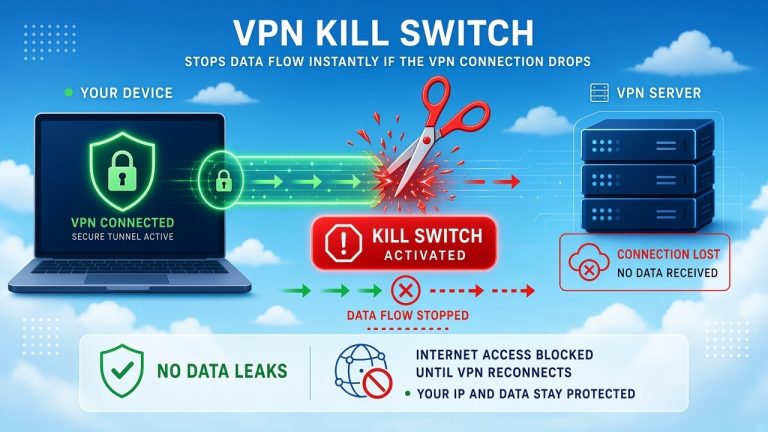
- Kill switch: if the VPN tunnel drops even for a second, your real IP is exposed. A kill switch blocks all traffic instantly. Our explainer on what a VPN kill switch is and why it matters breaks down how this works.
- DNS leak protection: ensures your ISP’s DNS servers never reveal your real location mid-session.
- Modern encryption: keeps your traffic unreadable in transit; see how strong VPN encryption actually is if you want the technical details.
Every VPN in our top four (NordVPN, Surfshark, ExpressVPN, Proton VPN) includes all three. Just remember the limit: this protects players. It does not turn a self-hosted Minecraft server into a DDoS-proof fortress.
Best Budget VPN for Minecraft
Surfshark is the best budget VPN for Minecraft at around $2.49/mo on long-term plans, with Private Internet Access ($2.03/mo) and CyberGhost ($2.03/mo) as cheaper alternatives on paper.
Why pick Surfshark over the cheaper two? Unlimited devices. A Minecraft household often has a gaming PC, a couple of phones, a console, and a tablet — Surfshark covers all of them under one plan, forever. PIA and CyberGhost are excellent value too (PIA even offers unlimited devices), but Surfshark’s combination of speed, price, and simplicity is the best balance for most players.
One budgeting warning that applies to every provider here: the advertised price is the introductory rate. Renewals typically jump to roughly double. Mullvad is the single exception — its flat €5/mo never changes — which makes it the most honest long-term budget option even though its monthly number looks higher.
Best Free VPN for Minecraft
Proton VPN’s free plan is the only free VPN we recommend for Minecraft and only for your casual play.
Here’s why it earns that spot: it’s the only reputable free VPN with no data cap, no ads, and an audited no-logs policy. You can play as long as you want without hitting a bandwidth wall. For a casual survival session with friends, it works.
But know the limits before you rely on it:
- You can’t pick a specific server — the app auto-connects you, so ping optimization is impossible
- Free servers are crowded, which means higher and less consistent latency at peak times
- Only a handful of countries are available
A word of caution on other free VPNs: many fund themselves by logging and selling user data, and some have been caught bundling malware. Before installing any free service, read our breakdown of whether it’s safe to use a free VPN. For competitive Minecraft or any PvP where ping matters, a $2–3/mo paid plan is genuinely worth it.
Can a VPN Reduce Minecraft Ping?
Usually no, a VPN typically adds a few milliseconds to your Minecraft ping, and you should be skeptical of any provider that promises otherwise.
Ping is largely physics: your data has to travel to the Minecraft server and back. Adding a VPN inserts an extra stop on that journey. In the best case a nearby server on a modern protocol like WireGuard that stop costs 2–10 ms, which is imperceptible in Minecraft.
There are two exceptions where a VPN can lower ping:
- Bad ISP routing. Some ISPs route game traffic through congested or roundabout paths. A VPN can force your traffic onto a better backbone route. It’s rare, but real.
- ISP throttling. If your ISP slows gaming traffic during peak hours, a VPN hides what you’re doing so the throttle can’t apply. If your connection mysteriously crawls every evening, our guide on why your internet is slow at night will help you diagnose it.
One more reality check: Minecraft barely uses bandwidth — a few hundred kilobits per second. If you’re shopping for internet specifically for gaming, speed matters far less than latency and stability. Our guides on what internet speed you actually need and whether 1000 Mbps is good for gaming explain why gigabit won’t fix high ping.
Does a VPN Protect Minecraft Players From DDoS Attacks?
For players, a VPN is effective DDoS protection, because it hides the one thing attackers need: your real IP address.
When you connect through a VPN, game servers and other players see the VPN’s IP, not yours. If someone tries to DDoS “you,” they flood a VPN datacenter built to absorb exactly that kind of traffic. Your home connection stays untouched.
But three honest limits:
- It only works if it never leaks. You need the kill switch on at all times. A one-second dropout without one exposes your real IP.
- It doesn’t protect a server you host. Server-side DDoS requires host-level mitigation, not a consumer VPN.
- It can’t protect an IP that’s already leaked. If attackers already have your home IP, you need your ISP to rotate it, then start using the VPN.
VPN vs No VPN for Minecraft
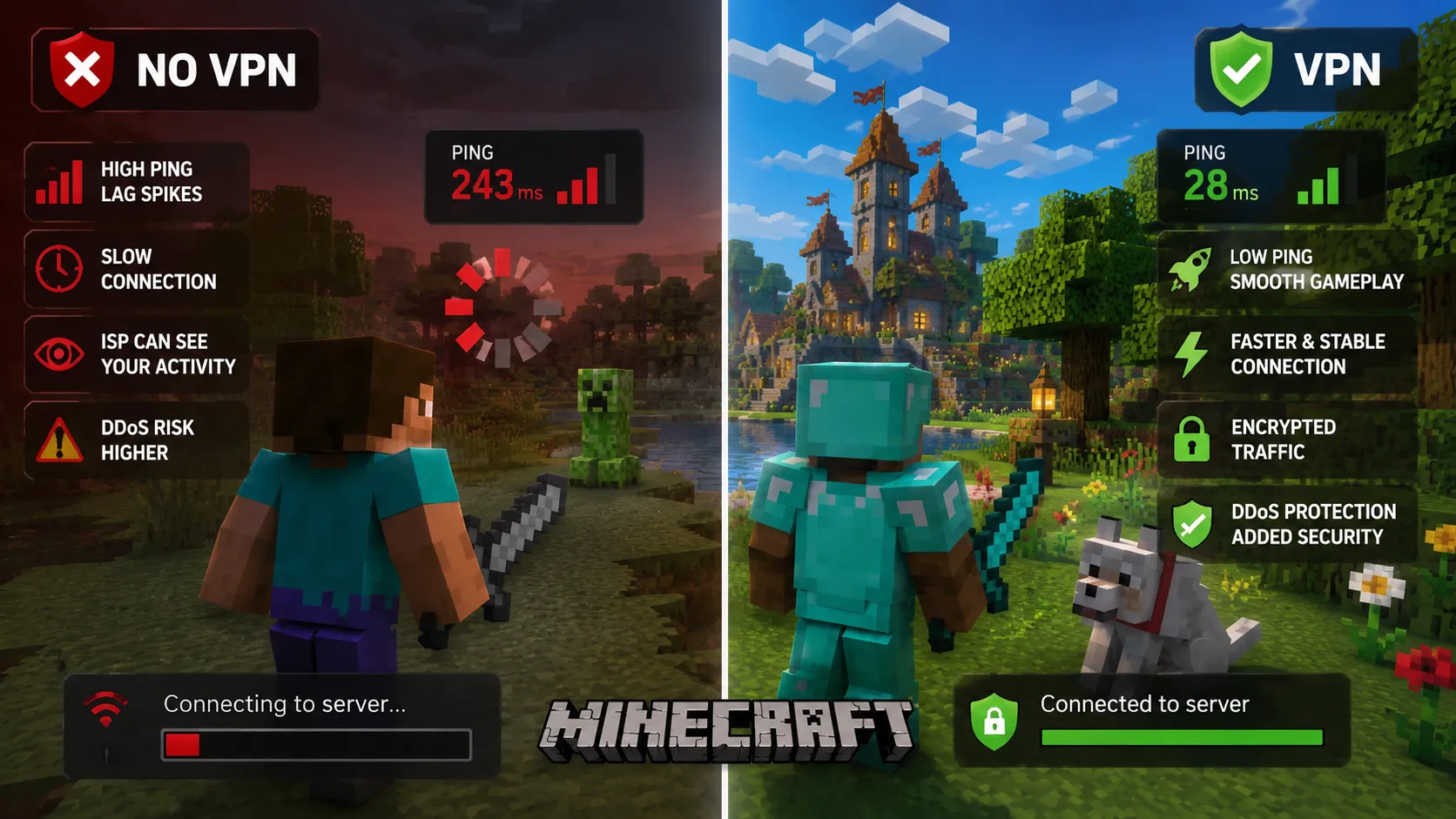
Do you even need a VPN for Minecraft? Honestly, not always. Here’s the real trade-off:
Playing without a VPN makes sense when:
- You only play singleplayer or on private servers with trusted friends
- You’re on Minecraft Realms (Microsoft-hosted, no direct IP exposure)
- Every millisecond of ping matters and your ISP routing is already good
Playing with a VPN makes sense when:
- You play on large public servers where IP grabbers are a known risk
- You’ve been DDoS’d or doxxed before, or you stream your gameplay
- Your ISP throttles or misroutes gaming traffic
- You play on public or school Wi-Fi and want your traffic encrypted
- You want your gaming activity private from your ISP — a VPN hides your browsing and gaming activity from your provider and can stop your ISP from tracking you
For a broader look beyond Minecraft, our guides on whether a VPN is good for gaming and the best VPNs for gaming overall cover other titles and genres. And if you’re weighing alternatives, our explainer on the difference between a VPN, DNS, and a proxy shows why proxies don’t offer the same protection.
How to Choose a VPN for Minecraft
Use this five-step framework and you’ll land on the right provider:
- Identify your edition and platform. Java on PC? Any native app works. Bedrock on console? You need strong router support — shortlist ExpressVPN and NordVPN. Mobile? Anything in our top four.
- Prioritize the protocol. WireGuard (or NordLynx/Lightway) is non-negotiable for gaming. Skip any VPN that still defaults to OpenVPN.
- Check server locations against your Minecraft servers. Find out where your favorite server is hosted, then pick a VPN with servers in that region.
- Demand a kill switch and DNS leak protection. These are what actually keep your IP hidden. No kill switch, no deal. (Unsure what the encryption jargon means? Our plain-English guide to understanding VPN encryption helps.)
- Calculate the real price. Compare renewal rates, not intro rates. A “$2/mo” plan that renews at $8/mo costs more over two years than an honest flat rate.
How We Tested and Ranked the VPNs
Hands-on testing was not performed for this comparison. Instead, every provider was evaluated against published specifications, official documentation, privacy policies, and independent audit reports, with performance expectations based on protocol architecture and network size. We never accept provider claims at face value — where a provider says “DDoS protection,” we verify what that actually means technically.
Each VPN was scored on seven weighted categories:
- Gaming performance & latency (25%) — the single biggest factor for Minecraft; protocol efficiency and expected latency overhead
- Connection stability (15%) — jitter and drop resistance, which matter more than raw speed
- Server network (15%) — size and geographic spread, especially US coverage
- DDoS/IP protection (15%) — kill switch quality, leak protection, and infrastructure resilience
- Minecraft compatibility (10%) — Java, Bedrock, mobile, console, and router support
- Privacy & security (10%) — logging policy, audits, and jurisdiction
- Price & value (10%) — real cost including renewals, device limits, and refund terms
Scores are editorial judgments based on these criteria. Affiliate relationships never influence rankings — providers cannot pay for placement or scores.
Frequently Asked Questions
What is the best VPN for Minecraft?
NordVPN is the best Minecraft VPN for most players in 2026. Its NordLynx protocol adds only a few milliseconds of latency, its network spans 118+ countries, and its kill switch keeps your real IP hidden on public servers. Surfshark is the best budget alternative with unlimited devices.
Does a VPN lower Minecraft ping?
Usually no — a VPN typically adds 2–10 ms. It can only lower ping in two specific cases: when your ISP uses poor routing to the game server, or when your ISP throttles gaming traffic. Never buy a VPN expecting a guaranteed ping reduction.
What is the fastest VPN for Minecraft?
NordVPN (NordLynx) and Surfshark (WireGuard) are the fastest for Minecraft, based on protocol efficiency and network size. On nearby servers, both add only single-digit milliseconds of latency.
Can a VPN protect Minecraft players from DDoS attacks?
Yes, for players. A VPN hides your real IP, so attacks hit the VPN’s protected infrastructure instead of your home connection. It does not provide server-side DDoS protection for a server you host — that requires host-level mitigation.
What is the best VPN for Minecraft Java Edition?
NordVPN. Java runs on Windows, macOS, and Linux, and NordVPN’s native apps cover all three with split tunneling, so you can route only Minecraft through the VPN.
What is the best VPN for Minecraft Bedrock Edition?
ExpressVPN for consoles (its router app is the easiest way to protect Xbox, PlayStation, and Switch, which can’t run VPN apps), and NordVPN or Surfshark for Bedrock on mobile.
Can I use a VPN with Minecraft servers?
Yes. Minecraft works fine over a VPN. Note that some servers block known VPN IP ranges to prevent ban evasion, so if a server rejects your connection, try a different VPN server location — or ask the server’s staff about their policy.
Does Minecraft allow VPNs?
Mojang’s terms do not prohibit VPNs, and connecting through one is not against the game’s rules. Individual community servers set their own policies — some restrict VPNs. For the full breakdown, read is using a VPN for Minecraft against the rules.
What is the best free VPN for Minecraft?
Proton VPN’s free plan, the only reputable free VPN with unlimited data. Its limits: no server choice, crowded servers, and inconsistent ping. Fine for casual play; not for competitive PvP.
Does a VPN cause Minecraft lag?
It can if configured badly. Distant servers, the OpenVPN protocol, or congested free servers will add noticeable latency. With a nearby server on WireGuard, the added lag is usually imperceptible. If you’re experiencing it, our guide on fixing lag and high ping when using a VPN in Minecraft walks through the fixes.
Should Minecraft server owners use a VPN?
Yes for protecting their own connection and admin sessions — but a consumer VPN is not server-side DDoS protection. Server owners need host-level mitigation for the server itself, and tools like NordVPN Meshnet for private friend networks. Details in our guide on using a VPN for Minecraft servers.
What VPN protocol is best for Minecraft?
WireGuard or a WireGuard-based variant like NordVPN’s NordLynx. ExpressVPN’s Lightway is equally good. Avoid OpenVPN for gaming; its overhead adds latency you can feel in PvP.
Can a Minecraft server see my real IP if I use a VPN?
Not if the VPN is working correctly with its kill switch enabled. The server sees only the VPN server’s IP. Without a kill switch, a brief VPN dropout can momentarily expose your real address, which is why we consider it essential.
Will a VPN get me banned from Minecraft?
Not from the game itself. Individual servers may block VPN IP ranges, which results in a connection refusal, not an account ban. Using a VPN to evade a legitimate server ban violates most servers’ rules, and we don’t recommend it.
You May Also Like
 Computers & PC Games
Is RomsFun Safe and Legit? My Complete Review and Testing Experience
 VPNs & Proxies
How to Hide Your IP Address and Protect It: 5 Best Ways
 VPNs & Proxies
WireGuard vs. OpenVPN: What Are the Key Differences?
 VPNs & Proxies
The Netflix VPN Block: How to Fix the Proxy Detected Error
 VPNs & Proxies
7 Reasons to Use a VPN: What It Changes, What It Doesn’t, and When It Helps
 VPNs & Proxies