
Is RomsFun Safe and Legit? I spent hours testing this site by downloading PS3 games and Windows games like Resident Evil 3 and Grand Theft Auto: Vice City. Here’s what I can tell you actually works. The games I downloaded were the right size and ran successfully on my console. But here’s the thing: you absolutely must protect yourself with antivirus software and an ad blocker if you want to download files from RomsFun.
I know many people wonder if sites like RomsFun are just scams or filled with viruses. After downloading several games, including Grand Theft Auto V, I found that the games I tested were available as described and worked on my setup. The files matched the listed sizes and ran successfully. However, the site has ads and pop-ups that can create security risks if you’re not careful.
Let me share everything I learned from using RomsFun, including the mistakes to avoid and the steps I took to keep my computer safer. This review is based on my actual experience downloading and testing games, not just theory.
What is RomsFun?
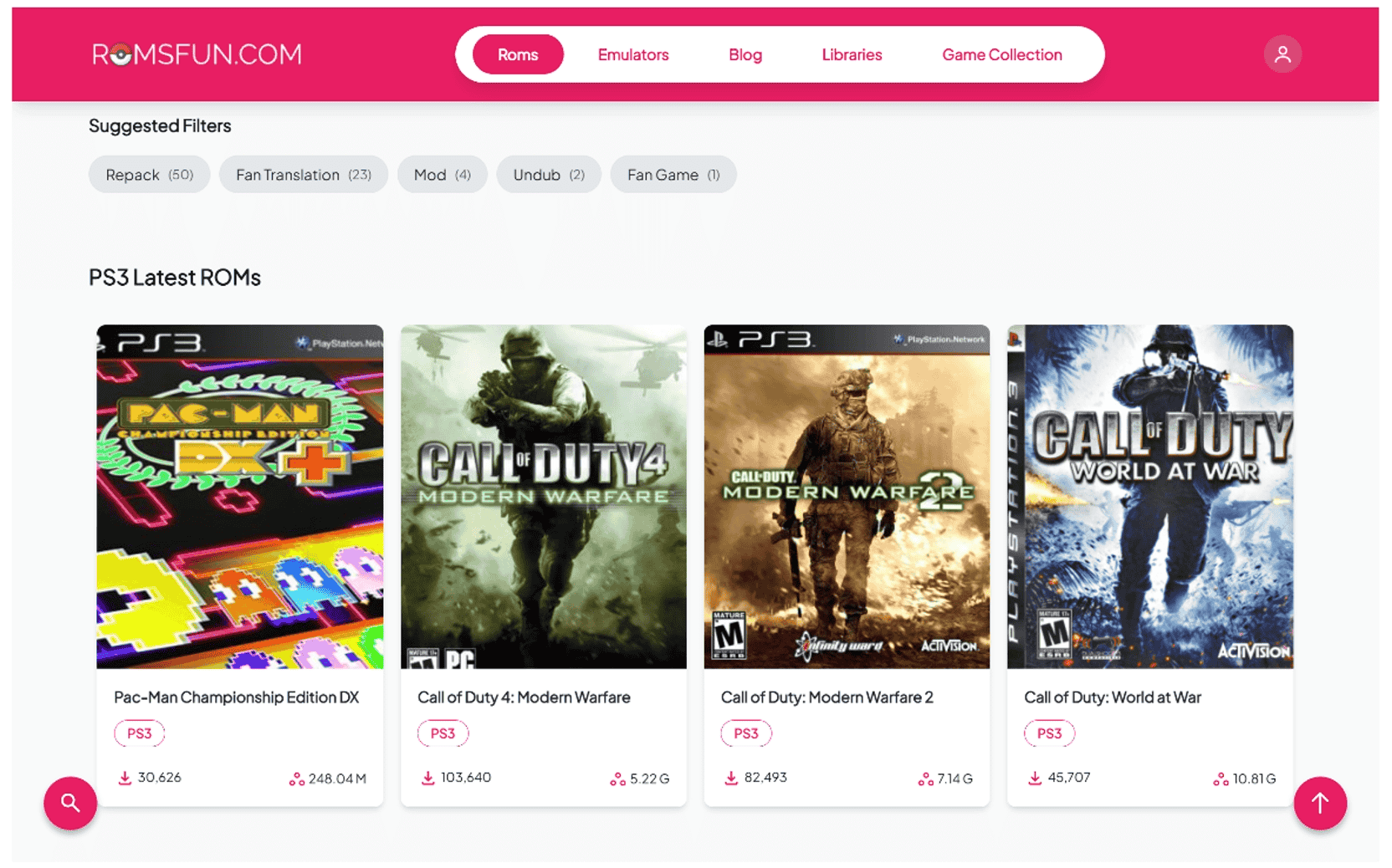
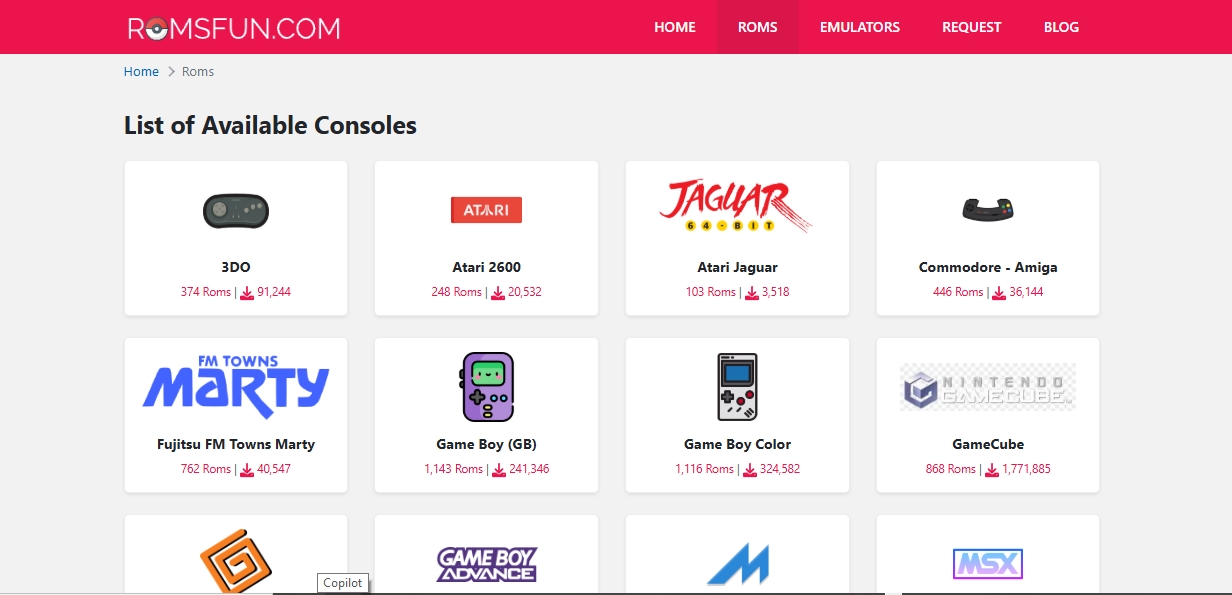
RomsFun is a website that offers ROMs and game files for a range of consoles and platforms, including Windows, PSP, PlayStation, Nintendo, Xbox, and older systems. Think of it as a large catalog of game files organized by platform, making it fairly easy to browse for a specific title.
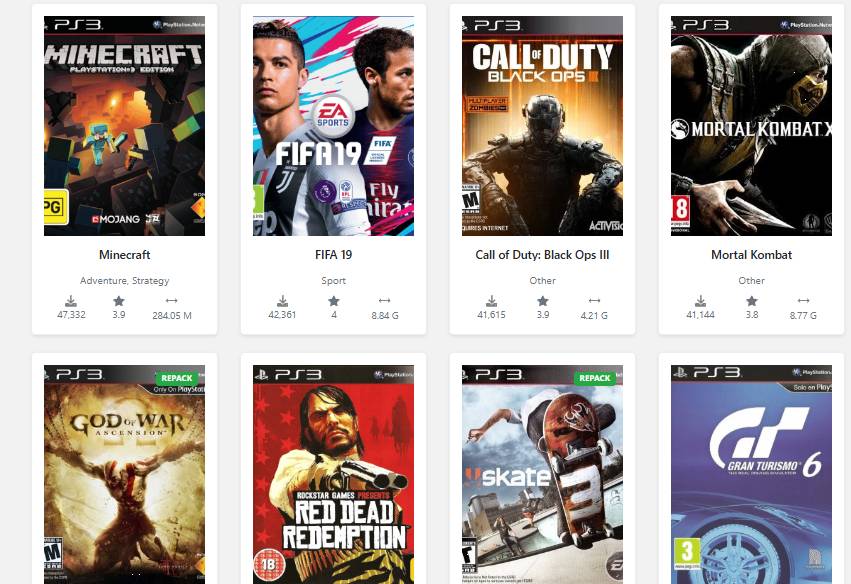
The site lists games spanning multiple generations, including well-known franchises such as God of War, FIFA, Mario, Pokémon, and Grand Theft Auto. If you’re interested in older titles, you can also explore our guide to the best retro games.
One thing that caught my attention was Minecraft: PlayStation 3 Edition. I really like Minecraft, so I was excited to find it on the site. I tested the game on my setup, and it ran smoothly. I had a lot of fun playing it, especially because I could play Minecraft with my brother. We built houses, explored the world, and enjoyed playing together again.
For console games, you’ll generally need compatible hardware or an emulator to run the files. In my testing, the download process was straightforward: I selected a game, waited for the download link to become available, and then downloaded the file to my computer.
What Makes RomsFun Different
Compared with some other ROM sites, RomsFun provides a fair amount of information on individual game listings. Depending on the title, you may see:
- File size: Useful for comparing the download with the size listed on the page
- File format: Shows the type of file you’re downloading
- User ratings and reviews: Gives you additional information from other users
- Download counts: Shows how many times a file has been downloaded
- Screenshots: Lets you see images associated with the game
Having this information made it easier for me to evaluate a listing before downloading it. Still, these details shouldn’t be treated as proof that every file is safe or that the site is legally authorized to distribute every game.
Is RomsFun Legit and Trustworthy?
From what I saw while testing it, RomsFun is a real working ROM site, but I’d still be careful with it. I downloaded several games, checked the files, and tested them on my setup. The games I tried worked, and the file sizes matched what was listed on the site.
What Made RomsFun Look Legit
- The downloads worked: The games I tested downloaded properly and ran successfully on my setup.
- The file sizes matched: This was one of the first things I checked. For example, a PS3 game listed at around 16 GB shouldn’t suddenly turn out to be a 5 MB download. A file that much smaller would immediately make me suspicious that I got a fake or unwanted file instead of the actual game.
- Game information is available: The listings provide details that helped me figure out what I was downloading before starting the download.
- User ratings are there: Ratings and reviews give you another thing to check before downloading a game.
What Made Me Be Careful
- Pop-ups and redirects: The site has ads and pop-ups, so it’s easy to click something you didn’t mean to. I’d use an ad blocker when browsing the site.
- Security risks: I’d also scan downloaded files with antivirus software before opening or transferring them.
- Some links may fail: Not every download link worked perfectly during my testing.
- Copyright concerns: A game being available for download doesn’t automatically mean the site has permission to distribute it. Copyright and distribution rights can depend on the game and the circumstances.
- File size alone isn’t proof: A matching file size is a useful thing to check, but it doesn’t guarantee that a file is safe or authentic.
So, Is RomsFun a Scam?
I didn’t have that experience. The games I downloaded worked, and the files were what I expected. Still, I wouldn’t blindly trust every file just because a few downloads worked for me.
I’d check the file size, scan it with antivirus software, and pay attention to where I’m clicking on the site. That’s especially important when a download page is surrounded by ads or pop-ups.
For me, RomsFun worked as a game-download site, but it’s a site I’d use carefully rather than one I’d trust without question.
My Real Testing Experience
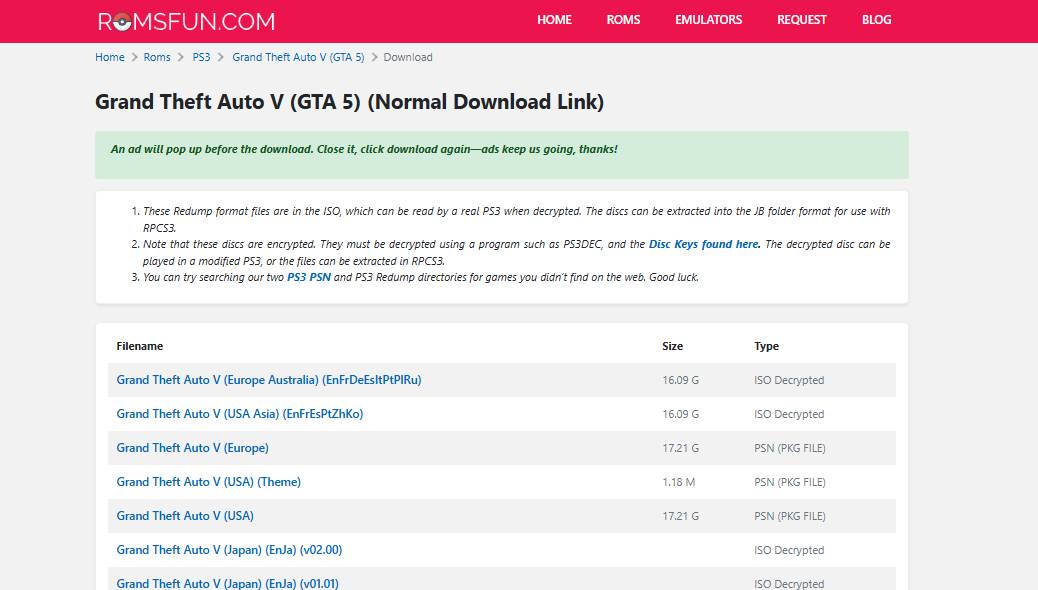
Downloading Grand Theft Auto V
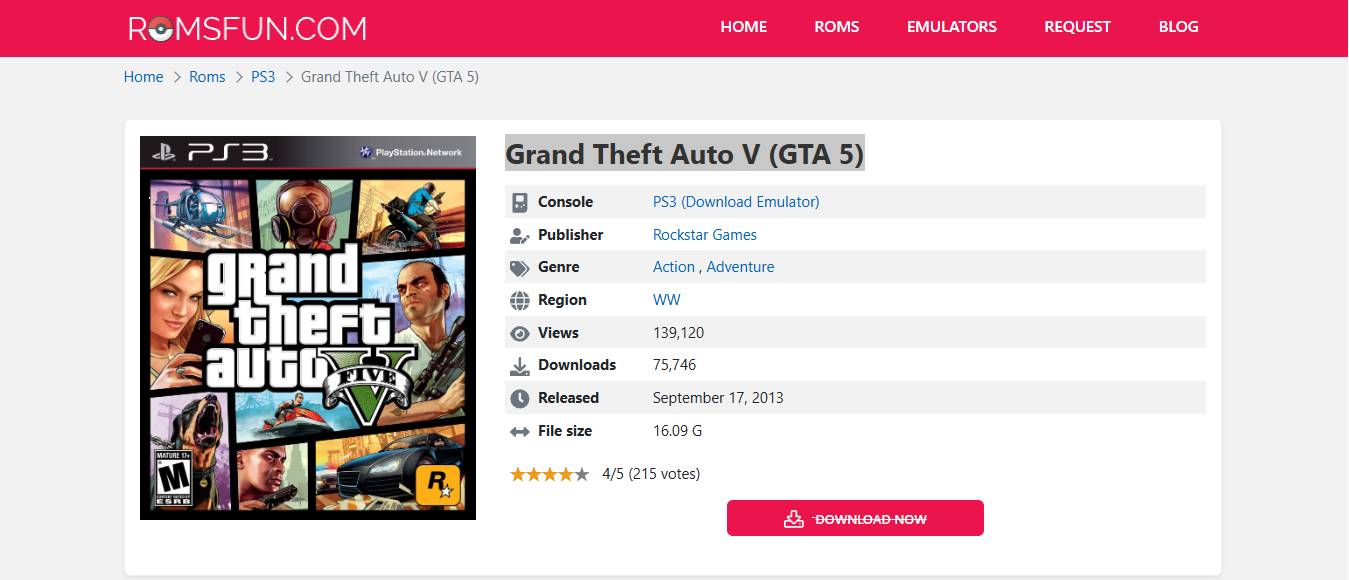
I decided to test RomsFun with one of the bigger games listed on the site: GTA V for PlayStation 3. The game is large, popular, and a good way to see how the download process actually works. Here’s what happened when I tried it: I found GTA V in the PlayStation 3 section.
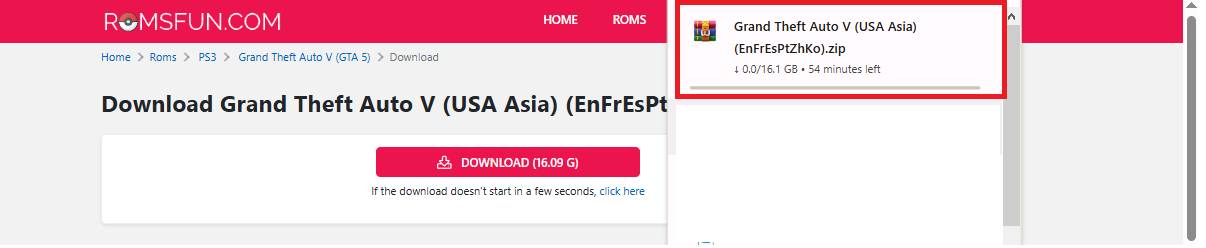
The listing showed a 4 out of 5 star rating from 215 votes, and the file size was listed as 16.09 GB. That size looked reasonable for a full PS3 game, so I continued with the download. After clicking the download button, I saw the usual “Your link is almost ready, please wait” message. In my case, I waited around 60 seconds before the actual download link appeared. The download took several hours because of the file size, but it finished without an issue. Once it was downloaded, I checked the file size and it matched the 16.09 GB shown on the listing.
Testing the Game
The real test was seeing whether the game would actually run. I loaded it using the PlayStation 3 emulator software on my setup, and it worked. The game loaded, the graphics appeared correctly, the sound worked, and I was able to play normally. That was useful because it showed that the particular file I tested wasn’t simply an empty download or a broken file.
It also matched the game I was expecting to download. That doesn’t mean every file on RomsFun will have the same result, though. My experience only reflects the games and files I actually tested.
How to Download Games from RomsFun Safely
If you decide to download from a third-party ROM site, take a few basic security precautions first. My approach is to protect the computer before downloading anything and then check the files before opening them.
Step 1: Prepare Your Security
Before visiting the site, I recommend having these basics ready:
- Use antivirus software – I use Windows Defender along with Malwarebytes for an extra layer of protection.
- Use a VPN if you need network privacy – A VPN can prevent your ISP from seeing the individual websites you’re accessing through the VPN connection, although it doesn’t make downloaded files safe.
- Install an ad blocker – I use an ad blocker to reduce pop-ups, redirects, and unwanted advertising while browsing.
- Use a security-focused browser – A browser with built-in tracking and pop-up protection can make this type of browsing less annoying and reduce some common risks.
Step 2: Navigate to RomsFun
Type the website address directly into your browser rather than relying on ads or random links from other sites. Fake copies of popular download sites can exist, so check the address carefully before entering any information or downloading a file.
Step 3: Find Your Game
Use the console categories or search feature to locate the title you’re looking for.
- Open the relevant console category.
- Search for the game title or browse the listings.
- Check the rating, file size, and format before downloading.
- Open the game listing and review the available information.
Step 4: Check the Details
I always look at a few things before starting a download:
- File size: The size should make sense for the game. For example, a PS3 game listed around 16 GB would make me suspicious if the download turned out to be only a few MB.
- User ratings: Ratings can give you another clue about the download, although they aren’t a guarantee that a file is safe.
- File format: Make sure the format matches the platform and software you’re using.
- User comments: Other users may mention broken downloads, missing files, or other problems.
Step 5: Start the Download
Click the appropriate download option and follow the site’s download process. You may have to wait while the download link is generated. During this part, be careful not to click on unrelated ads, buttons, or pop-ups that appear around the download area.
Step 6: Download Safely
Once the download starts, I keep things simple:
- Save the file to a folder that you can easily find later.
- Don’t open or run the file until you’ve checked it.
- Let large downloads finish rather than repeatedly restarting them.
- Keep enough free storage space available for the download and any extraction process.
Step 7: Scan Before Using
This is the step I wouldn’t skip. A working download isn’t automatically a safe download, so I scan files before opening or moving them to another device.
- Run your antivirus or security scanner on the downloaded file.
- Compare the file size with the size shown on the listing.
- If the file is unexpectedly tiny, has an unusual file type, or triggers a security warning, don’t open it.
Understanding the Risks and Red Flags
What Could Go Wrong
Even when a download works, there are still a few things worth watching out for: Malware or unwanted files – A suspicious download may not be the actual game you expected. A file that is dramatically smaller than the listed size can be a red flag, but file size alone doesn’t prove that a file contains malware.
Dangerous advertisements – Pop-ups and redirects can send you to unrelated pages or try to trick you into downloading software or entering personal information. That’s one reason I use an ad blocker when browsing sites like this.
Copyright concerns – Whether downloading or distributing a particular game is lawful can depend on the copyright status, the source of the game file, your location, and how the file is being distributed. Computer problems – Opening an unsafe file can expose your system to malware, unwanted software, or other security issues.
Red Flags to Watch For
These are the warning signs I pay attention to:
- File size is dramatically smaller than expected, such as a few MB for a game listed at around 16 GB.
- The file type doesn’t match what you expected to download.
- Antivirus software or your browser warns you about the file or download page.
- Multiple pop-ups or redirects keep appearing around the download button.
- A download page tries to convince you to install unrelated software.
How to Stay Safe
A few simple habits can reduce the chances of running into problems: Keep your antivirus software updated and running. Scan downloaded files before opening them, and don’t ignore security warnings just because a file appears to be the game you wanted.
An ad blocker can also make browsing much safer and less frustrating by cutting down on aggressive advertising and pop-ups.
A VPN can help with network privacy, but it isn’t a substitute for antivirus software or safe downloading habits. And if a file looks suspicious, it’s better to skip it than take a chance.
Game Library and What’s Available on RomsFun
PlayStation Games Collection
RomsFun has listings for PlayStation games from several generations.
For PlayStation 1, the site lists classics such as Final Fantasy VII, Crash Bandicoot, and Tony Hawk’s Pro Skater. The PlayStation 2 section includes titles such as Grand Theft Auto: San Andreas, God of War, and games from the Guitar Hero series.
The PlayStation 3 section caught my attention because it includes titles such as:
- Bloodborne
- The Last of Us
- FIFA 19 and FIFA 21
- Metal Gear Solid 4
- God of War III
- Red Dead Redemption
PSP games are also represented, including titles from series such as Naruto, Tekken, and Assassin’s Creed.
Nintendo Game Selection
The Nintendo section covers multiple generations of the platform.
For older systems, the site lists games such as Super Mario Bros., The Legend of Zelda, and Metroid for the NES, along with Super Mario World and A Link to the Past for the Super Nintendo.
Newer sections include Nintendo DS titles such as Pokémon Diamond and Pearl, as well as Wii games including Super Mario Galaxy and Mario Kart Wii.
The Game Boy Advance section also includes popular Pokémon titles such as Ruby, Sapphire, and Emerald.
Other Console Options
The collection extends beyond PlayStation and Nintendo.
Xbox 360 listings include games from series such as Halo, Gears of War, and Forza. The GameCube section includes titles such as Super Smash Bros. Melee and Mario Kart: Double Dash!!
Older platforms are represented too, including Sega Genesis, Atari, and arcade games from the 1980s and 1990s.
Legal Stuff You Should Know
The Copyright Reality
Here’s the tricky part about ROM downloads: the legal side isn’t always simple. Many games listed on RomsFun are still protected by copyright, even when they’re decades old. The fact that a game is old doesn’t automatically mean it has entered the public domain.
Whether downloading a particular game without permission is legal depends on the copyright status, the country you’re in, and the circumstances surrounding the download. Laws and enforcement can vary quite a bit from one place to another.
Game publishers and copyright holders can also take action against websites that distribute copyrighted files. Individual users aren’t always the focus of enforcement, but that doesn’t mean downloading copyrighted games is automatically risk-free.
What This Means for You
It’s worth knowing the legal situation before you download anything.
Your local laws matter, so don’t assume that rules in one country apply everywhere. In some places, personal downloading may be treated differently from sharing or distributing copyrighted files. Enforcement also varies.
Your internet service provider may also have policies about copyright complaints and network activity. A VPN can improve network privacy, but it doesn’t make copyrighted downloading legal or protect you from every possible consequence.
For me, the bigger day-to-day concern with third-party download sites is often security. A suspicious file or misleading pop-up can cause problems much faster than a legal dispute.
Safer Legal Alternatives
If you’d rather avoid the copyright question altogether, there are plenty of legal ways to play older games.
Steam has a large selection of older PC games, while services such as Nintendo Switch Online include libraries of classic Nintendo titles. PlayStation and Xbox also offer older games through their official stores and subscription services, depending on the platform and region.
These options aren’t always free, but you get the game through an official source without having to worry about whether a third-party site is authorized to distribute it.
RomsFun Troubleshooting Common Problems
When Downloads Don’t Work
Sometimes a download simply doesn’t cooperate.
If a download link is broken, try checking the page again later. Server issues or temporary problems can sometimes affect a particular link.
If a large download keeps stopping, a reputable download manager may help you resume it instead of starting from the beginning.
Free download sites can also be slower than paid services. Large game files may take a while, so a little patience can go a long way.
Installation and Emulation Issues
Getting a game to run can be a separate challenge from downloading it.
Make sure you’re using software that supports the platform you’re trying to emulate. A PlayStation game, for example, requires an emulator designed for the relevant PlayStation system.
Some emulators may also require additional components, such as BIOS files. The exact requirements depend on the emulator and platform, so check the documentation for the software you’re using.
If a game won’t load or crashes repeatedly, the downloaded file could be incomplete or corrupted. You may need to verify the file or obtain a clean copy from a legitimate source.
Dealing with Fake Files
A file looking like a game doesn’t necessarily mean it is one.
One thing I’d watch closely is the file size. A modern console game listed at around 16 GB shouldn’t suddenly turn into a 5 MB download. A huge difference like that is a good reason to stop and check the file before opening it.
Also pay attention to the file extension. An unexpected executable file, especially one that appears where you were expecting a ROM or archive, deserves extra caution.
Don’t disable your antivirus just to get a file to run, and don’t ignore a browser or security warning because you really want the game. User comments and ratings can sometimes give you useful clues, but they’re not a substitute for scanning the file yourself.
When something doesn’t look right, the safest move is to leave it alone rather than trying to force it to work.
Frequently Asked Questions
Is RomsFun completely safe to use?
No, RomsFun requires careful security measures because of advertisements and potential malware risks, though the game files themselves are generally authentic.
Is RomsFun legit?
Yes, RomsFun provides genuine game files that match advertised specifications and function properly when downloaded, making it a legitimate source for ROM files.
Is RomsFun trustworthy?
Partially, while the site delivers working game files as promised, users must navigate legal gray areas and security risks, making complete trustworthiness questionable.
Do I need to pay anything to download games?
No, all downloads from RomsFun are completely free, though you should ignore any ads or pop-ups asking for payment information.
Can I get viruses from RomsFun?
Potentially yes, improper security measures or clicking on malicious advertisements could expose your device to malware, making antivirus protection essential.
Are the file sizes accurate on RomsFun?
Yes, based on testing, file sizes displayed on RomsFun accurately reflect the actual download sizes and match authentic game specifications.
How long do downloads usually take?
Several hours for large games, depending on your internet speed and the game size – PlayStation 3 games can take 3-6 hours with average broadband.
Do I need special software to play downloaded games?
Yes, you need emulator software specific to each console type to run ROM files on your computer or device.
Can I download games on my phone?
Yes, the website works on mobile browsers, though downloading large files and running emulators is more practical on computers.
What should I do if a game doesn’t work after downloading?
First, scan for malware, then check emulator compatibility, verify file integrity, and consider re-downloading if the file appears corrupted.
Is it illegal to download games from RomsFun?
Generally, yes, downloading copyrighted games without permission violates copyright laws in most countries, regardless of the site’s legitimacy.
Can I share downloaded games with friends?
No, sharing copyrighted ROM files constitutes distribution and increases legal risks beyond personal use.
Does RomsFun keep records of what I download?
Unknown, the site’s privacy practices aren’t clearly detailed, which is another reason to use VPN protection when accessing it.
Are newer games available on RomsFun?
Some recent games are available, including PlayStation 4 titles, though the selection focuses heavily on older console generations.
What happens if RomsFun gets shut down?
Downloads would stop working, as these sites face ongoing legal pressures and occasionally disappear, making it unpredictable long-term.
Can I request specific games that aren’t listed?
No official request system exists, though popular games eventually appear as community members contribute to the collection.
Do downloaded games include all original features?
Usually yes, properly downloaded games maintain original graphics, sound, gameplay features, and content when used with compatible emulators.
Should I create an account on RomsFun?
Not necessary, most downloads work without registration, and creating accounts on ROM sites may create unnecessary privacy risks.
Final Thoughts
RomsFun worked for me, but I wouldn’t call it completely safe. I downloaded several games, checked the files, and tested them on my setup. The games I tried worked as expected, but that doesn’t mean every file on the site will have the same result.
When I first started using RomsFun, I was pretty careful. I kept my antivirus running, used a VPN for network privacy, and used an ad blocker to avoid a lot of the pop-ups and redirects. Those simple steps made the whole experience much less frustrating.
The biggest lesson for me was not to assume that a working game automatically means a safe download. I still scan files before opening them, pay attention to file sizes and extensions, and avoid clicking on random ads or download buttons.
There’s also the legal side. If you want to avoid the uncertainty around ROM downloads, official stores are the easiest option. Steam has plenty of older PC games, and services such as Nintendo Switch Online offer access to classic games depending on the subscription and region.
If you decide to use a ROM site, don’t rush the download. Check what you’re getting, keep your security software on, and stop if something doesn’t look right.
For me, RomsFun was able to provide working game files, but I wouldn’t treat that as a guarantee that every download is safe or that every game is legally distributed. Sometimes spending a few dollars on an official copy is simply easier than dealing with questionable ads, large downloads, and security checks.
At the end of the day, a working download is only one part of the picture. Pay attention to security, copyright, and where you’re getting the files from before you decide to download anything.
You May Also Like
 Computers & PC Games
How to Reduce Ping: 8 Fixes That Actually Help (PC, PS5, and Xbox)
 Computers & PC Games
10 Best Modded Minecraft Server Hosting (2026): Pricing, Specs & Honest Picks for Every Modpack
 Computers & PC Games
8 Best Valheim Server Hosting Providers in 2026: Dedicated Hosts Compared
 Computers & PC Games
76 Best Retro Games From Every Year (1980–1999)
 Computers & PC Games
13 Fun Games Like Wordle and Connections to Play Daily
 Computers & PC Games