
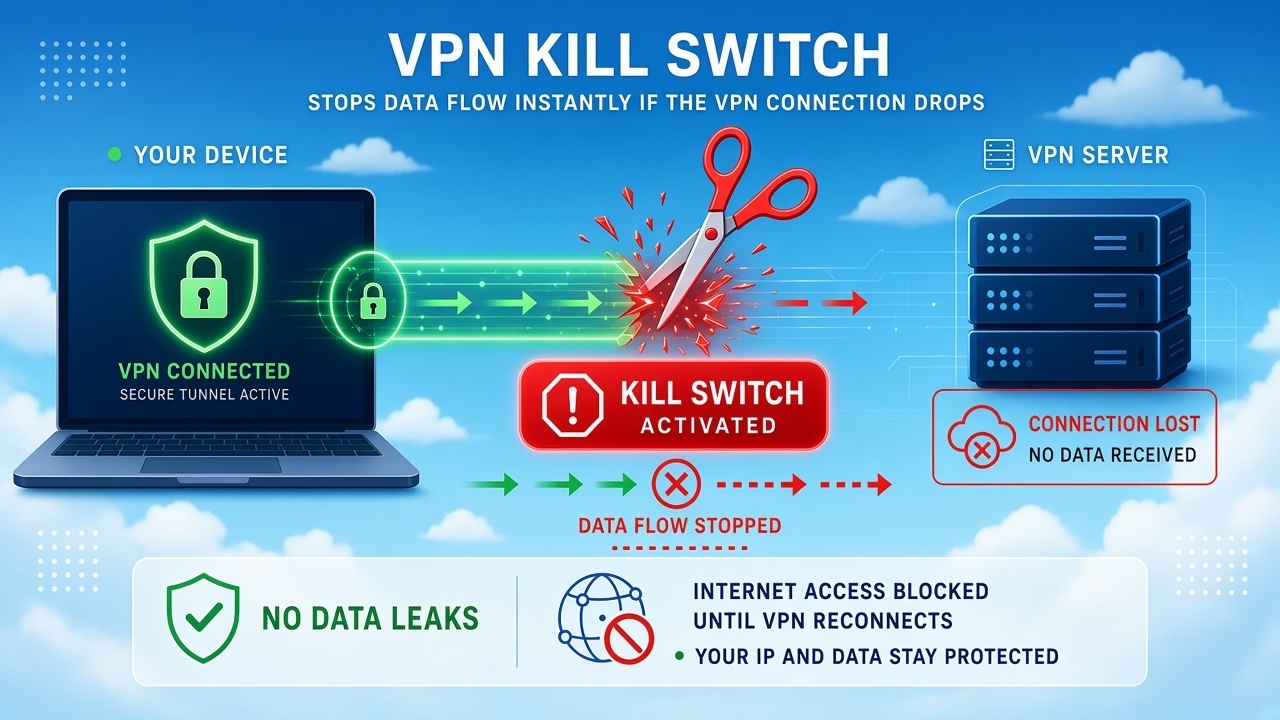
A VPN can protect your internet traffic by sending it through an encrypted connection. But what happens when the VPN connection suddenly stops?
Your internet connection may still work even when the VPN doesn’t.
Without an extra layer of protection, your device could fall back to its normal internet connection. Depending on your operating system, VPN app, and settings, that may expose your regular public IP address or allow traffic to leave outside the VPN.
This is where a VPN kill switch can help.
A VPN kill switch is a security feature that blocks network traffic when the VPN connection is unavailable. Its purpose is simple: prevent protected traffic from quietly switching back to the normal internet connection when the VPN connection drops.
A kill switch is not an anonymity tool, antivirus, or complete privacy solution. It solves a much narrower problem: what should happen to your traffic when the VPN fails?
For a broader explanation of how VPN protection works, see our guide to VPN encryption.
VPN Kill Switch at a Glance
| Question | Answer |
|---|---|
| What is a VPN kill switch? | A feature that can block traffic when the VPN is unavailable |
| Why is it useful? | It can reduce accidental traffic outside the VPN after a disconnect |
| Does it hide your identity? | No |
| Does it stop malware? | No |
| Can it stop your internet? | Yes, when strict traffic blocking is enabled and the VPN is down |
| Does every kill switch work the same way? | No. Behavior varies by VPN, operating system, and configuration |
| Can Android users use one? | Yes, some VPN apps offer a kill switch or system-level VPN blocking |
How Does a VPN Kill Switch Work?
The easiest way to understand a kill switch is to look at what happens when the VPN is connected, disconnected, and then restored.
Without a kill switch
Your normal connection may look like this:
Device → ISP → Internet
When the VPN is working:
Device → VPN tunnel → VPN server → Internet
Now imagine the VPN tunnel fails.
If there is no traffic block, an application may continue using the normal route:
Device → ISP → Internet
This can happen automatically. A browser, game, download tool, or background app doesn’t necessarily stop just because the VPN has disconnected.
With a kill switch
A kill switch is designed to stop that fallback for the traffic it protects:
VPN connected → traffic allowed
VPN connection drops → protected traffic blocked
VPN restored → protected traffic can resume
The exact behavior depends on the VPN provider and your operating system. Some kill switches use firewall or routing rules, while others apply the feature only to selected apps.
Microsoft also documents VPN configurations that can block network traffic when the VPN connection is unavailable. The basic idea is the same: if the VPN goes down, traffic that is supposed to use the VPN should not automatically switch to your regular internet connection.
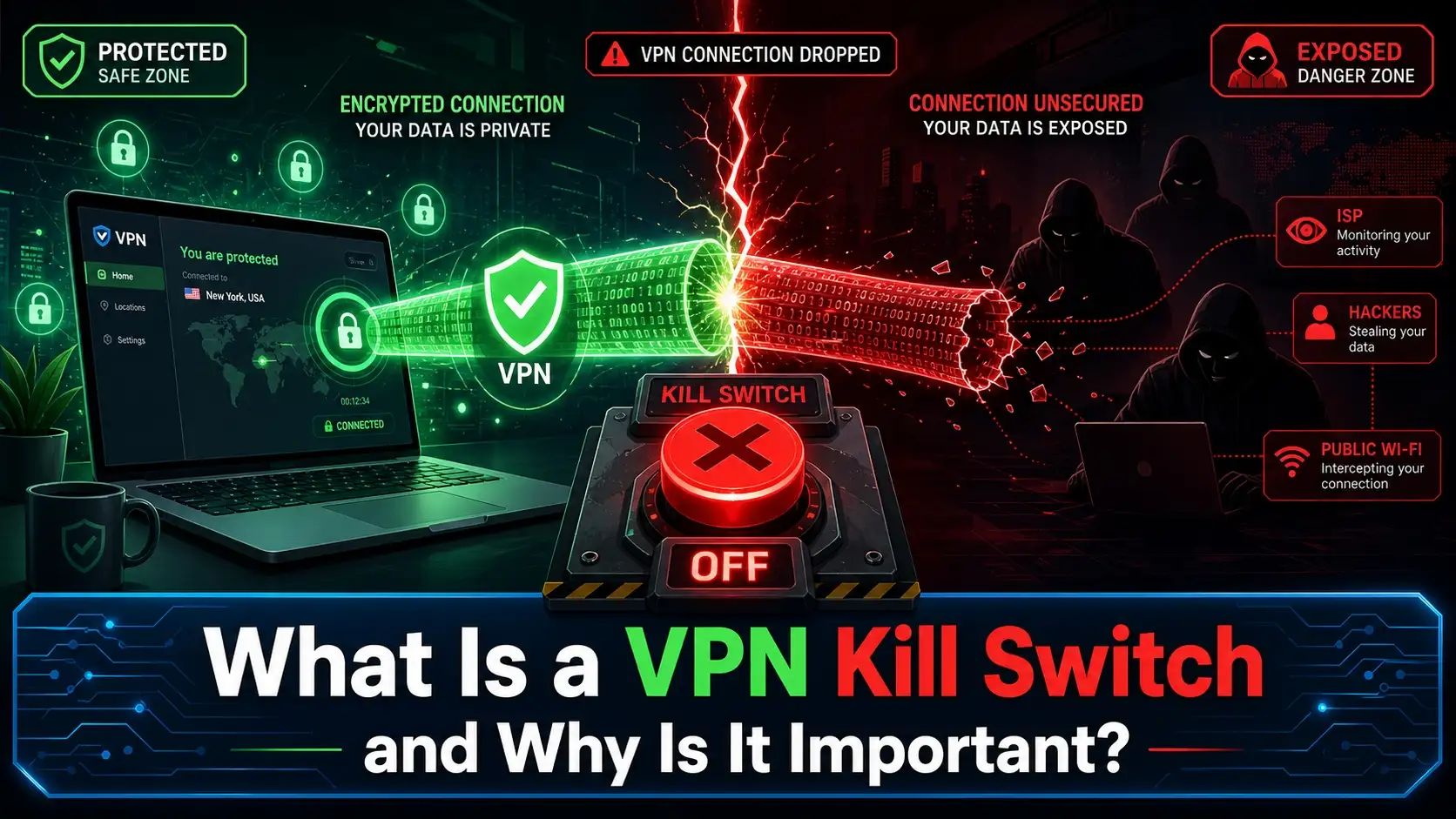
Why Do VPN Connection Drops Happen?
A VPN connection can fail for several reasons. It isn’t always a problem with the VPN provider itself.
Connection drops can happen when:
- Wi-Fi becomes unstable
- You switch from one Wi-Fi network to another
- Your device moves between Wi-Fi and cellular data
- Your router restarts
- The VPN server becomes unavailable
- The VPN app crashes or loses its connection
- Your device wakes from sleep
- Your network configuration changes
- A temporary internet outage interrupts the VPN tunnel
This is why a kill switch can matter even when your VPN normally works well.
You don’t need frequent failures to benefit from the feature. One unexpected disconnect can be enough to matter when keeping certain traffic inside the VPN is important to you.
What Does a VPN Kill Switch Actually Protect?
A kill switch has a specific job. It can help prevent traffic from leaving through the normal connection during a VPN failure.
It can help prevent public IP exposure
When a VPN is connected, websites generally see the VPN server’s public IP address rather than the public IP address assigned to your normal connection.
Suppose your regular public IP is:
203.0.113.10
The VPN connection may present:
198.51.100.25
If the VPN suddenly disconnects and an application keeps working, the destination service may see your normal public IP.
A kill switch can block that traffic instead, depending on how the feature is implemented.
It can help keep protected traffic inside the VPN
The most useful way to think about a kill switch is not:
“It makes me anonymous.”
Think of it as:
“Don’t allow protected traffic to use another network path when the VPN disappears.”
That distinction is important because it explains exactly what the feature is designed to do.
It can help during network changes
Network changes are a common time for a VPN connection to drop.
For example:
Home Wi-Fi → Public Wi-Fi
or:
Wi-Fi → Mobile hotspot
The VPN may need to reconnect after the network changes. A kill switch can block protected traffic during that transition rather than allowing it to continue over the normal connection.
What a Kill Switch Does Not Protect
A VPN kill switch should not be treated as complete online security.
It does not:
- Make you completely anonymous
- Remove malware
- Stop phishing attacks
- Replace HTTPS
- Protect a compromised device
- Stop websites from identifying an account you are signed into
- Delete information a service has already collected
- Make an untrustworthy VPN provider trustworthy
- Guarantee that every possible type of network leak is impossible
- Prevent an application from using a connection that you intentionally allowed outside the VPN
This is consistent with the broader security model described in NIST guidance on VPN technologies: a VPN can provide important protection for communications, but it does not eliminate every security risk.
You can read the NIST VPN Guidelines for additional technical background.
Does a Kill Switch Make You Anonymous?
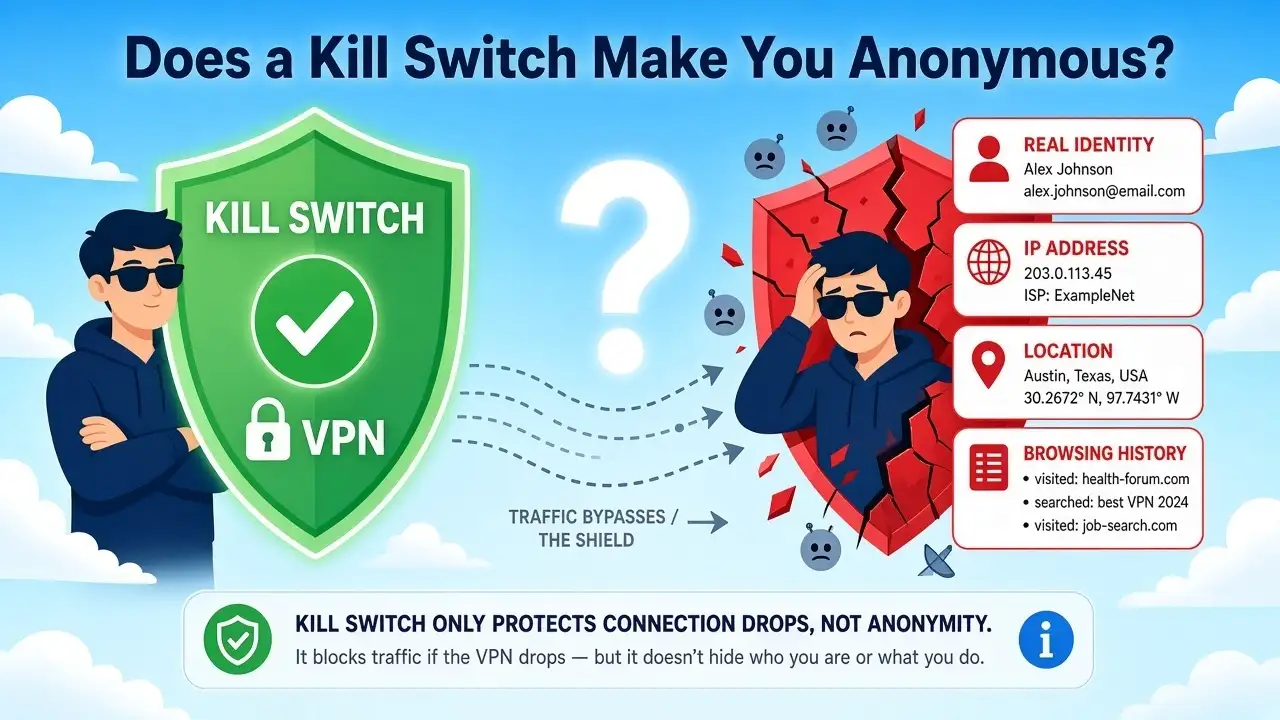
No. A kill switch controls network access when the VPN connection is unavailable. It doesn’t erase your identity from the internet.
For example, if you sign in to Google, Microsoft, a bank, an online store, or a social network, that service can still associate your activity with your account.
Websites can also use cookies and other account or device information.
So the more accurate explanation is:
A VPN kill switch can reduce accidental exposure during a VPN failure. It does not guarantee anonymity.
Can a Kill Switch Prevent DNS or IPv6 Leaks?
Potentially, but this is where the implementation matters. DNS translates domain names into IP addresses. A VPN may route DNS requests through the VPN connection.
If the VPN disconnects and the device starts using its normal DNS configuration, those requests could follow a different path.
A kill switch that blocks network traffic during a VPN failure may help prevent that fallback, but you shouldn’t assume that every provider handles DNS in exactly the same way.
IPv6 deserves similar attention.
Many modern networks support both IPv4 and IPv6. A VPN may need to route or block both protocols correctly.
When comparing a VPN with kill switch, check whether its documentation explains:
- How DNS traffic is handled
- Whether IPv6 traffic is supported, routed, or blocked
- Whether the kill switch covers both IPv4 and IPv6
- What happens while the VPN is reconnecting
The important lesson is simple:
A kill switch is only as effective as the traffic rules behind it.
System-Wide vs. App-Level Kill Switch
Not all kill switches behave the same way.
System-wide kill switch
A system-wide kill switch applies blocking across the device when the VPN is unavailable.
That can affect:
- Browsers
- Games
- Messaging apps
- Download tools
- Cloud sync services
- Background applications
The advantage is broad coverage.
The downside is straightforward: your whole device may lose internet access while the VPN is disconnected.
App-level kill switch
An app-level kill switch applies the rule only to selected applications.
For example:
Browser → VPN only
while:
Music app → Normal connection
This gives you more control, but it also requires you to understand which applications are protected and which ones are allowed to bypass the VPN.
Neither approach is automatically better. It depends on what you are trying to protect.
Why Split Tunneling Matters

Split tunneling lets you send some traffic through the VPN while allowing other traffic to use the regular connection.
For example:
| Application | Connection |
|---|---|
| Browser | VPN |
| Work app | VPN |
| Streaming app | Normal internet |
| Game launcher | Normal internet |
This can be useful, but it makes kill-switch behavior more important to understand.
The key question is:
What happens to each app when the VPN connection drops?
Some configurations may block everything. Others may intentionally continue allowing excluded applications through the regular connection.
So when you use split tunneling, don’t judge a kill switch only by whether the internet works or doesn’t work. Look at which traffic is actually covered by the rule.
Kill Switch vs. Always-On VPN
These features are related, but they solve different problems.
Always-On VPN
An Always-On VPN configuration is designed to keep a VPN connection active or automatically reconnect under certain conditions.
Kill switch
A kill switch is designed to block traffic when the VPN isn’t available.
A simple way to remember the difference:
Always-On VPN: Try to keep the VPN connected.
Kill switch: Don’t let protected traffic continue outside the VPN.
They can work together.
An automatic connection feature can try to restore the VPN, while a traffic block prevents protected traffic from escaping during the interruption.
How to Enable Kill Switch
The steps depend on your VPN provider and operating system, so there isn’t one universal setting path.
In most VPN apps, you can find the feature under settings related to:
- VPN connection
- Kill switch
- Network protection
- Advanced settings
- Auto-connect or connection behavior
Look for an option named Kill Switch, Internet Kill Switch, or similar wording.
Before enabling it, check what the setting actually blocks. Some services offer a strict system-wide mode, while others provide more limited or app-specific behavior.
Android VPN with kill switch
Android VPN behavior can also vary depending on the VPN app and Android version.
Some Android VPN apps provide their own kill switch settings, while Android itself also includes VPN-related controls that can affect how traffic behaves.
When looking for an Android VPN with kill switch, don’t stop at the feature list. Check whether the provider explains:
- Whether the kill switch applies to all traffic
- How it behaves during reconnection
- Whether split tunneling changes the behavior
- Whether the feature must be enabled manually
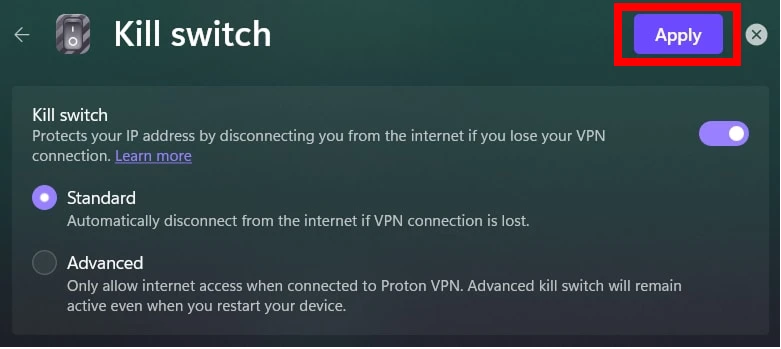
Proton VPN kill switch as an example
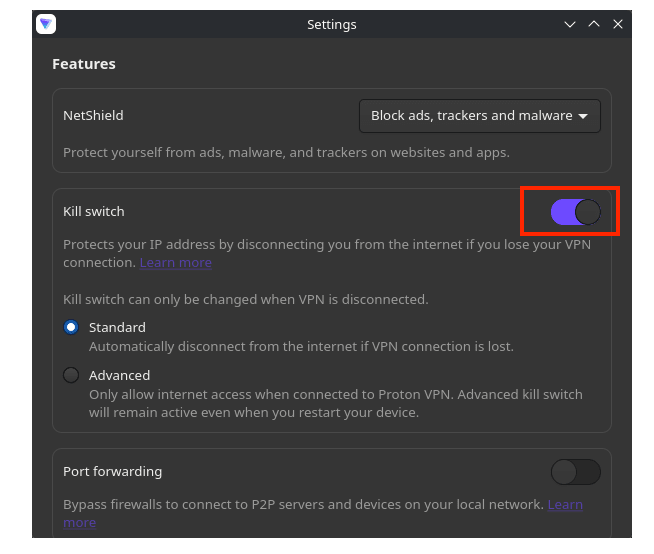
Proton VPN is one example of a provider that documents its kill switch behavior publicly.
Its official guide explains how the feature works and how users can configure it on supported platforms. See the official Proton VPN kill switch guide for the provider’s current instructions.
This is a useful example of why technical documentation matters. The important question isn’t simply whether a provider advertises a Proton VPN kill switch or any other kill-switch feature. You want to know exactly what happens when the VPN connection drops.
Does a Kill Switch Stop Your Internet?
It can, and that’s often the point. In a strict configuration, network traffic is blocked while the VPN is unavailable.
You may notice that:
- Web pages stop loading
- Games disconnect
- Downloads pause
- Messaging apps stop syncing
- Cloud services temporarily lose access
The trade-off is simple:
No connection
instead of:
An unprotected connection
For someone who wants certain traffic to remain on the VPN, that can be a useful trade-off.
For someone who values uninterrupted connectivity more than VPN-only routing, a strict kill switch may feel inconvenient.
Can a Kill Switch Break Games or Streaming?
Yes. Imagine you’re playing a game through a VPN and the VPN connection suddenly fails.
A strict kill switch may block the game’s traffic immediately. The game can disconnect. The same principle can affect:
- Netflix
- YouTube
- Live streams
- Discord
- Cloud gaming
- Large downloads
That doesn’t necessarily mean the VPN is broken. The kill switch may simply be enforcing its traffic rules.
For gaming-related VPN questions, see our guides on whether a VPN is good for gaming and how to reduce internet latency.
Can a Kill Switch Help With Torrenting?
A kill switch can be useful for peer-to-peer applications because torrent clients may continue running in the background.
If the VPN connection drops while the client is active, it may otherwise continue using the normal internet connection.
A kill switch can block that traffic until the VPN is available again.
However, don’t assume that every torrent-related connection is covered in the same way.
Check whether your VPN’s kill switch applies to:
- All applications
- Only selected applications
- DNS requests
- IPv6 traffic
- Traffic excluded through split tunneling
Does a Kill Switch Protect HTTPS?
No, because HTTPS and a kill switch have different jobs.
HTTPS protects data in transit between your device and the website.
A kill switch controls whether traffic can leave when the VPN isn’t available.
Imagine the VPN disconnects while you’re visiting an HTTPS website.
Without a kill switch:
Device → Normal connection → HTTPS website
The website connection can still use HTTPS, but the traffic is no longer traveling through the VPN.
With a strict kill switch:
Device → Traffic blocked
until the VPN connection returns.
So these technologies work at different layers. A kill switch doesn’t replace HTTPS, and HTTPS doesn’t perform the same function as a VPN kill switch.
Does a Kill Switch Protect Public Wi-Fi?
It can reduce one type of risk. A VPN can create an encrypted tunnel over a public or otherwise untrusted network. A kill switch can then help prevent protected traffic from falling back to the normal connection if the VPN fails.
But public Wi-Fi security is broader than one feature.
You should still:
- Use HTTPS
- Keep your operating system and apps updated
- Use strong, unique passwords
- Enable multi-factor authentication
- Avoid unknown software and suspicious links
- Pay attention to the Wi-Fi network you join
A kill switch is one layer, not the entire security stack.
What Happens When You Switch Wi-Fi Networks?
This is one of the clearest real-world examples of why a kill switch exists. Imagine you’re connected to your home Wi-Fi and your VPN is active. You leave home and the laptop switches to another network. The network change may interrupt the VPN tunnel.
Without a kill switch:
An application may continue using the normal connection.
With a kill switch:
Protected traffic may be blocked until the VPN reconnects.
This is particularly useful on laptops and phones that frequently move between networks.
What Happens During Sleep and Wake?
A device may need to rebuild its network connections after waking from sleep.
The VPN tunnel may also need to reconnect.
During that transition, a kill switch can help keep protected traffic blocked until the VPN is available again.
This is another example of why the feature matters most during transitions and connection drops, rather than during normal VPN operation.
How to Test a VPN Kill Switch
Don’t assume a kill switch behaves exactly the way you expect. Test it on the device and applications you actually use.
Basic test
- Connect to your VPN.
- Check your public IP address.
- Open a website or another network application.
- Disconnect the VPN manually.
- Check whether the protected traffic stops.
- Reconnect the VPN.
- Check whether network access returns.
The important part is what happens between the VPN disconnecting and reconnecting.
Test more than a browser
A browser test isn’t always enough.
Also consider the applications you regularly use:
- Games
- Download managers
- Messaging apps
- Torrent clients
- Cloud storage tools
- Background synchronization services
A system-wide kill switch should behave differently from a feature that protects only selected applications.
Test a network change
You can also test:
Home Wi-Fi → Another Wi-Fi network
or:
Wi-Fi → Mobile hotspot
Watch what happens while the VPN reconnects.
A good test should answer a practical question:
Does protected traffic remain blocked during the VPN connection drop?
How to Choose a VPN Provider With Kill Switch

Don’t choose a VPN provider with a kill switch simply because the feature appears on its comparison page.
Look at the details.
Does it protect the whole device?
A system-wide kill switch generally provides broader coverage than an app-only setting.
Can you choose specific apps?
App-level controls can be useful when you need some programs to use the VPN while others use the normal connection.
What happens during reconnect?
Find out whether protected traffic stays blocked until the VPN tunnel is fully restored.
How are DNS requests handled?
The provider should explain how DNS traffic is treated when the VPN disconnects.
What about IPv6?
Check whether IPv6 is supported and whether the kill-switch rules cover it.
Does split tunneling affect the feature?
Understand which applications are intentionally excluded from the VPN.
Does it work on your operating system?
A feature may behave differently on Windows, macOS, Android, iOS, and Linux.
Is it enabled automatically?
A feature that’s disabled by default requires an extra setup step.
Does the provider publish technical documentation?
This matters more than a marketing label.
A clearly documented security feature lets you understand the actual behavior instead of guessing from the name.
VPN Features Worth Comparing
| Feature | Main purpose | Why it matters |
|---|---|---|
| VPN encryption | Protects traffic inside the VPN tunnel | Helps protect data in transit |
| Kill switch | Blocks traffic when the VPN is unavailable | Reduces accidental VPN bypass |
| Always-On VPN | Tries to keep the VPN connected | Reduces manual reconnects |
| Split tunneling | Allows different traffic to use different paths | Provides more routing control |
| DNS protection | Controls how DNS traffic is routed | Helps keep DNS requests on the intended path |
| Auto-connect | Connects the VPN automatically | Helps restore the connection after network changes |
These features can complement one another.
For example, auto-connect can try to restore the VPN, while the kill switch blocks protected traffic during the interruption.
Common VPN Kill Switch Mistakes
Thinking it provides total anonymity
It doesn’t. A kill switch controls network traffic; it doesn’t remove account, browser, or device identifiers.
Assuming every kill switch works the same way
They don’t. Provider, operating system, app, and configuration all matter.
Forgetting to enable it
A disabled feature can’t protect traffic during a VPN connection drop.
Ignoring split tunneling
Traffic intentionally excluded from the VPN may still use the regular connection.
Testing only one application
Background applications can behave differently from your browser.
Expecting it to replace other security tools
A kill switch isn’t antivirus software, a password manager, phishing protection, or HTTPS.
When Should You Use a VPN Kill Switch?
A kill switch is most useful when keeping traffic inside the VPN matters to you.
You may find it useful when:
- You don’t want your regular public IP exposed after a VPN failure
- You regularly move between Wi-Fi networks
- You use public Wi-Fi
- You use peer-to-peer applications
- You want selected traffic to remain on the VPN
- You prefer privacy over uninterrupted connectivity
It may be less important when you use a VPN occasionally and don’t mind your device returning to its normal connection after the VPN disconnects.
There is no universal requirement. The value comes down to one question:
Would a temporary VPN bypass matter to you?
Should You Leave Your VPN On All the Time?
That depends on your goals.
Leaving a VPN connected can make sense when you want consistent VPN routing. But it may also affect:
- Internet speed
- Latency
- Battery life
- Access to local devices
- Streaming services
- Gaming performance
Our guide on whether you should leave your VPN on all the time covers the main trade-offs.
For gaming, see does a VPN really improve Minecraft ping? for more about latency and VPN routing.
Is a VPN Kill Switch Worth It?
For many users, yes. The value isn’t that a kill switch makes a VPN magically secure. Its value is what happens when the VPN stops working.
A normal VPN connection can look like:
VPN connected → traffic uses the VPN
With a kill switch:
VPN connected → traffic allowed
VPN connection drops → protected traffic blocked
VPN reconnects → traffic resumes
That behavior can reduce accidental exposure during an interruption.
The trade-off is that strict blocking can interrupt your internet access, games, streams, downloads, or other applications.
So the right question isn’t simply:
“Does this VPN have a kill switch?”
Ask:
“What happens to my traffic when the VPN connection drops?”
That answer is much more useful.
FAQ
What is a VPN kill switch?
A VPN kill switch is a security feature that can block network traffic when the VPN connection becomes unavailable. Its purpose is to reduce traffic falling back to the normal internet connection.
Why is a VPN kill switch important?
It can help prevent protected traffic from continuing over the normal connection after an unexpected VPN disconnect.
Does a kill switch hide my IP address?
It can help prevent your regular public IP address from being exposed during a VPN failure by blocking protected traffic until the VPN reconnects.
Does a VPN kill switch make me anonymous?
No. It controls network traffic during a VPN failure, but it doesn’t prevent websites from identifying your account or device.
Can a kill switch prevent DNS leaks?
It can help, but protection depends on the VPN’s DNS handling and how its traffic rules work on your operating system.
Can a kill switch prevent IPv6 leaks?
It can help when the VPN correctly handles IPv6 traffic. Check the provider’s documentation to understand whether IPv6 is routed or blocked.
Does a kill switch block all internet access?
A strict system-wide kill switch may block internet access when the VPN is unavailable. That’s often intentional.
What is the difference between a kill switch and Always-On VPN?
Always-On VPN is intended to keep the VPN connected or reconnect automatically. A kill switch blocks protected traffic when the VPN is unavailable.
Does split tunneling affect a kill switch?
Yes. Split tunneling determines which traffic uses the VPN and which traffic is allowed to use the normal connection.
How do I enable a kill switch?
Open your VPN app’s settings and look for an option called Kill Switch, Internet Kill Switch, Network Protection, or similar wording. The exact steps vary by provider and operating system.
Can an Android VPN have a kill switch?
Yes. Some Android VPN apps provide kill-switch controls, while Android also has system-level VPN settings that may affect traffic behavior.
Does a kill switch stop malware?
No. A kill switch doesn’t detect or remove malware. It is a network traffic control feature.
Does a kill switch protect HTTPS?
Not directly. HTTPS protects data between your device and the website, while the kill switch controls whether traffic can leave when the VPN is unavailable.
Is a kill switch useful for torrenting?
It can be useful because it may stop a torrent client from continuing over the normal connection after a VPN failure.
Can I test a VPN kill switch?
Yes. Connect the VPN, start network activity, disconnect the VPN, and check whether the protected traffic stops. You can also test a network change to see how the VPN behaves during reconnection.
The Bottom Line
A VPN kill switch is a security feature that blocks protected network traffic when the VPN connection is unavailable.
Its purpose is simple:
Keep protected traffic inside the VPN, or stop that traffic when the VPN connection drops.
That can help reduce accidental exposure of your regular public IP address and limit traffic falling back to the normal internet connection.
But a kill switch does not make you anonymous, remove malware, stop phishing, or replace HTTPS.
It also doesn’t mean every VPN works the same way.
Before choosing a VPN provider with a kill switch feature, check how the feature handles:
- System-wide versus app-level traffic
- DNS requests
- IPv4 and IPv6
- Reconnects
- Split tunneling
- Network changes
- Your specific operating system
The most important question is still the simplest:
What happens to my traffic when the VPN disconnects?
Once you know the answer, you can decide whether a kill switch fits the way you actually use a VPN.
You May Also Like
 Computers & PC Games
Does a VPN Really Improve Minecraft Ping and Performance?
 VPNs & Proxies
Why You Should Use a VPN for Minecraft Servers
 Computers & PC Games
Is RomsFun Safe and Legit? My Complete Review and Testing Experience
 VPNs & Proxies
How to Hide Your IP Address and Protect It: 5 Best Ways
 VPNs & Proxies
WireGuard vs. OpenVPN: What Are the Key Differences?
 VPNs & Proxies