
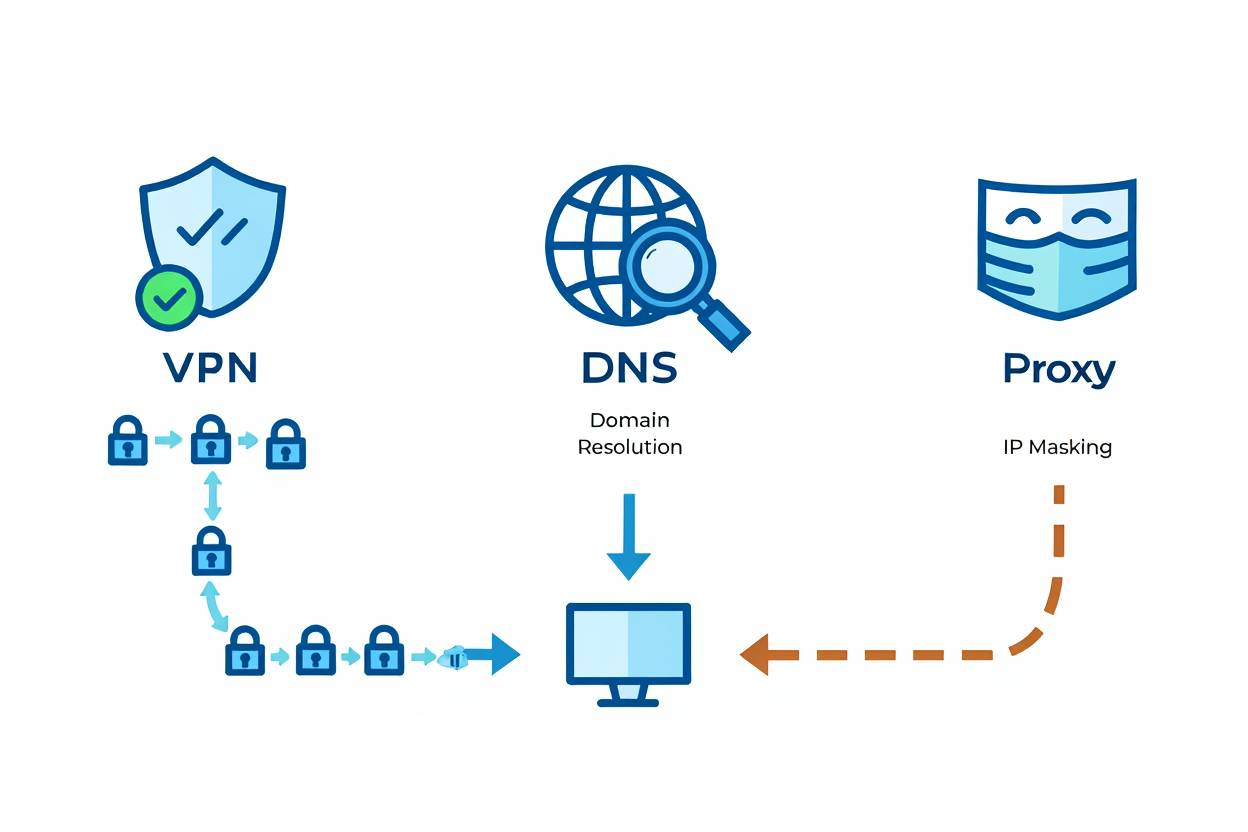
In today’s digital landscape, understanding how to protect your online privacy is more important than ever. With numerous tools available, it can be confusing to navigate your options. Three common solutions are VPNs, DNS, and proxies, each serving different purposes in the realm of online privacy and security. Let’s explore the differences between these options and their unique roles.
What is a VPN?
A Virtual Private Network (VPN) is a technology that creates an encrypted tunnel between your device and the internet. When you use a VPN, your data is protected from prying eyes, such as hackers, ISPs, and government agencies. This is particularly important when using public Wi-Fi networks where security is often compromised. To understand more about how this protection works, you might want to read about how strong VPN encryption really is.
Some key benefits of using a VPN include:
- Data Encryption: VPNs encrypt your internet traffic, making it unreadable to anyone who intercepts it.
- IP Address Masking: By masking your real IP address, a VPN provides an extra layer of anonymity.
- Access to Restricted Content: VPNs allow you to bypass geographical restrictions, letting you access content from different regions.
- Enhanced Security: VPNs protect your data even on unsecured networks, shielding your identity online.
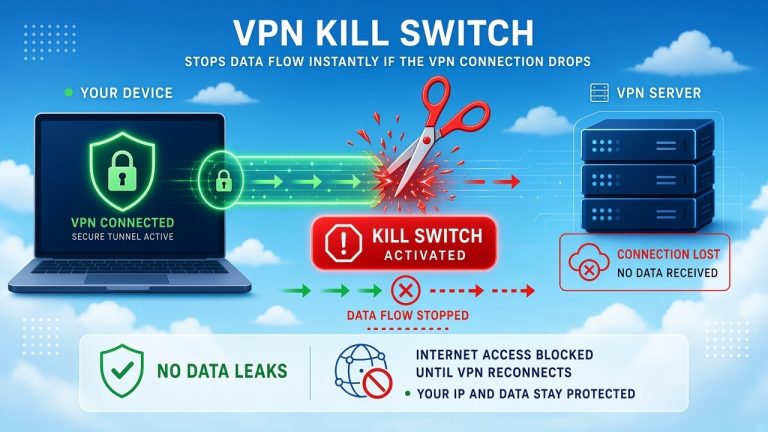
For those concerned about security features, understanding what a VPN kill switch is and why it’s important can provide additional insight into how these tools protect your privacy.
What is DNS?
The Domain Name System (DNS) is essentially the phonebook of the internet. It translates domain names (like www.example.com) into IP addresses that computers can understand. While DNS itself doesn’t provide privacy protection, using a secure DNS service can enhance your security.
Here’s how DNS works with online privacy:
- Faster Browsing: A reliable DNS can speed up your internet browsing by resolving domain names quickly.
- Content Filtering: Some DNS services offer additional security features, such as blocking malicious websites.
- No Encryption: Standard DNS queries are sent in plain text, meaning they can be tracked by ISPs.
What is a Proxy?
A proxy server acts as an intermediary between your computer and the internet. When you use a proxy, your requests from the browser are first sent to the proxy server. The proxy then forwards these requests to the internet, masking your IP address. This can be useful for various reasons, but there are limitations.
The main features of using proxies include:
- IP Address Change: Similar to a VPN, a proxy can hide your IP address, allowing you to browse anonymously.
- Bypassing Restrictions: Proxies can enable access to websites blocked in your region.
- No Encryption: Most proxies do not encrypt your traffic, which means your data could still be vulnerable.
Comparative Overview
To better visualize the differences among a VPN, DNS, and a proxy, here is a comparative summary:
| Feature | VPN | DNS | Proxy |
|---|---|---|---|
| Data Encryption | Yes | No | No |
| IP Masking | Yes | Depends on the DNS type | Yes |
| Access Geo-Blocked Content | Yes | No | Yes |
| Security Level | High | Moderate | Low |
Choosing the Right Tool for You
Your choice between a VPN, DNS, and proxy largely depends on your online activities:
- If you value security and privacy, a VPN is your best option. However, it’s important to choose wisely as some VPNs can potentially steal your data. Also, be cautious about whether it’s safe to use a free VPN.
- If you want faster browsing and are not concerned about privacy, a DNS service might suffice.
- If you need simple access to restricted content but do not require encryption, a proxy can be effective.
For a deeper dive into these differences, you can read our comprehensive guide on the difference between VPN, DNS, and Proxy.
The Importance of Choosing the Right Tool for Secure Internet Browsing: VPN vs. DNS vs. Proxy
In today’s digital age, ensuring secure internet browsing is more important than ever. With countless threats lurking online, choosing the right tool for protection can make all the difference. Let’s explore three popular options—VPNs, DNS, and proxies—to help you understand their unique strengths and weaknesses.
The Basics of VPNs
A Virtual Private Network (VPN) encrypts your internet connection, creating a secure tunnel between your device and the internet. This means your data is protected from prying eyes, whether you’re using public Wi-Fi or your home network. Here are some key features of VPNs:
- Encryption: VPNs encrypt your data, ensuring that even if someone intercepts your connection, they cannot read your information.
- IP Masking: By routing your traffic through a server in a different location, a VPN masks your actual IP address, enhancing your online privacy.
- Access to Geo-Restricted Content: A VPN can help you access content that may be restricted in your region, such as streaming services. However, be aware of the legal implications of using a VPN to watch Netflix.
Understanding DNS
Domain Name System (DNS) acts as the phonebook of the internet. When you type a website URL into your browser, DNS translates that address into an IP address, allowing your device to locate the website. While DNS is essential for browsing, it doesn’t provide security alone. However, there are secure DNS services that can enhance privacy:
- Faster Browsing: Public DNS services can often speed up your connection compared to your ISP.
- Security Features: Some DNS providers offer protection against phishing and malware sites, adding an extra layer of security.
- DoH and DoT: DNS over HTTPS (DoH) and DNS over TLS (DoT) encrypt DNS queries, protecting your browsing habits from potential snoopers.
Exploring Proxies
A proxy server acts as an intermediary between your device and the internet. While it can change your IP address and provide some level of anonymity, it’s important to know its limitations compared to a VPN:
- No Encryption: Most proxies do not encrypt your data, making them less secure than VPNs.
- Web Traffic Only: Proxies typically work only on specific applications or web browsers, not all internet traffic.
- Access Restrictions: Depending on the type of proxy you use, you may encounter sites that block proxy traffic.
Comparing the Three Tools
Understanding the differences between a VPN, DNS, and proxy is essential for making an informed choice. Here’s a simple comparison to highlight their key features:
| Feature | VPN | DNS | Proxy |
|---|---|---|---|
| Encryption | Yes | No (unless DoH/DoT is used) | No |
| IP Masking | Yes | Limited | Yes |
| Speed | Can be slower due to encryption | Can be faster | Varies |
| Geo-Restricted Access | Yes | No | Sometimes |
Which Tool is Right for You?
The best choice depends on your needs. If you require full privacy and security for sensitive transactions, a VPN is your best bet. Conversely, if you’re looking for a faster browsing experience and only need basic access, a DNS service may suffice. For basic anonymity without strong security requirements, a proxy could be adequate.
Understanding the characteristics of VPNs, DNS, and proxies allows you to make a strategic choice for safe internet browsing. Whether aiming for enhanced security, speed, or anonymity, selecting the right tool plays a crucial role in your online experience.
Conclusion
Understanding the difference between VPNs, DNS, and proxies is crucial for anyone looking to enhance their online privacy and security. Each of these tools plays a unique role in how you connect to the internet and manage your data. A VPN (Virtual Private Network) provides a secure tunnel for your internet traffic, encrypting your data and hiding your IP address. This is ideal for users who prioritize anonymity and security, especially when accessing public Wi-Fi networks. If you’re wondering about its effectiveness, you can read more about how a VPN can hide your browsing history from your internet provider.
On the other hand, DNS (Domain Name System) serves as the phonebook of the internet, translating domain names into IP addresses. While DNS isn’t inherently a security tool, using a secure DNS can help improve your browsing experience by blocking harmful sites. However, it does not offer the same level of privacy as a VPN.
Proxies act as intermediaries, routing your internet requests through a different server, thus masking your IP address. While they can help bypass geo-restrictions and provide some level of anonymity, they do not encrypt your data, making them less secure compared to VPNs.
Choosing the right tool depends on your needs. If you seek comprehensive privacy and security, a VPN is your best option. If you just want to navigate faster or access content from specific locations without much fuss, a proxy might suffice. Secure DNS can enhance your experience by providing additional safety when browsing. Each option has its strengths and limitations, so it’s essential to consider what fits your online habits best. By understanding these differences, you can make informed decisions that protect your privacy and keep your data safe.
You May Also Like
 Computers & PC Games
Is RomsFun Safe and Legit? My Complete Review and Testing Experience
 VPNs & Proxies
How to Hide Your IP Address and Protect It: 5 Best Ways
 VPNs & Proxies
WireGuard vs. OpenVPN: What Are the Key Differences?
 VPNs & Proxies
The Netflix VPN Block: How to Fix the Proxy Detected Error
 VPNs & Proxies
7 Reasons to Use a VPN: What It Changes, What It Doesn’t, and When It Helps
 VPNs & Proxies