
Your IP address is a normal part of using the internet, but it can reveal useful information about your connection and can sometimes become part of tracking, scanning, or other unwanted activity.
So, how do you hide your IP address?
For most everyday users, the simplest approach is a reputable VPN. Tor can make more sense when stronger anonymity is the priority, while a proxy or mobile connection can be useful for narrower situations.
The important part is knowing what problem you are trying to solve.
Hiding your IP address is not the same as becoming anonymous. Changing the IP that a website sees can reduce one source of identifying information, but websites can still recognize you through accounts, cookies, browser and device signals, and your own activity.
This guide explains what your IP address can reveal, which methods can hide it, what each method does not protect against, and how to secure the network behind your IP address.
What Is an IP Address?
An IP address is a numerical address used so network traffic can reach the correct destination.
When people ask how to hide their IP address, they usually mean their public IP address: the address that websites and other internet services may see when their traffic reaches them.
Your private local IP address is different. A device on a typical home network might use an address such as 192.168.1.20, while your router uses a public IP address to communicate beyond the local network.
For most privacy questions, the public IP is the one that matters.
What Can Someone Learn From Your IP Address?
An IP address can provide information about the network associated with a connection, but it does not normally reveal your exact street address by itself.
Depending on the address and the geolocation database being used, an IP may be associated with information such as:
- Your internet service provider or hosting provider
- Your approximate geographic area
- Your country or region
- Whether the address appears to belong to a residential, business, mobile, or hosting network
- Whether the address is associated with a VPN, proxy, or data center
IP geolocation is approximate. A database may associate an address with a nearby city, an ISP’s registered location, or another broader area rather than your actual physical location.
That distinction matters because an IP address is best understood as network metadata, not a built-in GPS coordinate.
Why Would You Want to Hide Your IP Address?
People hide or mask their public IP for different reasons, and the best method depends on the goal.
Protect Your Network-Level Privacy
Websites and online services can see the public IP associated with incoming connections. A VPN or other intermediary can replace the destination-facing IP with the intermediary’s address.
That reduces the amount of network-level information a destination can associate directly with your normal connection.
Reduce Direct Exposure to Internet Scanning
A public IP does not automatically make your device vulnerable. The risk depends heavily on what services are reachable from the internet and how those services are configured.
Reducing direct exposure can still be useful, especially when you do not need services to be reachable from the public internet.
Avoid Sharing Your Home IP With Other Participants
Some applications and services establish connections between users or peers. Depending on the application and protocol, another participant may be able to learn an IP address associated with your connection. Routing traffic through an intermediary can reduce that direct exposure.
Improve Privacy on Public Wi-Fi
A VPN can encrypt the connection between your device and the VPN server, which can reduce what the local network can observe about the protected traffic.
That does not make an untrusted Wi-Fi network safe by itself. You still need secure websites, current software, strong account security, and sensible device protections.
Change the Location Associated With Your Connection
Because services may use IP geolocation as one signal when estimating where a connection originates, changing your public IP can change the location associated with that connection.
It does not guarantee that a service will treat you as being in a different place. Other signals may still be available.
How to Hide Your IP Address
There is no single method that is best for every situation.
A useful way to choose is to start with the question:
Who do you want to hide your IP from, and what else are you trying to protect?
| Goal | Usually the best fit | Main benefit | Important limitation |
|---|---|---|---|
| Hide your home IP from websites | VPN | Websites generally see the VPN server’s IP | You are trusting the VPN provider |
| Reduce local-network visibility | VPN | Encrypts traffic between your device and VPN server | Does not solve endpoint or account security |
| Stronger anonymity needs | Tor | Routes traffic through the Tor network | Usually slower and requires careful use |
| Route one app or specific traffic | Proxy | Can provide application-specific routing | Privacy and encryption vary |
| Temporarily use a different public IP | Mobile connection | Gives you a different network path and public IP | It is not a full privacy solution |
| Protect only certain browser or service traffic | Relay service | Hides your IP from supported destinations | Coverage depends on the service |
The most useful choice is the one that matches your threat model rather than the one with the longest list of features.
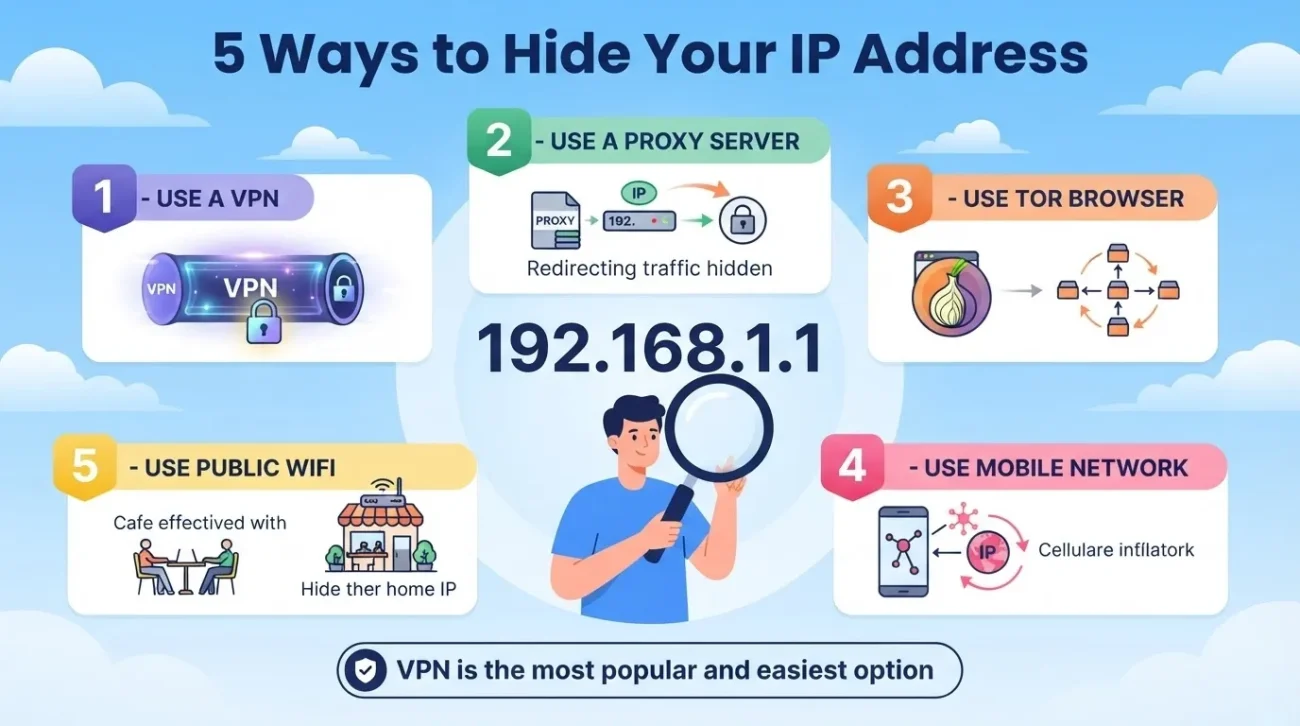
1. Use a VPN
For many everyday privacy scenarios, a reputable VPN is the most practical option. A VPN creates an encrypted connection between your device and a VPN server. Websites you reach through that connection generally see the VPN server’s public IP instead of your normal public IP.
Without a VPN
Your device → ISP → Website
The website can see the public IP associated with the connection.
With a VPN
Your device → VPN server → Website
The website generally sees the VPN server’s IP.
The VPN also changes your privacy relationship with the network. Instead of relying only on your ISP as the intermediary, you are now trusting the VPN provider with traffic that passes through its infrastructure.
That is why “uses a VPN” and “has good privacy” are not automatically the same thing.
What to Look for in a VPN
Look beyond download speed.
Useful factors include:
- Clear logging and data-retention policies
- Company ownership and transparency
- Jurisdiction and legal structure
- Security history
- Supported VPN protocols
- Independent audits or credible third-party assessments
- DNS leak protection
- IPv6 support or handling
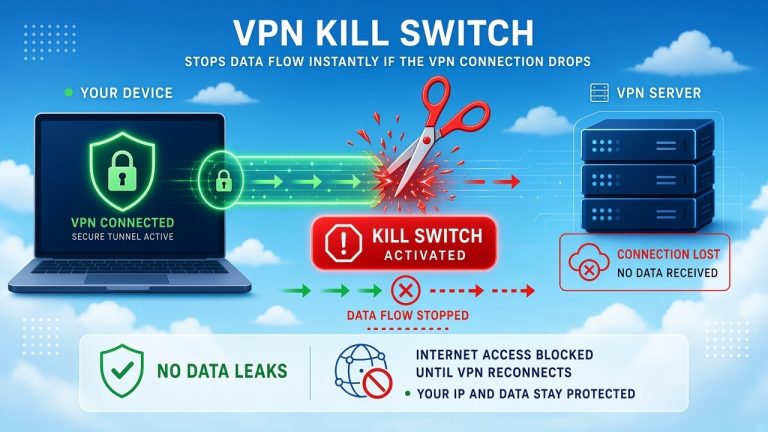
- Kill-switch behavior
- Transparency about infrastructure and third-party providers
Do not treat a VPN as a magic anonymity tool. A VPN can change which IP a website sees without preventing every other form of identification.
2. Use Tor
Tor takes a different approach.
Traffic sent through the Tor network is routed through multiple relays. In a typical Tor circuit, the final relay, known as the exit relay, connects to the public internet. The destination generally sees the connection coming from the Tor network rather than your normal public IP.
Tor can be a better fit when anonymity is more important than speed or convenience.
The trade-off is that routing traffic through multiple relays can add latency and reduce performance. Tor also depends on how you use it. Revealing your identity directly, signing into a personal account, or otherwise linking activity to yourself can undermine the anonymity you are trying to preserve.
Tor’s own documentation makes the same broader point: the network can provide stronger privacy properties, but it should not be treated as a guarantee of perfect anonymity.
3. Use a Proxy Server
A proxy server acts as an intermediary for traffic that has been configured to use it. The destination may see the proxy’s IP instead of the original public IP.
The important distinction is that a proxy is not one single privacy technology. Its protections depend on the protocol, service, and configuration.
For example, routing a browser through a proxy does not necessarily mean that every other application on your device is using the same path.
That makes a proxy useful for specific applications or traffic, but less suitable when you want broad device-level coverage.
4. Use a Mobile Connection
Switching from home broadband to a cellular connection changes the public IP associated with your internet connection.
That can be useful when you simply want to avoid exposing your home broadband IP to a particular service.
But a mobile connection is not automatically more private. Mobile carriers commonly use shared addressing and carrier-grade NAT, and the connection still belongs to the carrier’s network.
So think of this as changing your public IP, not as replacing a VPN or anonymity system.
5. Use a Privacy-Focused Relay
Some browsers, operating systems, and privacy services provide relay-style features that route supported traffic through an intermediary.
These services can hide your original IP from certain destinations while offering different privacy protections depending on how they are designed.
Coverage is the key limitation. A relay may protect only browser traffic, only particular services, or only traffic that uses a specific platform feature.
Read the provider’s documentation rather than assuming that a relay covers your entire device.
How to Protect Your IP Address From Hackers
Hiding your IP is only one layer of network security. Even when a website cannot see your normal public IP, the devices and services behind your connection can still have vulnerabilities.
Keep Your Router Updated
Router firmware can contain security fixes. Keep the firmware current and install updates from the manufacturer when they become available. CISA guidance has long recommended keeping network-device software current and disabling unnecessary services.
Disable Unnecessary Remote Administration
Remote administration can be useful, but it creates another path into the management interface.
When you do not need internet-based remote administration, consider disabling it. Also review port-forwarding rules and remove entries that are no longer required. CISA guidance recommends restricting remote administration and disabling unnecessary services on network infrastructure.
Use Strong, Unique Router Credentials
Do not keep a default administrator password.
Use a strong, unique password for router management and keep it separate from your Wi-Fi password. When supported, enable multi-factor authentication for any associated cloud or management account.
Review Port Forwarding and Internet-Facing Services
Every service exposed to the public internet increases the set of things an attacker can attempt to reach.
Review whether you actually need external access for:
- Remote desktop
- NAS services
- Cameras
- Game servers
- Smart-home devices
- Administrative interfaces
- Other port-forwarded services
The goal is not to turn off every network feature. It is to avoid exposing services you do not need.
Use a Firewall
A properly configured router firewall can block unsolicited inbound connections and reduce unnecessary exposure.
A firewall does not make a network invulnerable. It is one layer in a broader security setup.
Secure the Devices Behind the Router
Your network is only as strong as the devices using it.
Keep your operating system, browser, VPN application, and security tools updated. Use strong passwords and multi-factor authentication for important accounts, and avoid installing software from untrusted sources.
Can Someone Hack You With Your IP Address?
Knowing your IP address does not automatically give someone access to your device.
The more useful security question is:
What is reachable from the internet, and is it properly secured?
A public IP can be used as a target for scanning and probing, but the practical risk depends heavily on the services exposed and whether those services contain exploitable weaknesses.
A properly secured home router that blocks unsolicited inbound traffic presents a very different situation from an internet-facing device running an outdated or misconfigured service.
That is why simply changing your IP is not a substitute for securing the network behind it.
Does Hiding Your IP Make You Anonymous?
No. Hiding or changing your public IP removes one piece of network-level information. It does not remove every signal that can identify or track you.
Depending on the site and service, other signals can include:
- Account logins
- Cookies
- Browser characteristics
- Device information
- Advertising identifiers
- Fingerprinting
- Tracking technologies
- Your activity patterns
For example, signing into your usual account while connected through a VPN does not make the account itself anonymous.
The broader principle is simple:
IP masking changes one network signal. Anonymity is a much larger problem.
Can a VPN Protect You From Hackers?
A VPN can reduce some kinds of network exposure, but it is not an all-purpose anti-hacking tool.
It can help by routing traffic through the VPN server and encrypting the connection between your device and that server.
It does not automatically protect you from:
- Phishing
- Malware
- Stolen passwords
- Malicious browser extensions
- Vulnerable software
- Account takeovers
- Social engineering
- Compromised websites
A useful way to think about a VPN is as one layer of protection, not the whole security stack.
What Is the Best Way to Hide Your IP Address?
There is no universal winner. For an everyday user who wants websites to see something other than their normal home IP, a reputable VPN is usually the most straightforward choice.
- For stronger anonymity requirements, Tor provides a different privacy model.
- For a single application or specific traffic path, a proxy may be enough.
- For a temporary change to the public IP, a mobile connection can work.
The best choice depends on what you want to hide, from whom, and what trade-offs you are willing to accept.
How to Check Whether Your IP Address Is Hidden
You can verify the public IP that websites see.
Before connecting to a VPN or other intermediary
- Open a reputable IP-checking service.
- Record your public IP and the approximate location shown.
- Connect to your VPN or other intermediary.
- Refresh the page.
- Check whether the public IP has changed.
If privacy matters beyond the visible IP address, you may also want to test for DNS or IPv6 leaks.
An IP change by itself does not prove that every connection on your device is using the intended tunnel.
Some applications can use different networking paths, and configuration problems can allow traffic to bypass the VPN. IPv4/IPv6 interactions have been documented as a possible source of VPN tunnel leakage when software does not properly handle both protocols.
What About IPv6?
IPv6 is important because protecting only IPv4 may not be enough on a dual-stack device.
A VPN implementation that correctly routes IPv4 traffic but does not properly handle IPv6 can leave an IPv6 path outside the VPN tunnel. The IETF has documented this class of VPN leakage and recommends proper IPv6 handling by VPN implementations.
So when evaluating a VPN, check whether it supports IPv6 rather than assuming that changing your IPv4 address covers every traffic path.
Can I Hide My IP Without a VPN?
Yes.
You can use:
- Tor
- A proxy
- A mobile connection
- Certain relay services
But these methods solve different problems.
A proxy may affect one application while other traffic continues through your normal connection.
Tor uses a different routing and anonymity model and generally trades speed and convenience for stronger privacy properties.
A mobile connection can give you a different public IP, but it is still a connection through your carrier’s network.
The key distinction is:
Changing your IP address and protecting your connection are related, but they are not the same thing.
What About Incognito or Private Browsing?
Private or incognito browsing does not hide your public IP address.
Private browsing is mainly designed to reduce what the browser stores locally, such as browsing history and certain site data. It does not make you anonymous to websites or your internet provider. Mozilla’s current documentation explicitly notes that Private Browsing does not make users anonymous online and does not mask their IP address.
So:
Incognito mode = less local browser history
VPN = different network path and public IP
Those are different privacy controls.
Frequently Asked Questions
What is the easiest way to hide my IP address?
For many people, a reputable VPN is the simplest option. Websites using the VPN-routed connection generally see the VPN server’s IP instead of your normal public IP.
Can someone find my exact address from my IP?
Usually not from the IP address alone. IP geolocation is generally approximate, and accuracy varies by provider and database.
Your ISP may have more detailed subscriber information, but that is different from what an ordinary website visitor can see.
Does restarting my router change my IP address?
Sometimes, but not always. It depends on how your ISP assigns public IP addresses, so restarting a router is not a reliable privacy method.
Does incognito mode hide my IP?
No. Private browsing can limit what your browser stores locally, but it does not mask your public IP from websites or your ISP.
Does a VPN completely hide my IP?
A correctly configured VPN can hide your normal public IP from destinations that receive the traffic through the VPN.
However, traffic that bypasses the VPN, application-specific exceptions, or configuration problems can expose another network path. IPv6 handling is one example of an area that deserves attention.
Can my ISP still see me when I use a VPN?
Your ISP can still see that your device is communicating with the VPN service. The VPN tunnel is designed to prevent the ISP from seeing the protected traffic contents in the same way it could without the VPN.
The VPN provider then becomes an important part of your privacy model.
Can websites still track me with a VPN?
Yes. A VPN changes the network-level IP information visible to a destination, but websites can still use accounts, cookies, browser characteristics, device information, and other tracking signals.
Does a proxy hide my IP?
A proxy can hide your public IP from a destination when the relevant traffic is routed through the proxy.
Exactly what it protects depends on the proxy protocol, configuration, application, and service provider.
Does changing my IP stop hackers?
Not necessarily. Changing your IP can reduce exposure of your usual public address, but it does not protect against phishing, malware, stolen credentials, vulnerable software, or other attack methods.
The Bottom Line
Hiding your IP address can improve privacy and reduce some forms of direct network exposure, but it is not the same as becoming anonymous or invulnerable.
For many everyday users, a reputable VPN is the most straightforward way to replace the public IP seen by websites while encrypting traffic between the device and the VPN server.
Tor offers a different privacy model when stronger anonymity is the priority. Proxies can be useful for specific applications or traffic. A mobile connection can change your public IP, but it should not be mistaken for a complete privacy solution.
And whatever method you choose, secure the network behind the IP address too: keep your router updated, disable unnecessary remote administration, review port forwarding, use strong credentials, enable multi-factor authentication where appropriate, and keep your devices and software current.
The goal is not simply to make your IP address disappear.
The goal is to reduce unnecessary exposure while protecting the devices, accounts, and connections that matter.
You May Also Like
 VPNs & Proxies
How Strong Is VPN Encryption? A Simple Guide to VPN Security
 VPNs & Proxies
Can A VPN Stop Your ISP From Tracking You?
 Computers & PC Games
Is RomsFun Safe and Legit? My Complete Review and Testing Experience
 Computers & PC Games
Does a VPN Really Improve Minecraft Ping and Performance?
 VPNs & Proxies
Why You Should Use a VPN for Minecraft Servers
 VPNs & Proxies