
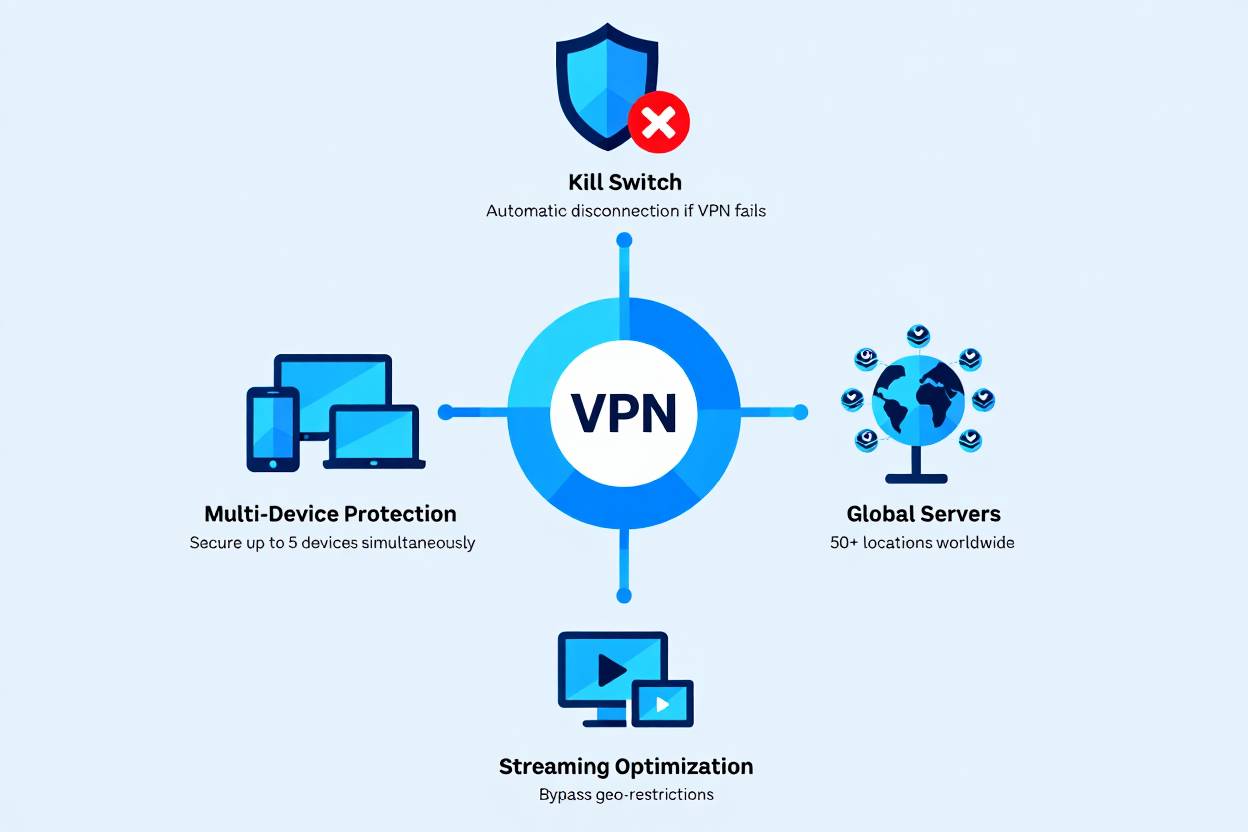
You’re at an airport gate when a sale you’ve been waiting for is about to end. Your cellular signal is weak, and the only usable network is called Free_Terminal_B.
Turning on a VPN sounds like the safe choice. In many cases, it is, but a VPN protects only one part of the purchase.
Answer: Yes. Using a reputable, properly configured VPN while shopping online is generally safe. It can protect traffic routed through the VPN on public Wi-Fi and hide your usual IP address, but it cannot verify a seller, prevent phishing, or guarantee payment approval. For most shoppers, HTTPS, account security, merchant verification, and payment protections matter more.
A useful way to think about a VPN is that it protects the route, not the retailer.
It can make it harder for the local network or your internet provider to observe your online activity. It cannot determine whether the store will deliver your order, protect a reused password, or recover your money after a scam.
It also shifts some trust to the VPN company. If you do not trust the provider, routing a payment session through it may introduce more uncertainty than it removes.
The 60-Second Decision Guide
Use these three questions before shopping with a VPN.
1. Do you trust the network?
- Airport, hotel, or café Wi-Fi: A vetted VPN can add useful privacy.
- Your secured home network: A VPN is usually optional.
- Cellular data: A VPN is usually optional unless you want additional IP privacy.
- Work or school network: Check the organization’s policy before using a personal VPN.
2. Do you trust the VPN provider?
Use the VPN only if you understand who operates it, what information it collects, and how it makes money.
If ownership or data practices are unclear, do not use that service for shopping or banking until you can verify it.
3. Is checkout working normally?
If checkout works, there is usually no reason to turn off a trusted VPN.
If payment or bank verification fails:
- Check whether an order or pending charge already exists.
- Do not immediately submit the payment again.
- Start a fresh session if no transaction was created.
- Try a nearby VPN server or your usual trusted home or cellular connection.
This approach protects privacy without turning the VPN into an all-or-nothing security rule.
What Changes When You Shop Through a VPN?
A properly configured VPN routes selected traffic through an encrypted tunnel to a VPN server. The connection then continues from that server to the retailer or payment service.
That changes who can observe different parts of the connection.
| Party | What it may generally observe |
|---|---|
| Public Wi-Fi operator | That your device is connected and exchanging encrypted VPN traffic |
| Internet provider | That you connected to a VPN, along with timing and data volume |
| VPN provider | Connection metadata and potentially clues about the services you use |
| Retailer | The VPN server’s IP address, plus information you provide or expose through your account, browser, and payment |
| Payment provider or card issuer | Transaction details and risk signals needed to process or authenticate the payment |
This is the central trade-off: the VPN reduces visibility for the local network and internet provider, but increases your reliance on the VPN company.
What a VPN Protects During Online Shopping
It protects traffic routed through the VPN tunnel
On public Wi-Fi, someone monitoring the local network generally sees encrypted VPN traffic rather than the content carried inside the tunnel.
The FTC’s VPN guidance explains that when a VPN app properly encrypts traffic, someone monitoring the Wi-Fi connection sees unreadable data, even if the destination site does not provide encryption.
There is an important limit: if a website does not use HTTPS, the VPN protects the connection only as far as the VPN server. Traffic traveling from that server to an unencrypted website may still be exposed.
That is one reason you should not continue when a checkout page shows a certificate or “connection is not private” warning.
A VPN also does not automatically isolate your device from every local-network risk. It may not protect:
- File sharing left open on your device
- Outdated software
- Traffic excluded through split tunneling
- Traffic exposed by a DNS or IPv6 leak
- Malicious software already running on the device
Keep your apps updated, disable sharing you do not need, and do not install apps requested by an unfamiliar Wi-Fi portal.
It limits what your internet provider can see
Your internet provider can generally still see that you connected to a VPN, when the connection occurred, and approximately how much data moved.
If the VPN is configured correctly and traffic is not leaking outside the tunnel, the provider generally should not see the individual pages you visit inside that connection.
That visibility does not simply disappear. Some of it shifts to the VPN provider.
It hides your usual IP address from the retailer
The retailer generally sees the VPN server’s public IP address rather than your home or mobile IP address.
This can:
- Reduce direct IP-based tracking
- Keep your home IP address away from the retailer
- Make your approximate network location less obvious
It does not make the purchase anonymous. The store may still recognize or identify you through:
- Your account
- Cookies
- Browser or device characteristics
- Email address
- Shipping and billing information
- Loyalty-program membership
- Payment details
- Previous order history
An IP address is only one of many identifying signals involved in an online purchase.
Can the VPN Provider See Which Stores You Visit?
Potentially, yes. But what it can see depends on the technology involved.
HTTPS normally prevents a standard VPN provider from reading protected content such as:
- Your password
- Card number
- Cart contents
- Messages sent through the encrypted connection
- The full path of a page you visit
The provider may still be able to infer some of the services you use from:
- DNS requests
- Destination IP addresses
- Connection timing
- Traffic patterns
- Unencrypted network metadata
Encrypted DNS and Encrypted Client Hello, or ECH, can reduce some hostname exposure. Mozilla says ECH has been enabled by default in Firefox since version 119 and provides its strongest privacy benefit when combined with encrypted DNS. Support still depends on the browser, DNS configuration, network, and destination website.
ECH is useful, but it is not an anonymity system. The practical rule is simpler:
Assume that a VPN provider may be able to infer at least some of the online services you use, even when HTTPS protects the content of the session.
Treat “no-logs” claims as claims that require evidence—not permanent guarantees.
What a VPN Does Not Protect
Many online-shopping losses happen in ways a VPN cannot prevent.
Fake stores and phishing pages
A scam website can use HTTPS and display a padlock. The connection may be encrypted while still delivering your information directly to the scammer.
The FTC’s public Wi-Fi guidance makes this distinction clear: scammers can create encrypted websites that look safe even though the people operating them are not trustworthy.
HTTPS means your connection to the domain is encrypted. It does not prove that the business is legitimate, dependable, or likely to deliver your order.
Malware and unsafe browser extensions
A standard VPN is not antivirus software. It may not detect:
- A malicious browser extension
- A fake shopping app
- An infected download
- Software that records or changes information before it enters the VPN tunnel
Some VPNs include malicious-domain blocking. That can provide an additional filter, but it is not a substitute for software updates and endpoint protection.
Stolen or reused passwords
A VPN cannot protect an account whose password has already been stolen or reused elsewhere.
Use a unique password for every shopping account. A password manager can generate and store those passwords for you.
Enable multifactor authentication when available. If the retailer supports passkeys or security keys, those options generally provide stronger phishing resistance than text-message codes.
Never approve a sign-in or payment prompt you did not initiate.
Sellers that do not deliver
Encryption cannot force a seller to:
- Ship an order
- Issue a refund
- Honor a warranty
- Follow its return policy
- Resolve a dispute fairly
Merchant verification, payment protections, and purchase records still matter.
Information you provide voluntarily
A VPN does not conceal information you enter during checkout, including your:
- Name
- Email address
- Phone number
- Shipping address
- Billing information
- Payment details
The retailer and relevant payment providers need some of this information to complete the transaction.
Breaches after the purchase
Once a retailer, payment processor, or shipping partner receives your data, the VPN’s role is largely over.
A later breach may expose stored information regardless of whether you used a VPN when placing the order.
Why a VPN May Cause Checkout Problems
A VPN does not automatically cause payment failure. It can, however, introduce signals that a retailer or payment provider considers unusual.
Online transactions may be screened using signals such as:
- IP address and approximate location
- Billing and shipping locations
- Device and browser characteristics
- Account history
- Purchase amount
- Transaction frequency
- Previous fraud associated with an IP address
- Card status and issuer rules
EMV 3‑D Secure can provide the card issuer with information such as the browser IP address, language, time zone, device characteristics, account history, and transaction details for risk assessment.
For example, your billing address and previous orders may point to Ohio while your checkout suddenly appears to come from a commercial VPN server in Amsterdam.
That mismatch does not guarantee a decline. It may, however, contribute to:
- A CAPTCHA
- An additional verification step
- A banking-app approval request
- A one-time code
- A delayed authorization
- A declined transaction
The VPN may not be the main cause. Incorrect billing information, card limits, merchant rules, issuer outages, unusual spending, and account-security concerns can produce similar results.
What to Do If Checkout Fails While the VPN Is On
Do not immediately press the payment button again.
First, check:
- Your email for an order confirmation
- Your retailer account for a completed or pending order
- Your card activity for a pending authorization
- Your banking app for an approval request
Repeated submissions can create duplicate orders or multiple pending authorizations.
If no order or charge exists:
- Close the failed checkout session.
- Start a fresh session.
- Try one nearby VPN server in your own country or region.
- If it still fails, use your usual trusted home or cellular connection.
- Contact the retailer or card issuer if the status remains unclear.
Avoid cycling rapidly through several countries. Multiple location changes during one purchase can look more unusual, not less.
Also avoid changing networks in the middle of a bank-authentication flow. The session may expire, restart, or lose the information needed to complete verification.
Could split tunneling help?
Split tunneling lets selected apps bypass the VPN.
It may help if your banking app cannot connect while the VPN is active. However, excluding the banking app does not necessarily change the IP address used by the browser checkout, so it will not solve every payment problem.
Configure and test split tunneling before you need it rather than changing network routes during an active transaction.
VPN Encryption and HTTPS Do Different Jobs
A VPN and HTTPS are related, but they are not interchangeable.
| Protection layer | What it generally protects | What it does not establish |
|---|---|---|
| VPN tunnel | Traffic routed from your device to the VPN server | That the seller is legitimate |
| HTTPS/TLS | Data in transit to the website or payment service you connected to | That the business will deliver or issue a refund |
| Payment tokenization | The reusable card number in supported payment flows | That every transaction or merchant is trustworthy |
| Passkeys or MFA | Account sign-in and some payment-approval steps | That the product or seller is legitimate |
| Card dispute protections | Potential recourse after certain payment problems | A guaranteed refund in every dispute |
Most established shopping sites already use HTTPS, so payment data is usually encrypted in transit even without a VPN.
A VPN adds another encrypted layer between your device and the VPN server. That can improve privacy on the local network, but it does not replace HTTPS.
If your browser shows a certificate warning, stop. A VPN does not make an invalid HTTPS connection trustworthy.
Is Public Wi-Fi Safe for Online Shopping?
Public Wi-Fi is generally safer than it was years ago because HTTPS is now widely used.
The FTC says connecting through public Wi-Fi is usually safe because most websites encrypt traffic. Someone on the same network normally cannot read information exchanged through a properly configured HTTPS connection.
Still, “usually safe” does not mean risk-free. Problems can occur if you:
- Join a fake network with a convincing name
- Visit a phishing site that uses HTTPS
- Ignore a browser certificate warning
- Use an outdated device or browser
- Install an unfamiliar app or certificate
- Leave unnecessary local services or file sharing enabled
A vetted VPN can add privacy from the local network, but it cannot correct every unsafe action taken on that network.
For a sensitive or high-value purchase, cellular data is often the simplest alternative because it avoids the shared Wi-Fi network. If cellular service is not practical:
- Confirm the official network name with the venue.
- Use a VPN provider you have already vetted.
- Type the store’s address yourself or use a saved bookmark.
- Do not install unexpected software or certificates.
- Stop if the browser displays a security warning.
Do You Need a VPN When Shopping at Home?
On a secured home network, a VPN is usually optional.
HTTPS already protects payment information while it travels to the retailer or payment processor. You may still want a VPN if you prefer to:
- Reduce visibility from your internet provider
- Keep your home IP address away from retailers
- Use the same privacy setup across different networks
- Avoid having to remember to activate it when traveling
Possible trade-offs include:
- Slower connections
- More CAPTCHAs
- Additional payment verification
- Problems reaching printers or other local devices
- Websites that block known VPN addresses
Whether those trade-offs are worthwhile depends on your privacy preferences and the reliability of your VPN provider.
How to Evaluate a VPN Before Using It for Payments
Using a VPN shifts trust from the local network and internet provider toward the VPN company.
The FTC warns that a VPN app may have access to a significant amount of internet traffic. Its guidance cites research involving nearly 300 VPN apps that found potential problems such as missing encryption, unexpected permissions, and third-party data sharing.
Apple similarly advises users to choose only a VPN service they trust and review how that provider handles data.
Before using a VPN for shopping or banking, check the following.
Ownership and accountability
- Is the operating company clearly identified?
- Are its ownership and leadership disclosed?
- Is there a working support channel?
- Can you determine where the company is legally based?
Data practices
- Does the privacy policy distinguish connection logs from browsing or usage logs?
- Does it explain what data is collected and why?
- Does the company share information with advertisers or analytics providers?
- Are retention periods stated clearly?
Security practices
- Does the service use modern or well-established protocols such as WireGuard, OpenVPN, or IKEv2?
- Does it offer DNS and IPv6 leak protection?
- Does the kill switch work on your operating system?
- Are security audits available?
- Did the company address problems found in previous audits?
- Are the apps updated regularly?
Business model
Operating VPN servers costs money. A free plan is not automatically unsafe, but its funding model should be understandable.
Some established providers offer limited free plans supported by paying subscribers. Be more cautious when a service promises unlimited access, has no paid plan, shows no advertising, and does not explain how it earns revenue.
Also be skeptical of labels such as “military-grade encryption.” Strong encryption is useful, but that phrase does not explain how the provider handles logs, protects its infrastructure, or responds to security incidents.
A Safer Online-Shopping Checklist
Before checkout
- Type the retailer’s address yourself or use a trusted bookmark.
- Read the full domain carefully.
- Check the seller’s contact information, return policy, and company history.
- Compare independent reports instead of trusting one review platform.
- Be cautious when prices are implausibly low.
- Confirm that the checkout page uses HTTPS and shows no certificate warning.
- Update your browser, operating system, and security software.
When paying
For U.S. consumers, credit cards generally provide stronger statutory protections than debit cards for unauthorized use and do not remove money directly from a checking account.
Under federal law:
- Liability for unauthorized credit-card use may be limited to $50.
- If only the credit-card number is stolen and the physical card is not lost or stolen, the cardholder generally has no liability for unauthorized charges.
- Issuers and card networks may offer protection beyond the federal minimum.
Debit-card liability depends more heavily on what was compromised and how quickly the issue was reported. The FTC’s lost-card guidance explains the applicable reporting periods and potential liability.
If you notice a credit-card billing error, including certain charges for goods that were not delivered as agreed, contact the issuer promptly. To preserve the formal Fair Credit Billing Act process, the FTC says a written dispute should reach the issuer’s billing-inquiries address within 60 days after the first statement containing the error was sent.
Follow the issuer’s current instructions, but do not assume that an in-app message automatically satisfies every legal requirement.
Avoid hard-to-reverse payments
Use extra caution when an unfamiliar seller insists on:
- Gift cards
- Wire transfers
- Cryptocurrency
- Cash
- A payment-app transfer to an individual
The FTC warns that scammers favor payment methods that are difficult to trace or reverse. A seller demanding only one of these methods is a strong reason to pause and verify the transaction.
Consider tokenized payment options
Where available, digital wallets and virtual card numbers can reduce the amount of reusable card information exposed during a purchase.
Depending on the implementation, tokenization replaces the card number with a substitute value whose use may be limited to a device, wallet, merchant, or payment context.
Tokenization can reduce the usefulness of information exposed in some merchant breaches. It does not prevent every form of fraud or guarantee a successful dispute.
Protect the account
- Use a unique password.
- Store it in a password manager.
- Enable MFA, a passkey, or a security key when supported.
- Keep recovery information current.
- Turn on transaction and login alerts.
- Never approve a prompt you did not initiate.
Save evidence
Keep:
- The order confirmation
- Receipt
- Product description
- Delivery estimate
- Seller contact details
- Return and refund policy
- Relevant messages
- Screenshots of special offers or unusual terms
These records may help if the product never arrives or the transaction needs to be disputed.
Quick Recommendation by Situation
| Situation | Practical recommendation | Why |
|---|---|---|
| Secured home Wi-Fi | VPN is optional | HTTPS already protects data in transit to the retailer or payment service |
| Hotel, airport, or café Wi-Fi | Use a previously vetted VPN if desired | It adds privacy from the local network |
| Cellular data | VPN is usually optional | You are not using the shared Wi-Fi network |
| Work or school device | Check the policy first | Personal VPNs may conflict with organizational controls |
| High-value purchase | Use only a provider you trust | An unknown intermediary may add uncertainty |
| Checkout repeatedly fails | Confirm no order exists, then try your usual trusted connection | The VPN IP or location may be one of several risk signals |
| Unfamiliar free VPN | Do not use it for payments until you verify it | Ownership, permissions, logging, or funding may be unclear |
| Browser certificate warning | Stop the transaction | A VPN cannot make an invalid HTTPS connection safe |
Frequently Asked Questions
Does a VPN protect my credit card number?
A VPN encrypts traffic routed between your device and the VPN server. HTTPS separately encrypts payment data as it travels to the retailer or payment processor.
Because established checkout pages normally use HTTPS, the VPN is an additional privacy layer rather than the main protection for your card number.
Neither layer controls how the retailer or processor stores your information after receiving it.
Can a store tell that I am using a VPN?
Often, yes.
Retailers and fraud-prevention services may recognize IP addresses associated with hosting companies, data centers, proxies, or consumer VPN services. They may also notice that many unrelated accounts use the same IP address.
VPN detection does not always block a transaction, but it may lead to a CAPTCHA, login challenge, or additional payment verification.
Does a VPN make online shopping anonymous?
No.
A VPN can hide your usual IP address, but an ordinary online purchase generally requires identifying information such as your name, email address, payment details, and shipping address.
The retailer may also recognize your account, cookies, browser characteristics, and purchase history.
What should I do if checkout fails while my VPN is on?
First, check whether the order or charge already went through. Review your confirmation email, retailer account, banking app, and pending card activity.
If nothing was created, start a fresh session. Try one nearby VPN server or switch to your usual trusted home or cellular connection.
Do not repeatedly submit the same payment or cycle through several countries.
Is a free VPN safe for shopping?
A limited free plan from an established and independently reviewed provider may be reasonable.
An unfamiliar free VPN with unclear ownership, broad app permissions, no meaningful privacy policy, and no visible funding model is a poor choice for payments. Verify the provider before trusting it with sensitive traffic.
Can I use a VPN to get lower prices?
Location can sometimes affect currency, inventory, regional offers, or displayed prices, but an IP address is rarely the only factor.
Retailers may also use the billing country, delivery address, account history, tax rules, and payment method. Misrepresenting your location may violate the retailer’s terms or complicate refunds, delivery, and warranty claims.
The Bottom Line
A reputable VPN can add privacy when you shop on airport, hotel, or café Wi-Fi, but it protects only part of the purchase.
It hides your usual IP address and encrypts traffic routed to the VPN server. It does not prove that a store is legitimate, protect a reused password, or ensure that a payment will be approved.
Verify the seller, use HTTPS, secure your account, and choose a payment method with meaningful dispute protections. If checkout fails, confirm that no order or pending charge was created before trying again over a trusted connection.
Use a VPN as one privacy layer—not as proof that the transaction itself is safe.
Sources and Further Reading
- FTC, Are Public Wi-Fi Networks Safe? What You Need To Know
- FTC, In the Market for a VPN App?
- FTC, Using Credit Cards and Disputing Charges
- FTC, Lost or Stolen Credit, ATM, and Debit Cards
- FTC, What To Know About Cryptocurrency and Scams
- Consumer Financial Protection Bureau, Unauthorized Credit-Card Liability
- Apple, VPNs & Privacy
- Mozilla, Encrypted Client Hello FAQ
- RFC Editor, RFC 9849: TLS Encrypted Client Hello
- EMVCo, EMV 3-D Secure Technical Features
Related Guides
- Can a VPN steal your data?
- Can a VPN hide your browsing history from your ISP?
- Is a free VPN safe?
- Should you leave your VPN on all the time?
You May Also Like
 Computers & PC Games
Does a VPN Really Improve Minecraft Ping and Performance?
 VPNs & Proxies
Why You Should Use a VPN for Minecraft Servers
 VPNs & Proxies
What Is a VPN Kill Switch and Why Is It Important?
 Computers & PC Games
Is RomsFun Safe and Legit? My Complete Review and Testing Experience
 VPNs & Proxies
How to Hide Your IP Address and Protect It: 5 Best Ways
 VPNs & Proxies