
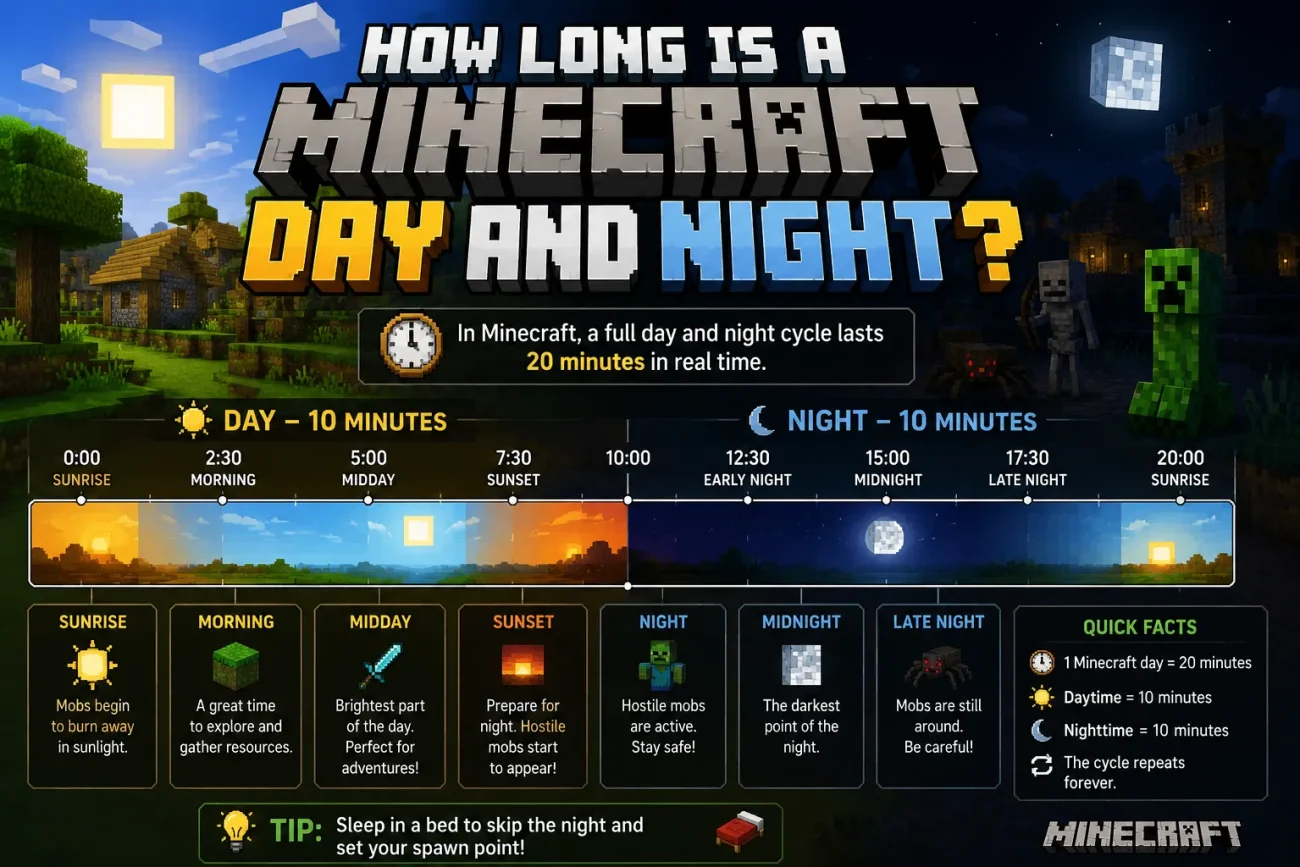
So, how long is a day in Minecraft? A full Minecraft day lasts 20 minutes in real time under normal game conditions. That is the time it takes for the game to complete one full day-and-night cycle and return to the same point in the cycle.
Twenty minutes may not sound like much, but Minecraft packs a lot into that time. You get daylight, sunset, nighttime, and sunrise before the cycle starts again. For survival players, understanding this cycle can make it easier to decide when to explore, mine, build, farm, or head back to safety.
This guide explains how long a Minecraft day and night actually last, how the in-game clock works, how to keep track of time, and the different ways you can change or skip time.
How Long Is a Day in Minecraft?
One complete Minecraft day lasts 20 real-world minutes when the normal daylight cycle is running.
Minecraft measures time using ticks. A complete day-and-night cycle contains 24,000 game ticks, and at normal game speed, those 24,000 ticks equal 20 real minutes.
The cycle can be roughly divided like this:
| Time Period | Approximate Real-Time Length |
|---|---|
| Daytime | About 10 minutes |
| Sunset / Dusk | Part of the transition into night |
| Nighttime | About 7 minutes |
| Sunrise / Dawn | Part of the transition back into day |
The exact visual transition between day and night is better understood as part of the overall cycle rather than four completely separate blocks of time.
In practical terms, you have roughly 10 minutes of full daylight before the world becomes dark.
That gives you plenty of time to explore, gather resources, work on a build, or return home before hostile mobs become a bigger concern.
How Many Minutes Is a Minecraft Day?
A normal Minecraft day lasts 20 real-world minutes. The game runs on a tick-based clock. One complete cycle contains 24,000 ticks:
24,000 ticks = 1 Minecraft day = 20 real minutes
This is the standard cycle when the daylight cycle is enabled and the game is running at normal speed.
The actual amount of real-world time you experience can be different if you sleep, pause the game, use commands, or change the world’s time settings.
How Long Is a Minecraft Day in Real Time?
Under normal conditions, one Minecraft day takes 20 real minutes.
However, you can change how time behaves in several ways.
- Sleeping in a bed: Moves the game forward to morning instead of making you wait through the entire night.
- Commands: Commands such as
/time setcan immediately change the time. - Daylight cycle disabled: The
doDaylightCyclegamerule can stop the normal passage of time. - Game speed or custom settings: Mods, plugins, or other custom configurations can alter normal time progression.
So, 20 minutes is the standard answer, but it assumes the world is using the normal daylight cycle.
How Long Is Nighttime in Minecraft?
Nighttime lasts roughly 7 minutes during a normal Minecraft day.
This is the part of the cycle when the world becomes dark and many hostile mobs can spawn if the required conditions are met.
You may encounter zombies, skeletons, creepers, spiders, and other hostile mobs during this period. Darkness also makes caves and unlit areas more dangerous.
You have a few options when night arrives:
- Return to your base and wait for morning.
- Sleep in a bed to skip the night.
- Light up the area around you.
- Continue exploring if you have enough equipment and food.
If you’re playing with friends, the same day-night cycle applies to multiplayer worlds. If you’re running a dedicated or modded server, our guide to modded Minecraft server hosting can help you get started.
What to Do During Night in Minecraft?
Night doesn’t mean you have to stop playing. In fact, it can be a useful time to work on things that don’t require you to be outside.
Here are some things you can do:
- Build or find shelter: A simple enclosed structure can protect you from most hostile mobs.
- Light up your base: Torches, lanterns, and other light sources can make your surroundings safer.
- Sleep in a bed: Sleeping lets you skip most of the nighttime and move to morning.
- Work indoors: You can craft, smelt, organize storage, and work on many building projects while it is dark outside.
- Explore carefully: If you’re properly equipped, nighttime can also be useful for gathering mob drops or fighting hostile mobs.
The easiest way to make nighttime less stressful is to prepare before sunset. Keep your base lit, have a bed available, and make sure you have enough food and equipment before heading far from home.
How Long Are Dusk and Dawn in Minecraft?
Dusk and dawn are the transition periods between daylight and nighttime.
Rather than thinking of them as two exact blocks of time with a fixed duration, it is more accurate to think of them as gradual lighting transitions within the Minecraft day-night cycle.
- Dusk: The sun moves toward the horizon and the sky gradually becomes darker before nighttime.
- Dawn: The sun rises and the world gradually becomes brighter as daytime returns.
These transitions are useful visual cues. If you see the sky getting darker, you know it is time to consider heading home. When the sky begins to brighten, nighttime is coming to an end.
If you’re dealing with performance problems while playing, check out our guide on how to fix lag and high ping in Minecraft.
Sunrise, Sunset, Midday, and Midnight in Minecraft
Minecraft measures time using a 24,000-tick cycle. Players often use familiar terms such as sunrise, midday, sunset, and midnight to describe different points in that cycle.
Here are the main reference points:
- Sunrise: Around tick 0, when a new Minecraft day begins.
- Midday: Around tick 6,000, when the sun is at its highest point.
- Sunset: Around tick 12,000, when the sun moves below the horizon.
- Midnight: Around tick 18,000, roughly the middle of the nighttime period.
After tick 23,999, the cycle returns to tick 0 and the next Minecraft day begins.
This gives you a simple way to understand the game’s clock:
0 → 6,000 → 12,000 → 18,000 → 24,000
Sunrise → Midday → Sunset → Midnight → Sunrise
How to Track the Time in Minecraft
You don’t have to guess the time by looking at the sky. Minecraft gives you several ways to keep track of the day-night cycle.
Use a Clock
A clock is one of the easiest options for survival players. You can craft one using gold ingots and redstone dust.
The clock does not display the time as a number. Instead, its hands show the approximate position of the sun or moon, allowing you to tell whether it is currently daytime or nighttime.
It’s particularly useful when you’re underground and cannot see the sky.
Watch the Sun and Moon
You can also estimate the time by watching the sky.
The sun moves across the sky during the day, while the moon appears at night. After playing for a while, you’ll naturally get a feel for how much time you have left before sunset or sunrise.
Use a Command
If you have cheats enabled or the required permissions, you can query the current game time.
On Java Edition, you can use:
/time query daytime
This returns the current time in game ticks.
Command syntax and available arguments can differ between Java Edition and Bedrock Edition, so check the commands supported by your version if a command doesn’t work as expected.
Watch the Shadows
Shadows can also give you a rough idea of the time.
They are generally longer when the sun is low near sunrise or sunset and shorter when the sun is higher in the sky around midday.
How Long Is 24 Hours in Minecraft Days?
Let’s reverse the calculation.
A real-world day contains 1,440 minutes.
One Minecraft day contains 20 minutes.
So:
1,440 ÷ 20 = 72
That means 72 Minecraft days fit into 24 real-world hours if the game runs continuously at normal speed.
How Long Is 45 Minecraft Days?
At 20 minutes per Minecraft day:
45 × 20 = 900 minutes
900 minutes equals 15 real-world hours.
So, 45 Minecraft days would take 15 hours of continuous real-world time if the daylight cycle runs normally without interruption.
How Long Is 100 Minecraft Days?
The popular “100 Days in Minecraft” challenge is another useful way to understand the game’s time scale.
At 20 minutes per Minecraft day:
100 × 20 = 2,000 minutes
That equals:
33 hours and 20 minutes
So 100 Minecraft days represent 33 hours and 20 minutes of continuous real-world time under normal time progression.
However, a 100 Days Minecraft video does not necessarily require exactly 33 hours of gameplay. Players may sleep to skip nighttime, pause the game, spend time in menus, or use other mechanics that affect how much real-world time is spent playing.
How Long Is 20,000 Minecraft Days in Real Time?
Now let’s take the calculation much further.
20,000 × 20 minutes = 400,000 minutes
That works out to approximately:
- 6,666 hours and 40 minutes
- 277 days, 18 hours, and 40 minutes
- About 9.1 months
So 20,000 Minecraft days would take roughly 278 real-world days of nonstop gameplay under normal time progression.
That’s an enormous amount of in-game time. A world reaching 20,000 days has usually been played for a very long time.
How Long Is a Year in Minecraft?
Minecraft does not have an official calendar year made up of 365 days.
However, using 365 Minecraft days as a comparison can help put the game’s time scale into perspective.
The calculation is:
365 × 20 minutes = 7,300 minutes
That’s:
121 hours and 40 minutes
Or approximately:
5 days, 1 hour, and 40 minutes
So if you treat 365 Minecraft days as a “Minecraft year” for comparison purposes, one such year would take just over 5 real-world days of continuous gameplay.
This is only a comparison, though. Minecraft itself does not officially define 365 days as a year.
The Daylight Cycle in Minecraft
The daylight cycle controls the movement between daytime and nighttime. It affects more than just the appearance of the sky.
Some gameplay elements connected to the cycle include:
- Mob spawning: Darkness allows many hostile mobs to spawn when other spawning conditions are met.
- Mob behavior: Some mobs behave differently depending on the time of day and lighting conditions.
- Visibility: The changing light level affects how easy it is to see the world around you.
- Villager routines: Villagers follow daily routines that include working and sleeping.
- Sleeping: Players can use beds at the appropriate times to skip ahead to morning.
The daylight cycle is therefore an important part of survival gameplay. Knowing when night is approaching can help you decide whether to keep exploring or return to safety.
Ways to Change Minecraft Time
You don’t always have to wait for the normal 20-minute cycle to finish. If you have the required permissions, Minecraft provides several ways to change or skip time.
1. Use the /time Command
The /time command is one of the fastest ways to change the time in a world where commands are available.
Common commands include:
/time set day
/time set night
/time set noon
/time set midnight
You can also move the game clock forward by a specific number of ticks:
/time add [amount]
For example:
/time add 1000
moves the game time forward by 1,000 ticks.
Keep in mind that command syntax can vary between Java Edition and Bedrock Edition, so use the syntax supported by your version.
2. Turn Off the Daylight Cycle
You can stop the normal passage of time using the doDaylightCycle gamerule:
/gamerule doDaylightCycle false
This freezes the normal day-night progression.
To turn the cycle back on:
/gamerule doDaylightCycle true
This can be useful for building projects, adventure maps, screenshots, or custom worlds where you want to keep a particular time of day.
3. Sleep in a Bed
Sleeping is the easiest way to skip nighttime without using commands.
In a normal survival world, entering a bed at night allows you to move forward to morning instead of waiting for the entire night to pass.
In multiplayer, whether the night can be skipped depends on the world’s sleep settings and the players connected to the world or server.
4. Use Mods or Custom Server Settings
Mods, plugins, and custom server configurations can change how time works.
Depending on the setup, you may be able to create longer days, shorter nights, or other custom time systems.
If you’re running a customized Minecraft server, our guide to modded Minecraft server hosting can help you understand the basics of setting one up.
Frequently Asked Questions
How long is a Minecraft day?
A full Minecraft day and night cycle lasts 20 minutes in real time under normal game settings. The cycle includes daytime, sunset, nighttime, and sunrise.
How long is nighttime in Minecraft?
Nighttime lasts about 7 minutes. During this period, hostile mobs can spawn in dark areas, so it is usually safer to stay inside, light up your surroundings, or sleep through the night.
How long is 100 Minecraft days in real time?
At 20 minutes per Minecraft day, 100 Minecraft days take about 33 hours and 20 minutes of real time if the game runs continuously at normal speed.
How many Minecraft days are in 24 real hours?
There are 72 Minecraft days in 24 real hours. Each Minecraft day takes 20 minutes, so 1,440 real-world minutes ÷ 20 = 72 Minecraft days.
How long is a Minecraft year?
Minecraft does not have an official calendar year. However, players commonly use 365 Minecraft days as an approximate Minecraft year. At 20 minutes per day, that works out to about 5 days and 1 hour of real time.
Can you skip the night in Minecraft?
Yes. You can sleep in a bed during the night to move the game forward to morning. In multiplayer, the exact sleeping requirements can depend on the server’s settings and the number of players online.
How do you change the time in Minecraft?
If cheats or commands are available, you can use commands such as /time set day, /time set night, /time set noon, or /time set midnight. You can also use /time add to move the game clock forward by a specific number of ticks.
Can you stop time in Minecraft?
Yes. You can turn off the daylight cycle with:
/gamerule doDaylightCycle false
This stops the normal passage of in-game time. To turn it back on, use:
/gamerule doDaylightCycle true
Does sleeping make a Minecraft day shorter?
Sleeping does not change the normal length of the Minecraft day cycle. Instead, it skips the nighttime portion and moves the game forward to morning. This means less real-world time passes while you are sleeping, but the game’s normal 20-minute cycle remains unchanged when the daylight cycle is running normally.
Conclusion
A full Minecraft day lasts just 20 minutes, but that short cycle has a big impact on survival gameplay. You get roughly 10 minutes of daylight to explore, build, mine, and gather resources before the world becomes dark.
Once you understand how the cycle works, it becomes much easier to plan your activities. You can decide when to leave your base, when to head home, when to sleep, and when it is worth taking the risk of exploring at night.
Whether you’re starting a new survival world, building a trading hall, or working on a long-term project, understanding Minecraft’s time system can help you make better use of every in-game day.
You May Also Like
 Computers & PC Games
Is 16GB RAM Enough for Gaming?
 Computers & PC Games
How Old Do You Have to Be to Play Fortnite? Age Rating and Parental Controls
 Computers & PC Games
How to Reduce Ping: 8 Fixes That Actually Help (PC, PS5, and Xbox)
 Computers & PC Games
Is RomsFun Safe and Legit? My Complete Review and Testing Experience
 Computers & PC Games
10 Best Modded Minecraft Server Hosting (2026): Pricing, Specs & Honest Picks for Every Modpack
 Computers & PC Games