
Starlink Mini has changed the way people think about portable satellite internet. It’s small, easy to carry, and the current price makes it much easier to consider than it was when it first launched.
But is it still the right pick for you? That depends on how you plan to use it.
I’ve had the opportunity to use the Starlink Mini myself, and one thing stood out pretty quickly: the biggest advantage isn’t simply that the dish is smaller. It’s that the whole idea of satellite internet becomes more portable.
You can take it on a trip, set it up at an RV or cabin, and have another way to get online when cable, fiber, or cellular service isn’t a practical option.
There are trade-offs, though.
Power matters. Wi-Fi coverage matters. Your Starlink plan matters. And, perhaps most importantly, the weather and your view of the sky can affect how the connection performs.
Here’s what I’ve learned from using the Starlink Mini and what you should know before buying one.
What Is Starlink Mini?
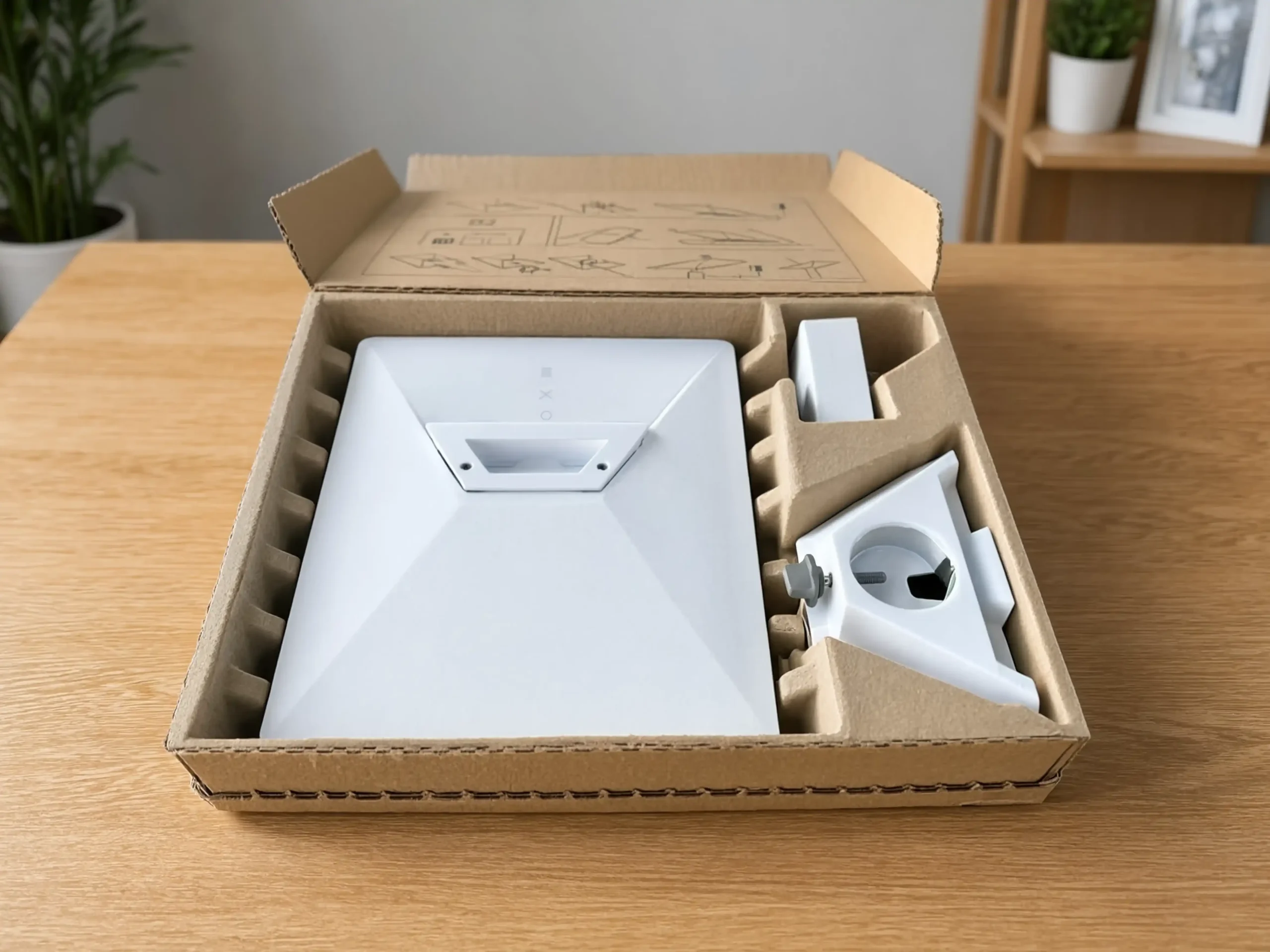
Starlink Mini is SpaceX’s compact, portable satellite internet kit. It combines the satellite antenna and Wi-Fi router into one small unit designed to fit in a backpack.
That’s the biggest difference between the Mini and a traditional home internet setup.
You’re not simply getting a smaller Starlink dish. You’re getting a system designed around portability.
That makes it interesting for travelers, remote workers, RV owners, campers, and people who spend time in places without cable or fiber internet.
The Starlink Mini includes a built-in Wi-Fi router, so you don’t need a separate router just to get online.
It also has a built-in kickstand that makes temporary deployment easier.
If you’re not totally clear on how a router differs from a modem, our guide on the difference between a modem and a router explains it in simple terms.
The Mini weighs 1.10 kg (2.4 lb), so it’s light enough to carry in a backpack or daypack without taking up much room.
That’s something I noticed when using it myself. The Mini feels more like something you can pack with your normal travel gear than a piece of equipment that needs its own dedicated carrying space.
That changes the kind of situations where satellite internet makes sense.
You don’t have to be installing internet for a permanent home. You can simply take the connection with you.
Still, smaller doesn’t automatically mean better.
If you’re setting up internet for a permanent home with several heavy users, portability may not be your biggest concern. In that situation, a larger Starlink setup or traditional broadband may make more sense.
Starlink Mini Price and Plans
The biggest change to the Starlink Mini is its price.
Starlink’s official US product page currently lists the Mini Kit starting at $199.
That’s a major difference from the Mini’s original launch pricing and makes the hardware much easier to consider.
But don’t stop your calculation at $199.
The $199 price is for the hardware. You’ll still need a Starlink service plan.
For portable use, the Mini is associated with Starlink’s Roam service.
The US Roam options have included:
- Roam 100GB: Around $55 per month with a set amount of high-speed data before reduced-speed service applies.
- Roam 300GB: Around $80 per month with a larger high-speed data allowance for longer trips or heavier use.
- Roam Unlimited: Around $175 per month for people who need substantially more data while traveling.
These prices are a snapshot, not a guarantee.
Starlink can change pricing, plan availability, data policies, and service terms, so check the current Starlink service plans before ordering.
You can also read our guide on how much Starlink costs per month for a broader look at Starlink pricing.
One thing I would pay attention to is how much data you actually use.
A 100GB plan can be plenty for occasional browsing, email, navigation, and lighter travel use. But streaming video regularly, downloading large games, backing up files, or working online every day can consume data much faster than you might expect.
For example, modern PC games can be very large. Our guides on GTA 5 game size for PC and Fortnite’s game size show why large downloads can quickly become relevant when you’re using a capped high-speed plan.
There’s also Standby Mode, which may be useful if you only use the Mini occasionally. Rather than paying for a full service plan during every month you’re not traveling, a standby option can be useful for keeping the service available at a lower cost, depending on the current terms for your account.
And if you’re traveling internationally, don’t assume the same Roam rules will apply everywhere.
Check the current plan terms for your account before crossing borders because roaming policies and availability can change.
Starlink Mini Features and Specs
The Mini’s specifications explain why the hardware is so easy to carry.
Design and Build Quality
The Starlink Mini measures 298.5 x 259 x 38.5 mm, or 11.75 x 10.2 x 1.45 inches.
That’s roughly the footprint of a large laptop.
It also weighs 1.10 kg (2.4 lb), which is one of the most important numbers if you plan to carry it regularly.
The Mini combines the satellite antenna and Wi-Fi router into one unit, and the built-in kickstand makes temporary setup easier.
The official specifications list an IP67 rating and wind resistance of 60 mph or more.
Starlink also lists a snow-melt capacity of up to 25 mm per hour, or about 1 inch per hour.
That doesn’t mean weather has no effect on the connection. Satellite internet can still be affected by heavy weather and environmental conditions.
The point is that the Mini is built to operate outdoors rather than being treated like an indoor-only networking device.

Technical Specifications
- Wireless system: Wi-Fi 5
- Dimensions: 298.5 x 259 x 38.5 mm (11.75 x 10.2 x 1.45 inches)
- Weight: 1.10 kg (2.4 lb)
- Average power usage: 25 to 40W
- IP rating: IP67
- Wind resistance: Operational in 60 mph+ conditions
- Snow-melt capacity: Up to 25 mm per hour (1 inch per hour)
- Operating temperature: -30°C to 50°C (-22°F to 122°F)
- Input rating: 12-48V, 60W maximum
- Coverage: Up to 1,200 square feet (112 m²)
- Devices: Up to 128 connected devices
- Ethernet: One latching Ethernet LAN port
- Security: WPA2
- Mesh: Compatible with Starlink mesh systems; third-party mesh systems are not listed as compatible
There’s one specification worth highlighting because it’s easy to confuse with newer routers:
Starlink Mini uses Wi-Fi 5, not Wi-Fi 6.
That’s not necessarily a problem.
Wi-Fi 5 is still capable of handling phones, laptops, tablets, streaming devices, and many other everyday devices. It simply isn’t the newest Wi-Fi standard.
The Mini can also connect up to 128 devices.
That doesn’t mean 128 devices can all stream, game, download large files, and make video calls simultaneously without affecting the connection. The available bandwidth is still shared.
Performance Capabilities
Starlink’s official Mini information advertises speeds of up to 300+ Mbps.
That’s the maximum advertised capability, not a speed you’re guaranteed to see every time you turn the dish on.
Your actual result can change depending on location, network capacity, satellite visibility, obstructions, weather, and other conditions.
This is where my own experience with the Mini becomes useful.
In my normal use, I generally see download speeds in the 100 to 200 Mbps range. The fastest result I’ve seen has been around 250 Mbps.
So while Starlink advertises speeds up to 300+ Mbps, I wouldn’t buy the Mini expecting to see 300 Mbps every day.
The difference between clear and bad weather is noticeable too.
When the weather is clear and the Mini has a good view of the sky, I’ve seen speeds comfortably above 100 Mbps and sometimes around 200 Mbps or more.
During heavy rain, the speed can fall significantly. In my experience, it can sometimes drop below 100 Mbps during particularly bad weather.
That’s important because the real-world experience isn’t a fixed number.
You might get a strong result on one day and a much lower result during a storm.
I think that’s a more useful way to look at Starlink than simply quoting the highest speed the hardware can reach.
Starlink Mini Performance: Real-World Use
This is where the Mini becomes more interesting than a list of specifications.
I’ve used the Mini in real-world situations, and for me, its appeal isn’t just the raw download speed.
It’s the combination of speed, portability, and the ability to get online somewhere that may not have another practical internet option.
That’s the part that a product page can’t really explain.
Speed Test Results
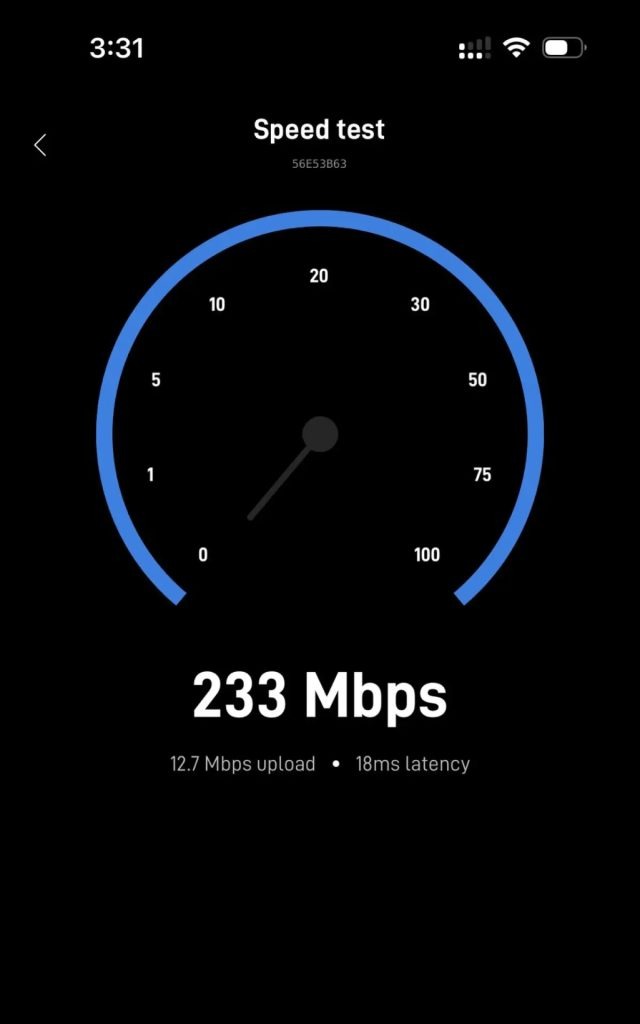
Based on my own experience, 100 to 200 Mbps is a realistic range for the Mini when conditions are good.
I’ve also seen speeds around 250 Mbps at the high end.
At the other end, heavy rain can have a noticeable effect. During bad weather, I’ve seen speeds fall below 100 Mbps.
That variation is exactly why I would avoid presenting one speed as “the Starlink Mini speed.”
A better way to think about it is:
Clear conditions: I can see well over 100 Mbps and sometimes around 200 Mbps or higher.
Peak result: I’ve seen around 250 Mbps.
Heavy rain: Speeds can drop substantially, sometimes below 100 Mbps.
Those are my results, not a promise for every Mini.
Starlink’s official maximum of 300+ Mbps remains a useful reference, but actual performance depends on your location and conditions.
For most normal internet use, the speeds I’ve experienced are more than enough.
If you’re not sure how much speed you actually need, our guide on what internet speed you need can help put those numbers into context.
And if you want a broader explanation of internet speed, our article on whether 100 Mbps is fast is also useful.
Latency and Online Gaming
Speed isn’t the only thing that matters.
Latency is important for gaming, video calls, remote desktop sessions, and other interactive applications.
The Mini can be suitable for gaming when conditions are good, but satellite internet still isn’t the same as a good wired connection.
For gaming, a stable connection is often more important than having an enormous download speed.
Our guide on whether Starlink is good for gaming goes deeper into the topic.
You can also see our guides on whether 1,000 Mbps is good for gaming and whether 1 gig internet is good for gaming to see why having more bandwidth doesn’t automatically solve every gaming problem.
If you’re dealing with high latency or lag, our guide on how to reduce internet latency is a useful place to start.
Fortnite players can also see our guide on how to fix Fortnite high ping.
Coverage and Connectivity
The Mini’s built-in Wi-Fi is rated to cover up to 1,200 square feet, or about 112 square meters.
That’s enough for many RVs, cabins, campsites, and smaller spaces.
But the advertised coverage area isn’t a guarantee that every corner will have the same signal strength.
Walls, furniture, construction materials, distance, and the layout of your space all affect Wi-Fi coverage.
This is especially important when you use the Mini inside a larger building.
If your goal is to improve coverage in another room, our guide on how to extend Wi-Fi range to a room explains some of the basics.
You can also learn more about where to place wireless equipment with our guide to the best places to put a Wi-Fi extender in a 2-story house.
One important difference with the Mini is mesh compatibility.
Starlink’s official specifications say the Mini is compatible with Starlink mesh systems but not third-party mesh systems.
So don’t assume that any consumer mesh system you already own will work.
Power and Portable Use
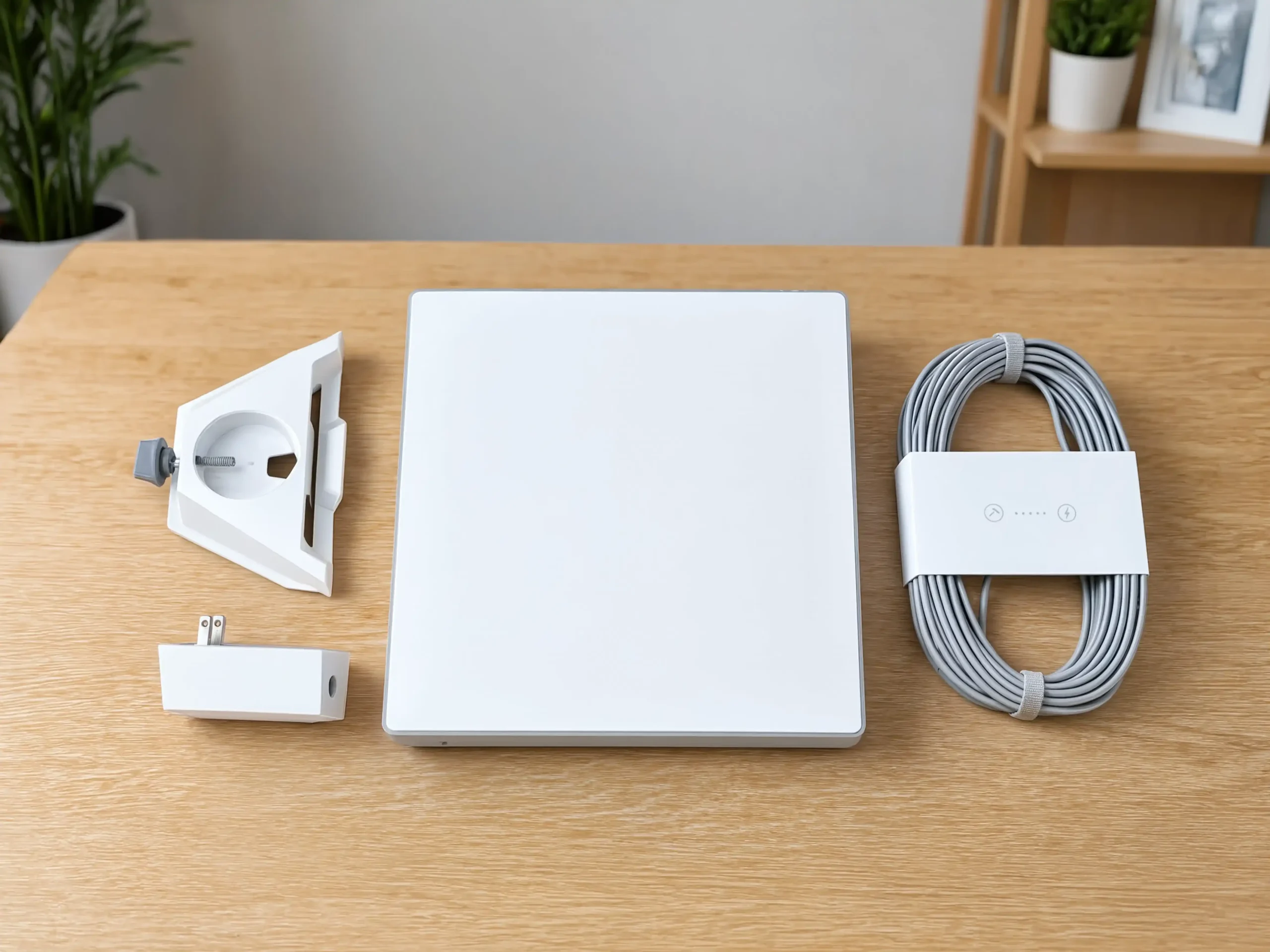
Power is probably the most overlooked part of the Mini.
The hardware is portable, but it isn’t battery-powered by itself.
Starlink lists average power usage at 25 to 40W.
That is relatively modest, but you still need a suitable power source.
The Mini uses DC power with a 12-48V input range and a 60W maximum input rating.
Starlink also specifies a 100W USB Power Delivery source with a minimum 20V/5A output when using the Starlink USB-C to barrel-jack cable accessory.
So don’t assume every USB-C power bank can run the Mini.
The power source has to meet the required output.
This is something I would think about before the trip rather than after arriving.
The dish itself is easy enough to carry. Your power solution can be the less convenient part of the setup.
That’s one of the biggest trade-offs of the current Mini.
Starlink Mini vs Standard: Which Should You Choose?
They’re both Starlink products, but they’re built around different priorities.
The Mini prioritizes portability.
The Standard setup makes more sense when your main goal is a permanent installation with heavier household use.
Starlink also offers other products and service options, including the Starlink Residential Lite, which is worth considering when you’re looking for a fixed home connection.
Size and Portability
This is the Mini’s biggest advantage.
It’s compact enough to fit in a backpack and light enough to carry without making the trip feel like you’re transporting a piece of home networking equipment.
I’ve noticed that this changes how I think about the device.
With a larger dish, moving your internet setup can feel like a project.
With the Mini, taking the connection with you feels much more natural.
That makes it particularly attractive for road trips, RVs, camping, and remote work.
Performance Comparison
The Mini advertises speeds up to 300+ Mbps, but raw speed isn’t the only thing separating it from the Standard system.
The Mini is built around a smaller, lighter package and a built-in Wi-Fi 5 router.
A larger setup is generally more appropriate when portability isn’t important and you want a more permanent system for a busy household.
So I wouldn’t call the Mini simply “worse.”
It’s a different balance.
You get a much smaller package, but you need to accept the limitations that come with that design.
Cost Considerations
The Starlink Mini Kit currently starts at $199 in the US.
That’s attractive, especially compared with its earlier pricing.
But the hardware is only the first part of the cost.
You still need a service plan, and depending on how you use the Mini, you may also need additional power equipment, mounting hardware, or other accessories.
That’s why I think it’s better to ask:
How much will my complete setup cost?
rather than only:
How much does the Starlink Mini cost?
Use Case Recommendations
Choose Starlink Mini if you:
- Travel frequently and want a compact satellite internet system
- Work remotely from places without reliable traditional broadband
- Use an RV, camper, cabin, or other mobile setup
- Value portability more than maximum hardware capacity
- Want a built-in Wi-Fi router
- Need a connection that can work in places where cellular service isn’t reliable
- Are willing to plan your power setup before traveling
Consider the Standard Kit if you:
- Plan to keep the system in one location
- Have several heavy internet users
- Want a more permanent home internet setup
- Care more about overall capacity than portability
- Don’t need to carry the satellite equipment from place to place
Pros and Cons of Starlink Mini
Pros
It’s genuinely portable. The compact design is the Mini’s biggest strength. It’s small enough for a backpack and light enough to carry without much trouble.
The router is built in. You don’t need a separate router just to create a Wi-Fi network.
Power usage is relatively low. Starlink lists average power usage of 25 to 40W, which makes portable power setups more practical than they would be with a larger system.
Real-world speeds can be strong. In my own use, I’ve generally seen 100 to 200 Mbps, with a peak around 250 Mbps when conditions were favorable.
It’s designed for outdoor use. The IP67 rating, 60 mph+ wind resistance, and snow-melt capability make the Mini suitable for outdoor deployments.
Cons
Weather can affect performance. In my experience, heavy rain can reduce speeds significantly, sometimes pushing them below 100 Mbps.
It uses Wi-Fi 5. The built-in router isn’t based on the newer Wi-Fi 6 standard.
Power planning matters. The Mini is portable, but you still need a suitable power source.
Third-party mesh systems aren’t officially supported. Starlink lists its own mesh systems as compatible, while third-party mesh systems are not listed as compatible.
The ongoing service cost matters. A $199 hardware price doesn’t mean the complete internet setup will cost $199.
Is Starlink Mini Worth It?
Yes, for the right type of user. I wouldn’t buy the Mini simply because it’s the cheapest way to get into Starlink. I’d buy it because I need a portable satellite internet connection. That’s an important difference.
When Starlink Mini Makes Sense
Digital nomads and remote workers can get a lot of value from the Mini because the hardware can move with them.
The main benefit isn’t necessarily having the fastest connection possible.
It’s having another way to get online when local Wi-Fi or cellular service isn’t reliable enough for work.
That flexibility can be a big deal when your ability to work depends on staying connected.
If you’re working from different locations, our Starlink VPN guide can also help if you’re considering how a VPN fits into your setup.
RV and camping users are another natural fit.
The Mini can be useful for checking weather, navigation, streaming, staying in touch, and working remotely.
For more setup ideas, see our guide on using Starlink for RV internet.
You can also compare alternatives in our roundup of the best RV satellite internet options.
People preparing for emergencies may also appreciate having a portable backup connection.
You can store the Mini until you need it instead of keeping a permanent satellite setup installed.
Of course, it still needs suitable power and Starlink service availability.
Rural property owners may also find it useful for cabins, vacation properties, and temporary locations where cable or fiber isn’t practical.
When You Should Consider Alternatives
If you’re setting up internet for a permanent home, compare the Mini with larger Starlink hardware and local broadband before buying.
A fixed connection may be a better fit if several people will be streaming, gaming, working, and uploading files at the same time.
Budget-conscious users should also look beyond the $199 hardware price.
The monthly service cost can become much more significant over time.
And if you rely heavily on large uploads, don’t focus only on the Mini’s maximum advertised download speed.
Your complete workload matters more than one number.
For comparison, fiber connections can behave very differently from satellite internet. Our guide to fiber internet benefits and functionality explains why a wired fiber connection can be a better fit for some households.
FAQ
Is Starlink Mini suitable for gaming?
Yes, it can work for many online games, but gaming performance depends on latency, network conditions, congestion, weather, and your location. A wired broadband connection can still provide a more predictable gaming experience. Our guide on whether Starlink is good for gaming covers the subject in more detail.
Can I use Starlink Mini while driving?
In-motion use depends on the applicable Starlink service plan, hardware setup, and current service rules. Check the current Starlink Roam terms before using the Mini while moving.
Does Starlink Mini work in bad weather?
The Mini is designed for outdoor conditions and has an IP67 rating, 60 mph+ wind resistance, and a stated snow-melt capacity of up to 25 mm per hour. However, severe weather can still affect performance. In my own use, heavy rain has caused download speeds to fall below 100 Mbps at times.
Is the data truly unlimited?
That depends on your Starlink service plan. Some Roam plans include a specific amount of high-speed data before reduced-speed service applies, while an Unlimited option offers a much larger data allowance. Check the current Starlink plan terms before signing up.
Can I expand the Wi-Fi range?
Starlink’s official specifications say the Mini is compatible with Starlink mesh systems. They also state that third-party mesh systems are not compatible. Your available options therefore depend on whether you use Starlink’s supported mesh hardware.
How long does the battery last?
The Mini does not have a built-in battery. Runtime depends on the external power source you use. Starlink lists average power usage of 25 to 40W, so battery capacity, output, and efficiency determine how long it can run.
How many devices can Starlink Mini connect?
The official specification lists support for up to 128 devices. That’s the maximum connection count, not a guarantee that 128 devices can all perform demanding tasks simultaneously.
Does Starlink Mini have Wi-Fi 6?
No. The built-in router uses Wi-Fi 5.
Can I connect an external router?
Yes. The Mini has one latching Ethernet LAN port, so you can connect networking equipment through a wired connection. The exact configuration depends on the router and network setup you’re using.
Conclusion
Starlink Mini makes the most sense when you think of it as a portable internet tool rather than simply a smaller Starlink dish.
The current US price starts at $199, and the hardware weighs just 1.10 kg (2.4 lb). It also includes a built-in Wi-Fi 5 router and is designed for outdoor use.
But the real selling point is portability.
From my own experience, that’s what stands out most.
The Mini is easy to pack, easy to think about as travel gear, and capable of delivering strong speeds when conditions are good.
In my testing, I generally see around 100 to 200 Mbps, with the fastest result reaching roughly 250 Mbps.
When the weather is clear, speeds can stay comfortably above 100 Mbps and often reach 200 Mbps or more.
Heavy rain is different. I’ve seen the connection slow significantly during bad weather, sometimes dropping below 100 Mbps.
That tells me something important about the Mini: you shouldn’t judge it from one speed test.
The experience depends on the conditions around you.
There are other trade-offs too.
You still need to plan for power. The built-in router uses Wi-Fi 5 rather than Wi-Fi 6. Wi-Fi coverage depends on the environment, and the ongoing service cost can be much more significant than the $199 hardware price suggests.
So, is Starlink Mini worth it?
For travelers, remote workers, RV users, campers, and people who need internet in places where traditional broadband isn’t practical, I think it can be a very useful option.
For a permanent home with several heavy users, I’d compare it with the Standard hardware, fiber, cable, or other local broadband before buying.
The key question is simple:
Do you need internet that can move with you?
If the answer is yes, the Starlink Mini is worth serious consideration.
Before purchasing, check Starlink’s official Mini product page and current service plans, since pricing, availability, and service rules can change.
Pricing, plans, and specifications can change over time and may vary by location. The speed figures in this article include my own real-world experience with the Starlink Mini and should not be treated as guaranteed performance. Check Starlink’s official website for the latest details before purchasing.
You May Also Like
 Computers & PC Games
What Internet Speed Do I Need For Gaming and Streaming?
 Internet
The Best Places to Put a WiFi Extender in a 2-Story House
 Internet
How to Fix Slow Internet: 15+ Things That Actually Work
 Internet
Why Is My Xfinity Internet So Slow All of a Sudden
 Internet
3 Cheap Satellite Internet Providers: Plans, Pros and Cons, Ratings, and Rural Coverage
 Internet