
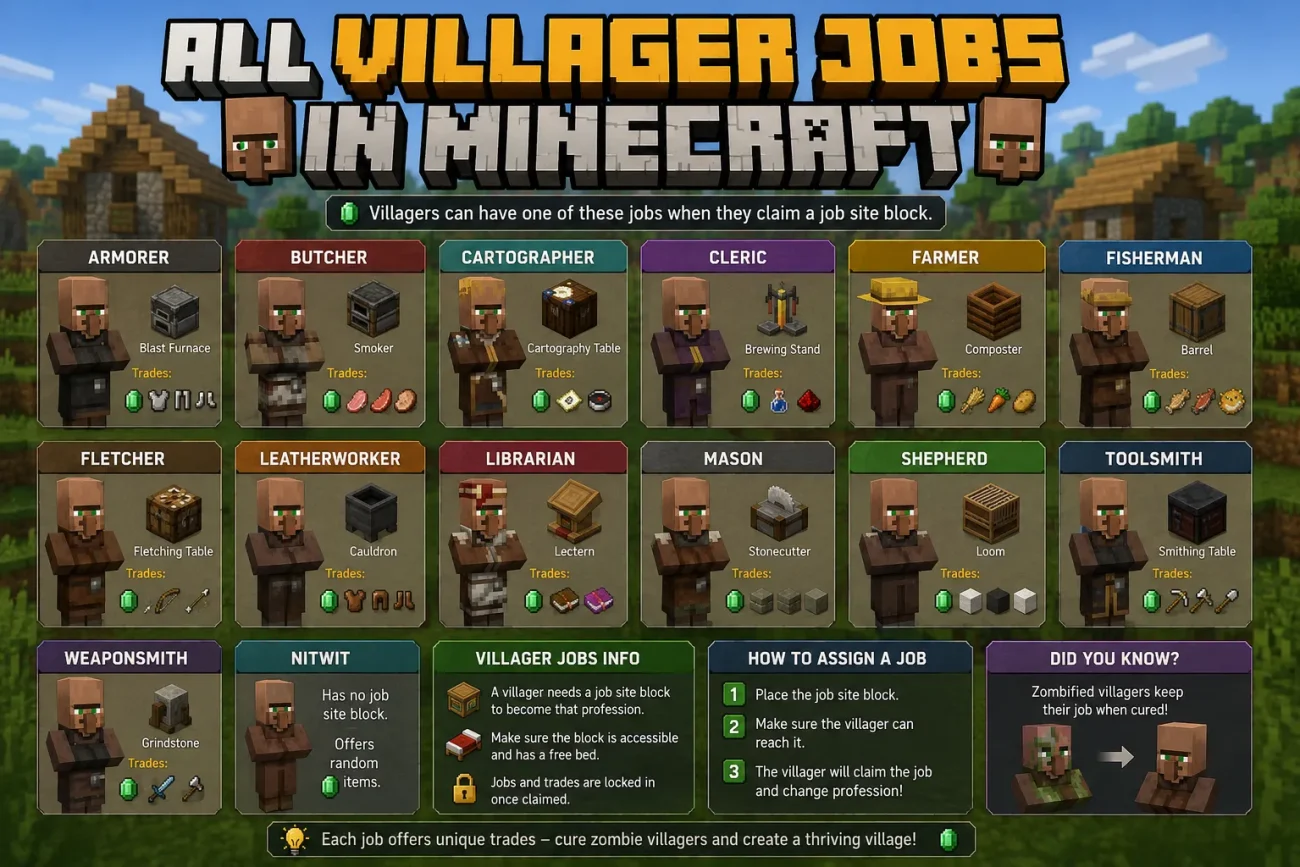
Minecraft villagers can take on different professions, and each profession is linked to a specific workstation. Once a villager claims the right workstation, it takes on that job and unlocks a set of trades.
The system sounds simple, but it can be surprisingly confusing. Which block gives a villager a specific job? Can a Nitwit ever become a working villager? And can you change a villager’s profession after you’ve already traded with it?
We’ll answer all of those questions here. You’ll learn about all 13 standard villager professions, the workstation each one needs, the types of trades you can expect, and how to manage villager jobs in your own world.
How Many Villager Jobs Are There in Minecraft?
Minecraft currently has 13 standard villager professions. Each profession is linked to a specific job site block and comes with its own set of possible trades. Here’s the complete list:
- Armorer — Blast Furnace
- Butcher — Smoker
- Cartographer — Cartography Table
- Cleric — Brewing Stand
- Farmer — Composter
- Fisherman — Barrel
- Fletcher — Fletching Table
- Leatherworker — Cauldron
- Librarian — Lectern
- Mason — Stonecutter
- Shepherd — Loom
- Toolsmith — Smithing Table
- Weaponsmith — Grindstone
You’ll also encounter two other types of adult villagers that don’t have professions:
- Unemployed villagers: Adult villagers that haven’t claimed a workstation yet. They can take a profession when they find a valid, unclaimed workstation.
- Nitwits: Villagers that can never take a profession or trade with players, regardless of which workstation you place nearby.
Neither of these counts as a profession. So when you ask how many villager jobs there are in Minecraft, the answer is 13, not 15.
This distinction is important: an unemployed villager can still become a working villager, while a Nitwit never can.
Minecraft Villager Jobs at a Glance
Before getting into the details, here’s a quick overview of all 13 standard villager professions, their workstations, and what each profession is generally useful for.
| Villager Profession | Workstation | Common Trade Types | Best Use |
|---|---|---|---|
| Armorer | Blast Furnace | Armor, iron, and diamond equipment | Getting armor through trading |
| Butcher | Smoker | Meat and other food items | Getting food and trading surplus meat |
| Cartographer | Cartography Table | Maps, explorer maps, and related items | Finding structures and exploring the world |
| Cleric | Brewing Stand | Redstone, glowstone, ender pearls, and other items | Getting brewing and End-related resources |
| Farmer | Composter | Crops, bread, and other food items | Trading farm produce for emeralds |
| Fisherman | Barrel | Fish, boats, and fishing-related items | Getting food and fishing supplies |
| Fletcher | Fletching Table | Arrows, bows, crossbows, and related items | Getting ranged combat supplies |
| Leatherworker | Cauldron | Leather, leather armor, and related items | Getting basic armor and leather items |
| Librarian | Lectern | Books, bookshelves, and enchanted books | Getting books and useful enchantments |
| Mason | Stonecutter | Bricks, stone, quartz, and other building blocks | Getting building materials |
| Shepherd | Loom | Wool, dyes, banners, and related items | Getting wool and decorative materials |
| Toolsmith | Smithing Table | Iron and diamond tools | Getting useful tools through trading |
| Weaponsmith | Grindstone | Iron and diamond weapons | Getting weapons through trading |
The exact trades a villager offers can vary by profession, trading level, Minecraft edition, and in some cases the features enabled in your world. So think of this table as a quick guide rather than a complete list of every possible trade.
Now let’s look at how villager professions actually work, how villagers get their jobs, and what you need to know before you start trading with them.
What Are Villager Professions?
A villager profession is the job a villager takes when it claims a nearby workstation. The workstation determines which profession the villager gets and, in turn, what types of trades it can offer.
The basic process looks like this:
Unemployed villager → claims a workstation → gets a profession → unlocks trades → gains experience → levels up
For example, place a Lectern near an unemployed villager, and it can become a Librarian. Place a Blast Furnace instead, and it can become an Armorer.
Once a villager has claimed a workstation, that block becomes its job site. An unemployed villager can change professions by claiming a different valid workstation, but there are important rules to keep in mind, especially if you have already traded with it.
This gives you a lot of control over villager jobs. By choosing which workstations you place and where you place them, you can guide villagers into the professions you actually need.
1. Armorer
Workstation: Blast Furnace
The Armorer is a great choice if you want armor without spending hours mining for the materials yourself. It works at a Blast Furnace and can offer different types of armor as it levels up.
Common trade types:
- Iron armor
- Diamond armor
- Iron ingots
- Chainmail armor
Best use: Getting armor through trading, especially when you want to save some of your mining resources.
Tip: Be careful when placing Blast Furnaces near unemployed villagers. If one claims the block, it can become an Armorer when you may have had another profession in mind.
2. Butcher
Workstation: Smoker
The Butcher is a food-focused villager that works at a Smoker. It can be useful if you have plenty of meat from animal farms and want to turn your surplus into emeralds or trade for food.
Common trade types:
- Raw and cooked meat
- Other food items
- Items such as sweet berries and rabbit stew
Best use: Trading surplus meat and maintaining a reliable source of food.
3. Cartographer
Workstation: Cartography Table
The Cartographer specializes in maps and can be particularly useful when you’re looking for specific structures or exploring unfamiliar parts of the world.
Common trade types:
- Maps
- Explorer maps
- Glass panes and other map-related items
Depending on the Minecraft version and features enabled in your world, Cartographers can offer maps that point toward different structures or locations.
Best use: Finding structures and exploring without having to search the entire world manually.
Tip: Explorer maps can save you a lot of time when you’re looking for a particular structure, especially when it is far from your base.
4. Cleric
Workstation: Brewing Stand
The Cleric focuses on items associated with brewing, magic, and the Nether. It can be especially useful once you start working toward more advanced progression.
Common trade types:
- Rotten flesh
- Gold
- Redstone dust
- Glowstone dust
- Ender pearls
- Other potion-related items
Best use: Getting useful resources such as ender pearls, glowstone, and redstone through trading.
5. Farmer
Workstation: Composter
The Farmer is one of the most useful villager professions for everyday survival. It trades crops and food, making it a great way to turn a large farm into a steady source of emeralds.
Common trade types:
- Wheat
- Carrots
- Potatoes
- Beetroot
- Bread and other food items
- Pumpkins and melons
Best use: Turning surplus crops into emeralds while keeping a reliable source of food.
Tip: If you already have an automatic or large-scale crop farm, Farmers can be one of the easiest villagers to use for regular emerald trading.
6. Fisherman
Workstation: Barrel
The Fisherman specializes in fish and other fishing-related trades. You don’t necessarily need to spend hours fishing yourself to make use of this profession.
Common trade types:
- Raw and cooked fish
- Boats
- Fishing-related items
- Enchanted fishing rods at higher levels
Best use: Getting food, boats, and fishing equipment through trading.
7. Fletcher
Workstation: Fletching Table
The Fletcher is one of the most useful professions for ranged combat. It can provide arrows and other items that make using a bow or crossbow much easier.
Common trade types:
- Sticks
- Arrows
- Flint
- Bows
- Crossbows
- Enchanted ranged weapons at higher levels
Best use: Stocking up on arrows and getting useful ranged combat gear.
Tip: A Fletcher can be particularly valuable early in a survival world because sticks are easy to produce, giving you a simple way to generate emeralds through trading.
8. Leatherworker
Workstation: Cauldron
The Leatherworker deals mainly in leather and leather-based equipment. It can be useful early in the game, although its usefulness tends to decrease once you have access to stronger armor.
Common trade types:
- Leather
- Leather armor
- Dyed leather armor
- Other leather-related items
Best use: Getting basic armor and making use of excess leather.
9. Librarian
Workstation: Lectern
The Librarian is one of the most valuable professions for players who want to build a strong long-term survival setup. Its most famous trades are books and enchanted books.
Common trade types:
- Paper
- Books
- Bookshelves
- Enchanted books
Best use: Getting useful enchantments through trading, including powerful options that can make a major difference to your tools, armor, and weapons.
The exact enchanted book a Librarian offers can vary. If you have an unemployed villager that has never been traded with, you can place a Lectern nearby and check its available trades. If you don’t get the enchantment you want, you can remove and replace the Lectern to generate a new set of trades.
Important: Once you trade with the villager, its profession and current trade offers are locked in. Breaking the Lectern afterward will not reset those trades.
Minecraft has also introduced the Villager Trade Rebalance as an experimental feature. It changes some villager trades, including Librarian trades, but it is not part of the standard trading system unless you manually enable the relevant experiment in your world.
10. Mason
Workstation: Stonecutter
The Mason is the villager to look for if you need building materials. It specializes in stone and other blocks commonly used for construction.
Common trade types:
- Stone
- Clay
- Bricks
- Stone-related building blocks
- Quartz and other decorative blocks
Best use: Getting building materials without having to gather every block yourself.
11. Shepherd
Workstation: Loom
The Shepherd focuses on wool, dyes, and decorative items. It can be particularly useful if you are working on large builds that require lots of colored wool or banners.
Common trade types:
- Wool
- Dyed wool
- Dyes
- Banners
- Beds
Best use: Getting wool and decorative materials for building and customization.
12. Toolsmith
Workstation: Smithing Table
The Toolsmith specializes in tools and can save you some of the work involved in crafting or upgrading your equipment.
Common trade types:
- Iron tools
- Diamond tools
- Iron ingots
- Other tool-related items
Best use: Getting useful tools through trading, especially when you want to reduce the amount of mining needed for equipment.
13. Weaponsmith
Workstation: Grindstone
The Weaponsmith focuses on melee weapons and can be a useful source of swords and axes as you progress through the game.
Common trade types:
- Iron swords
- Iron axes
- Diamond swords
- Diamond axes
- Enchanted weapons at higher levels
Best use: Getting weapons through trading instead of crafting or relying entirely on random loot.
Unemployed Villagers Explained
An unemployed villager is a regular adult villager that does not currently have a profession. It has no job and cannot offer profession-based trades until it claims a suitable workstation.
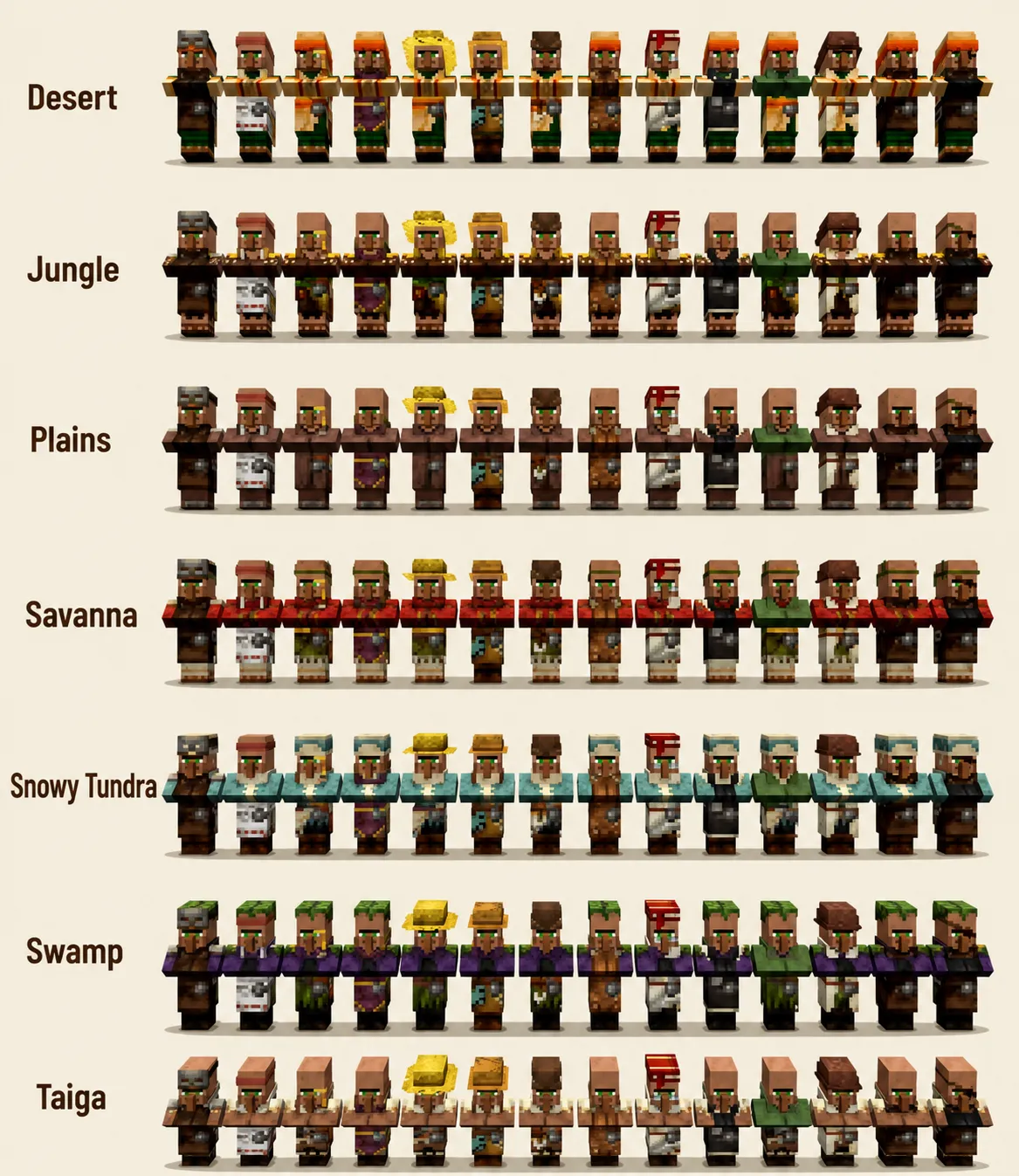
You can usually recognize an unemployed villager by its plain clothing rather than the outfit associated with one of the 13 professions.
Unemployed villagers can search for nearby job site blocks. When an eligible villager claims an available workstation, it takes on the profession associated with that block and gains access to that profession’s trades.
For example:
- Lectern → Librarian
- Blast Furnace → Armorer
- Composter → Farmer
- Smithing Table → Toolsmith
- Grindstone → Weaponsmith
If you are assigning jobs manually, it helps to keep unnecessary workstations away from the area. Otherwise, another villager may claim a workstation before the villager you had in mind gets to it.
One important rule is that trading changes everything. Before you trade with a villager, you have more flexibility to change its profession by removing its workstation and assigning another one. After you have traded with it, its profession and trade offers are locked in.
Also remember that Nitwits are different from unemployed villagers. An unemployed villager can become a professional villager, while a Nitwit can never take a job.
What Is a Nitwit?
A Nitwit is a special type of villager that can never take a profession, no matter how many workstations you place nearby.
They may look like an unemployed villager at first, but there’s an easy way to tell them apart: Nitwits wear green and never take a job.
Here’s what you need to know about Nitwits:
- Appearance: They wear a green outfit that makes them easy to spot.
- Trading: They cannot trade with players.
- Jobs: They cannot claim a workstation or become a professional villager.
- Breeding: They can still breed and have children.
- Village life: They can sleep, wander around, and count toward the village population.
So, if you find a villager standing around without a job, check its outfit before assuming it is unemployed. An unemployed villager can still take a profession. A Nitwit never can.
If you’re building a trading hall, it’s usually best to identify and separate Nitwits early so you don’t waste a workstation trying to give them a job.
Baby Villagers and Jobs
Baby Villagers and Jobs
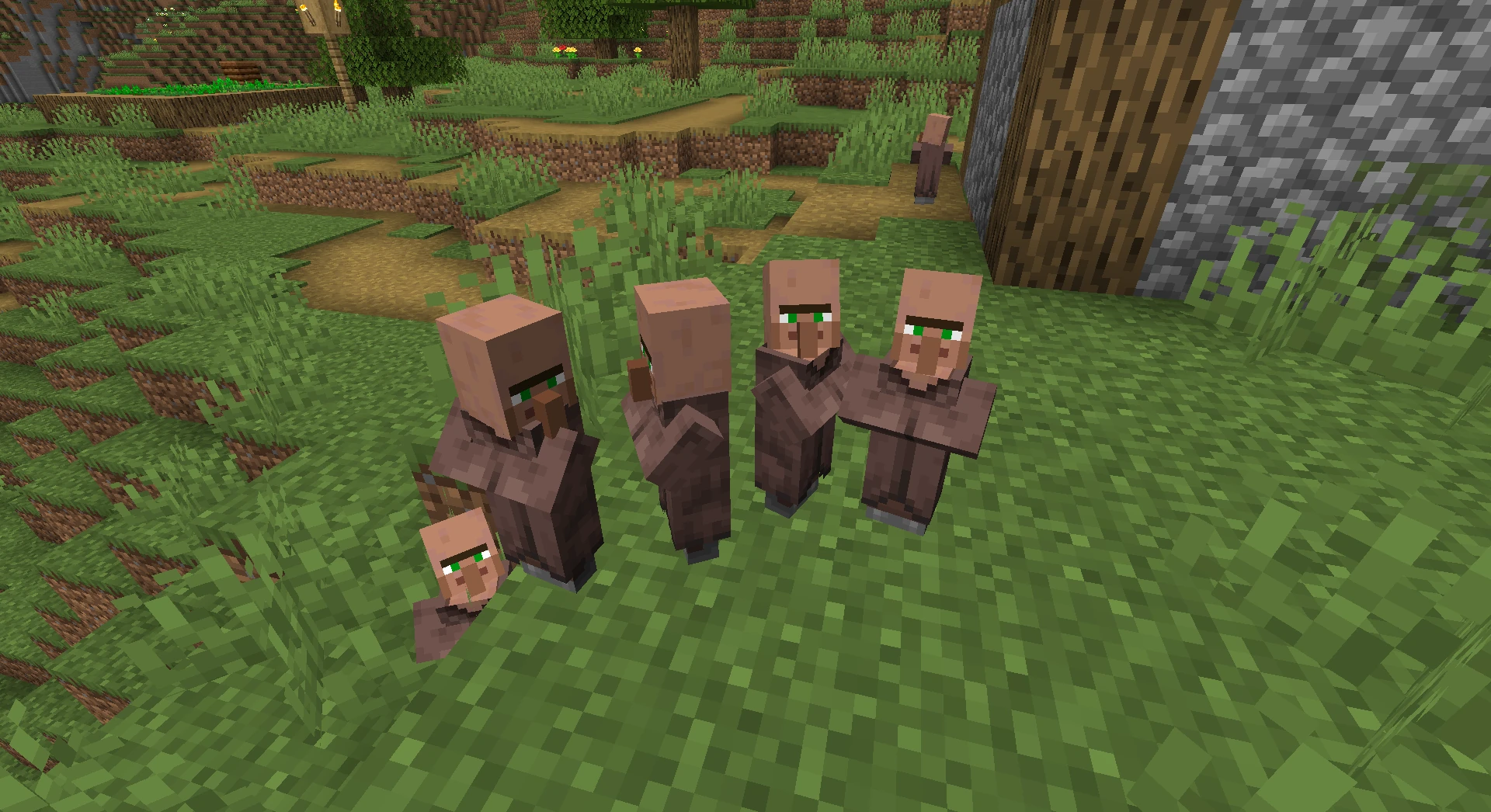
Baby villagers cannot take a profession while they are still babies. They cannot claim workstations or trade with players.
Once a baby villager grows into an adult, it can become an unemployed villager and claim a nearby workstation. If a suitable workstation is available, it can take on a profession shortly after growing up.
If you’re breeding villagers for a trading hall, it’s a good idea to keep workstations away from the breeding area until you’re ready to assign jobs. This gives you more control over which villager takes which profession.
How to Give a Villager a Job
Giving an unemployed villager a profession is fairly simple:
- Find an unemployed adult villager. Look for a villager that does not currently have a profession.
- Place the appropriate workstation nearby. Make sure the workstation is available for a villager to claim.
- Give the villager time to claim it. Once it links to the workstation, its profession will change.
- Check the villager’s outfit. The new outfit can help you confirm which profession it has taken.
- Open the trading menu. Interact with the villager to see its available trades.
For example, if you want a Librarian, place a Lectern near an unemployed villager. Once it claims the Lectern, it becomes a Librarian and can offer librarian trades.
How to Change a Villager’s Job
You can change a villager’s profession, but there is one rule you really need to remember: whether you have traded with the villager before matters.
- Before trading: If you haven’t traded with the villager yet, you can usually remove its workstation and let it become unemployed again. You can then place a different workstation and give it a new profession.
- After trading: Once you complete at least one trade with a villager, its profession and trade offers are locked in. Removing its workstation will not reset the profession or reroll its trades.
- Rerolling trades: If you’re trying to find a specific trade, such as a particular enchanted book from a Librarian, you can remove and replace the workstation before making any trades. This allows the villager to generate a new set of offers.
For example, if a new Librarian doesn’t offer the enchanted book you want, remove the Lectern, wait for the villager to lose its profession, and then place the Lectern again. You can repeat this until you get a trade you want—as long as you haven’t traded with that villager yet.
Once you make a trade, that villager is locked in. So if you find a valuable trade, it’s a good idea to trade with the villager at least once to preserve it.
One More Thing to Keep in Mind
Workstation management can become tricky when several unemployed villagers are close together. A workstation you place for one villager may be claimed by another eligible villager instead.
If you’re setting up a trading hall, assigning villagers one at a time and keeping unnecessary workstations out of the area can make the process much easier.
Villager Trading Levels Explained
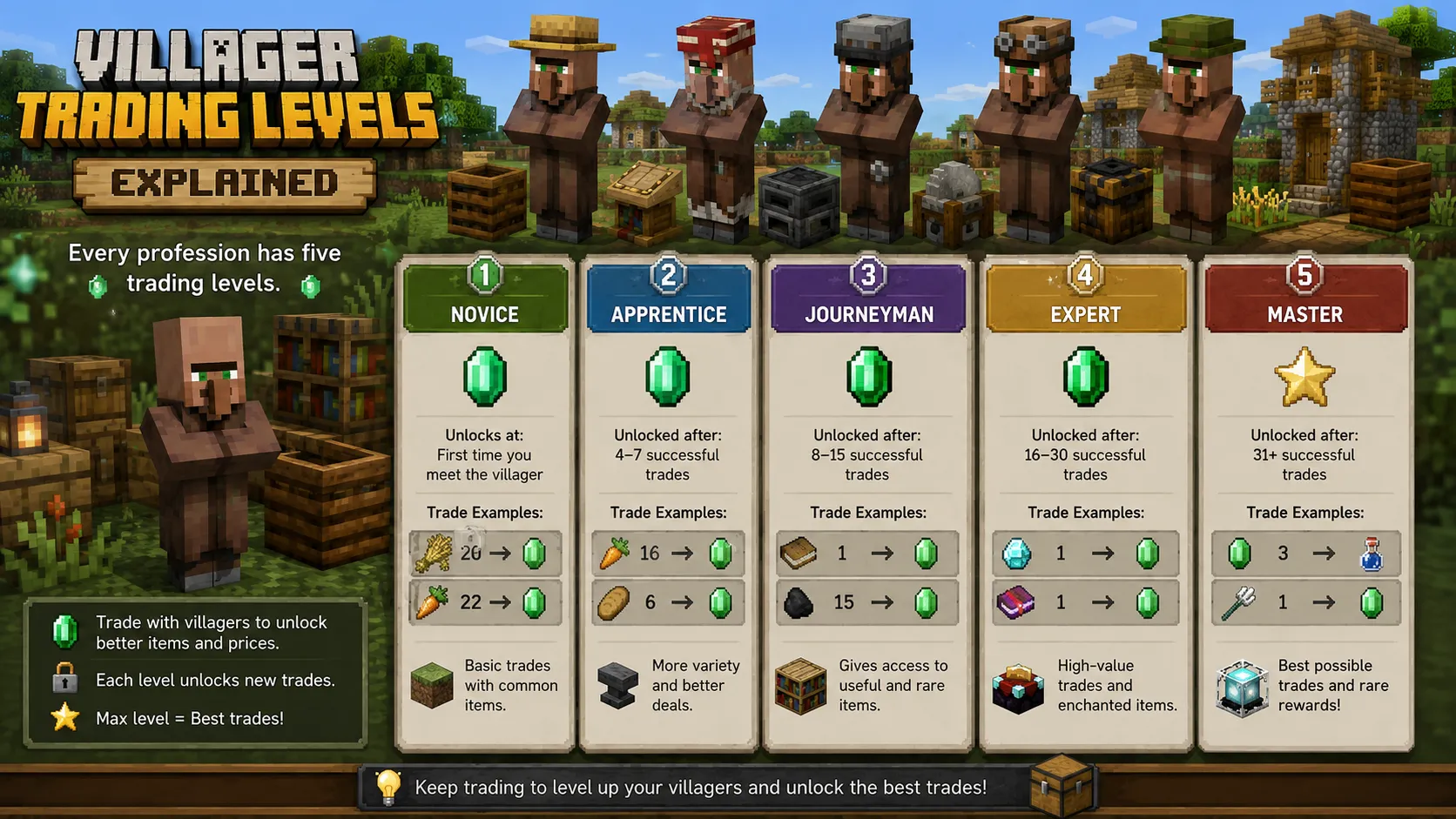
Villagers don’t start with all of their trades available. Each working villager begins at Novice and can level up as you trade with it.
There are five trading levels:
- Novice
- Apprentice
- Journeyman
- Expert
- Master
Every time you complete eligible trades, the villager gains experience. Once it earns enough experience, it moves to the next level and unlocks additional trade offers.
This means a villager becomes more useful as you continue trading with it. For example, a Librarian can unlock more book-related trades as it levels up, while an Armorer, Toolsmith, or Weaponsmith can unlock additional equipment trades.
The exact experience requirements and available trades depend on the profession and Minecraft version, so there’s no need to memorize specific numbers. The important thing to remember is simple: trade with a villager to help it level up and unlock more offers.
Best Villager Jobs for Different Needs
There isn’t one villager profession that is best for everything. The right choice depends on what you’re trying to get.
Best Villager Job for Enchanted Books
Librarian
The Librarian is the main profession to look for if you want enchanted books through villager trading.
Best Villager Job for Food
Farmer
Farmers are particularly useful if you already have crop farms, since you can trade surplus crops for emeralds. Butchers and Fishermen can also be useful if you have plenty of meat or fish.
Best Villager Job for Armor
Armorer
Armorers can offer iron and diamond armor, making them useful when you want equipment without crafting every piece yourself.
Best Villager Job for Tools
Toolsmith
Toolsmiths specialize in tools and can offer iron and diamond equipment as they level up.
Best Villager Job for Weapons
Weaponsmith
Weaponsmiths specialize in swords and axes, with higher-level trades offering stronger equipment.
Best Villager Job for Arrows
Fletcher
Fletchers are a convenient source of arrows and can also offer bows and crossbows.
Best Villager Job for Building Materials
Mason
Masons are useful for builders because they offer various stone, brick, quartz, and other building-related materials.
Common Villager Job Mistakes
Even though the villager job system is fairly simple once you understand it, a few mistakes can make managing villagers much harder.
- Placing the wrong workstation: Check which profession the block creates before placing it near a villager.
- Leaving too many workstations nearby: Multiple unemployed villagers may compete for available job site blocks, making it harder to control who gets which profession.
- Trying to give a Nitwit a job: Nitwits can never become professional villagers, regardless of which workstation you place nearby.
- Trading too early: If you’re trying to find a specific trade, make sure you’re happy with the villager’s offers before making your first trade. Trading locks in the villager’s profession and trade setup.
- Assuming every version works exactly the same: Villager trades and mechanics can change between Minecraft updates, so check the rules for your edition and version if something doesn’t behave as expected.
- Ignoring Java and Bedrock differences: Most of the core job system is shared, but some villager mechanics can behave differently between editions.
- Confusing unemployed villagers with Nitwits: An unemployed villager can still take a profession. A Nitwit cannot.
- Breaking a workstation without knowing whether the villager is locked: Removing a workstation can affect an untraded villager, but it will not reset the profession of a villager that has already been traded with.
Java vs. Bedrock Villager Jobs
For the most part, the basic villager job system works similarly in Minecraft Java Edition and Bedrock Edition. Villagers still use job site blocks to take professions, and the same 13 standard professions are available in both editions.
However, some villager mechanics can differ between Java and Bedrock, especially when it comes to how villagers interact with workstations, pathfinding, and certain trading mechanics. Version-specific changes can also affect individual trades.
Another thing to watch is the Villager Trade Rebalance. Mojang has tested changes to villager trading as an experimental feature, including major changes to Librarian and Armorer trades. These changes should not be assumed to apply to a normal world unless the relevant experiment has been enabled.
Cartographer trades have also received changes in recent Minecraft updates, including additional explorer maps. If you’re following an older guide or tutorial, some of the information you find may no longer match the current game.
The safest approach is to check your Minecraft edition, version, and enabled experiments before assuming a particular villager mechanic will work exactly as described.
If you’re running a multiplayer server, make sure everyone is using the same game version and that the relevant world experiments are configured consistently. This becomes even more important for modded servers, where mods can change or add to normal villager behavior. If you’re setting up a modded server, our modded Minecraft server hosting guide can help you get started.
Villager Trading Halls
A villager trading hall is an organized area where you keep multiple villagers so you can access their trades easily. Most trading halls give each villager its own small space, with the villager and workstation positioned so players can interact with them safely.
You don’t need a complicated design to build one. The important part is keeping your villagers, workstations, and trades organized.
Here are a few practical tips:
- Choose the profession before trading. If you’re looking for a specific trade, make sure the villager has the profession and offers you want before making your first trade.
- Keep workstations organized. A clearly planned layout makes it easier to identify which workstation belongs to which villager.
- Separate villagers when assigning jobs. If several unemployed villagers are nearby, they may compete for available workstations.
- Lock in valuable trades. Once you find a trade you want to keep, make at least one trade with that villager. This locks in its profession and current trade setup.
- Label your villagers. Signs, item frames, or other markers can make a large trading hall much easier to navigate.
- Leave enough space to interact with villagers. A cramped trading hall can make it frustrating to select the villager you actually want.
- Plan for restocking. Villagers need access to their job site to restock their trades, so don’t design your trading hall in a way that permanently prevents them from reaching or using their workstations.
If your trading hall contains a large number of villagers, you may also notice increased entity activity or performance issues, particularly on lower-end devices or busy worlds. If your Minecraft world starts feeling sluggish, you can try our guides on fixing lag in Minecraft Bedrock and allocating more RAM to Minecraft.
Villager Job Tips
Managing villagers becomes much easier when you understand a few basic rules:
- Place workstations deliberately. Don’t place random job site blocks around an area where you’re trying to control villager professions.
- Assign jobs one villager at a time when possible. This reduces confusion when multiple unemployed villagers are nearby.
- Check the profession before trading. Make sure you have the villager you actually want before locking it in.
- Reroll trades before your first trade. If you’re searching for a specific trade, such as an enchanted book from a Librarian, don’t trade until you’re satisfied with the offer.
- Lock in valuable trades. Once a villager gives you a trade worth keeping, trading with it prevents you from accidentally losing that setup.
- Don’t waste workstations on Nitwits. Nitwits cannot become professional villagers.
- Remember that baby villagers cannot take jobs. They can only become eligible for a profession after growing into adults.
- Keep version differences in mind. Villager mechanics and trade tables can change with Minecraft updates.
- Be careful with experimental features. The Villager Trade Rebalance can significantly change some trades when enabled.
- Give villagers access to their workstations. This is especially important in trading halls because villagers need their job sites to restock their trades.
FAQ
How many villager jobs are there in Minecraft?
There are 13 standard villager professions. Unemployed villagers and Nitwits are not professions.
What are all the villager professions?
The 13 standard professions are:
Armorer, Butcher, Cartographer, Cleric, Farmer, Fisherman, Fletcher, Leatherworker, Librarian, Mason, Shepherd, Toolsmith, and Weaponsmith.
What is the best villager job?
There isn’t one profession that is best for every player. Librarians are especially useful for enchanted books, Farmers are great for food and emerald trading, while Toolsmiths, Armorers, and Weaponsmiths can provide useful equipment.
How do I give a villager a job?
Find an unemployed adult villager and place an appropriate workstation nearby. If the villager can claim the workstation, it will take the profession associated with that block.
How do I change a villager’s profession?
If you haven’t traded with the villager yet, remove its current workstation and give it access to a different valid workstation. Once you have traded with the villager, its profession is locked.
Can unemployed villagers get jobs?
Yes. An unemployed adult villager can claim an available workstation and become one of the 13 standard professions.
Can Nitwits get jobs?
No. Nitwits cannot claim workstations or become professional villagers.
What villager sells enchanted books?
The Librarian is the profession associated with enchanted book trades.
What villager sells armor?
The Armorer can offer iron and diamond armor. The Leatherworker focuses on leather armor.
What villager sells tools?
The Toolsmith specializes in tools such as pickaxes, axes, shovels, and hoes.
What villager sells weapons?
The Weaponsmith specializes in swords and axes.
What villager sells arrows?
The Fletcher is the main villager for arrows and other ranged-combat items.
What villager sells maps?
The Cartographer specializes in maps and can offer explorer maps among its trades.
What workstation does each villager use?
Each profession has a specific job site block. For the complete list, see the Minecraft Villager Jobs at a Glance table earlier in this guide.
Can a villager change jobs after being traded with?
No. Once you complete a trade with a villager, its profession and trade setup are locked in. Removing its workstation will not turn it back into an unemployed villager.
Are villager jobs different in Java and Bedrock?
The core profession system is similar in both editions, but some details can differ between Java and Bedrock. Minecraft updates can also change villager trades and mechanics, so always consider the specific edition and version you’re playing.
Do villagers need their workstations?
Workstations are important for both assigning professions and restocking trades. In a trading hall, make sure your villagers can properly access their job sites if you want them to continue restocking.
Conclusion
Minecraft’s villager system is much easier to manage once you understand the basics: workstations determine professions, professions determine trade pools, and trading locks in a villager’s setup.
There are 13 standard villager professions, each with its own workstation and set of trades. Unemployed villagers can take one of these jobs, while Nitwits can never become professional villagers.
Whether you’re looking for enchanted books, cheap food, armor, weapons, tools, or building materials, the right villager can save you a lot of time and resources.
The key is to assign professions carefully, reroll unwanted trades before making your first trade, and lock in valuable offers once you find them. Keep your edition and Minecraft version in mind as well, since villager mechanics can change over time.
Once you have these basics down, building and managing your own villager trading hall becomes much simpler.
You May Also Like
 Computers & PC Games
Is 16GB RAM Enough for Gaming?
 Computers & PC Games
How Old Do You Have to Be to Play Fortnite? Age Rating and Parental Controls
 Computers & PC Games
How to Reduce Ping: 8 Fixes That Actually Help (PC, PS5, and Xbox)
 Computers & PC Games
Is RomsFun Safe and Legit? My Complete Review and Testing Experience
 Computers & PC Games
10 Best Modded Minecraft Server Hosting (2026): Pricing, Specs & Honest Picks for Every Modpack
 Computers & PC Games