

If you have Xfinity Internet, Xfinity TV, NOW TV, or an Xfinity streaming bundle, you may be wondering whether Peacock is included at no extra cost.
The short answer is: Peacock Premium is not free for every Xfinity customer. Your access depends on your Xfinity plan, internet speed, rewards tier, bundle, and current promotion.
Some Xfinity customers can get Peacock Premium included. Others can add it through a bundle, receive it for a limited promotional period, or pay for it separately through Peacock. The offer can also change over time, so it is always smart to check your Xfinity account before signing up for a separate Peacock subscription.
Peacock gives you access to NBCUniversal content, live sports, NFL games, Premier League soccer, WWE events, movies, TV shows, Bravo programs, original series, news, and live channels. But the type of Peacock access you get matters. Peacock Premium includes ads, while Peacock Premium Plus offers fewer ads and additional features.
Let’s break down how Peacock works with Xfinity, who may qualify for free access, how to activate it, and what to do if you already pay for Peacock.
Is Peacock Premium Free With Xfinity?
Peacock Premium may be included with certain Xfinity plans and offers, but it is not automatically free for all Xfinity customers.
You may qualify for Peacock Premium at no added monthly cost if you have one of these eligible offers:
- Xfinity Gigabit Internet or faster plans
- Xfinity Rewards Platinum status
- Xfinity Rewards Diamond status
- NOW TV
- Some Xfinity StreamSaver bundles
- NOW StreamSaver bundles
- Certain Xfinity TV or Internet promotions
Your eligibility depends on the exact plan connected to your Xfinity account.
For example, Xfinity Gigabit Internet customers may receive Peacock Premium for a limited promotional period. Xfinity Rewards Platinum and Diamond members may receive Peacock Premium while they remain eligible at those reward levels. NOW TV customers may have Peacock Premium included as part of their package.
The key point is simple: you should not assume that having Xfinity automatically means you have free Peacock Premium.
What Is the Difference Between Peacock and Peacock Premium?
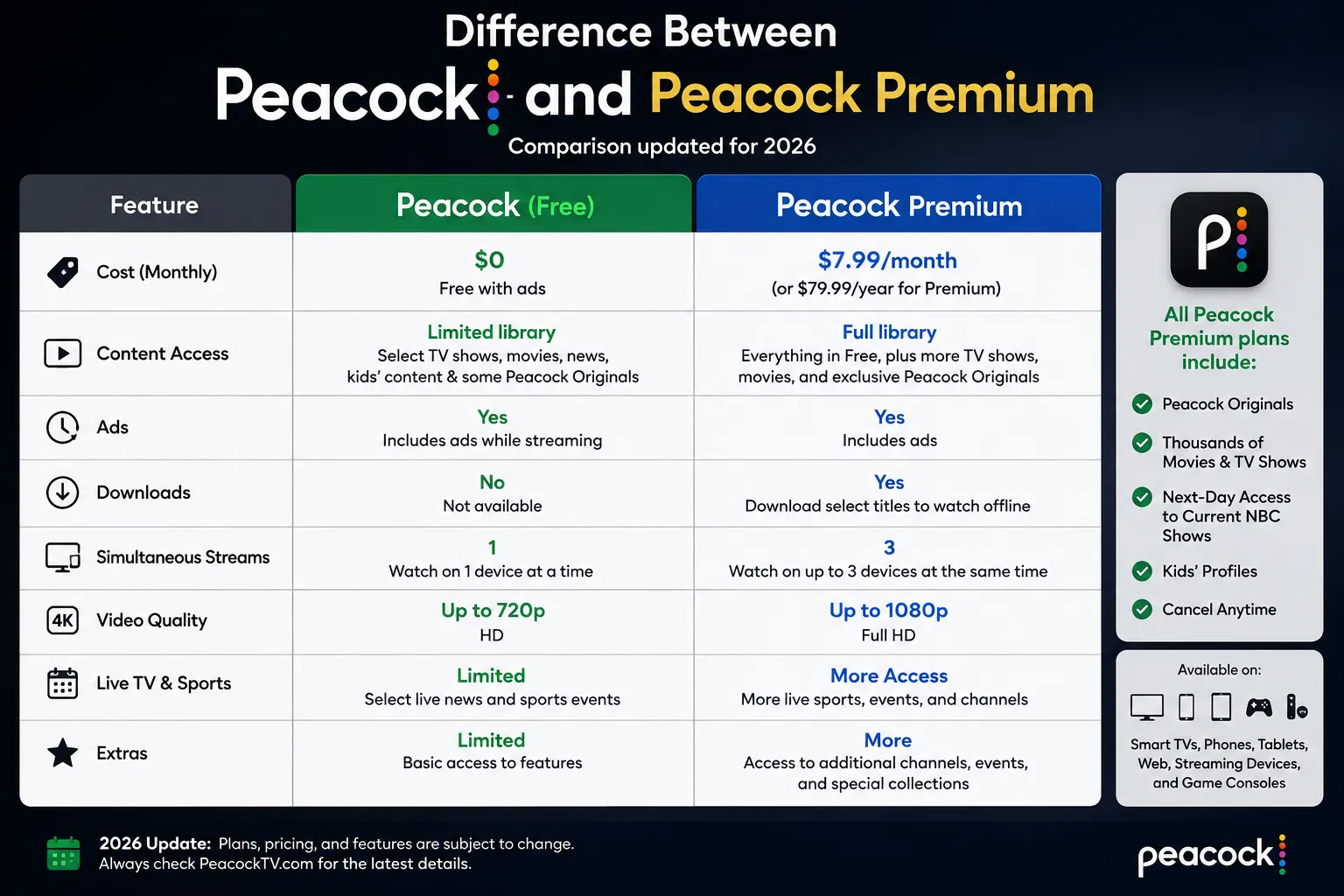
Peacock offers different subscription levels. The plan you receive through Xfinity is usually Peacock Premium, not Peacock Premium Plus.
Peacock Premium is the standard paid plan with ads. It includes a large on-demand library, live channels, sports coverage, news, movies, TV series, and Peacock Originals.
Peacock Premium Plus is the higher-tier plan. It offers fewer ads on most content and may include additional features, such as downloads for offline viewing and access to your local NBC station in supported markets.
Here is a simple comparison:
| Peacock plan | What you get | Advertising | Typical access method |
|---|---|---|---|
| Peacock Premium | Movies, shows, sports, live channels, originals | Includes ads | Direct subscription, Xfinity offer, NOW TV, StreamSaver |
| Peacock Premium Plus | Most Premium content with fewer ads | Limited ads may still appear | Separate upgrade or direct subscription |
| Peacock through an Xfinity promotion | Usually Peacock Premium | Includes ads | Eligible Xfinity Internet, rewards, or bundle offer |
Even with Peacock Premium Plus, some live sports, live channels, and NBC programming may still contain advertising. “Ad-free” does not always mean that every part of the service has no commercials.
Which Xfinity Customers Can Get Peacock Premium Included?
Xfinity offers can change, but several groups of customers may be eligible for included Peacock Premium.
Xfinity Gigabit Internet Customers
If you have an eligible Xfinity Internet plan with 1 Gig speed or faster, Peacock Premium may be included for a promotional period.
Xfinity has offered Peacock Premium for up to 24 months with eligible Gigabit Internet plans. You may need to activate the offer through your Xfinity account after you sign up for or upgrade to the eligible internet service.
This is not always a permanent benefit. When the promotional period ends, you may need to pay the regular Peacock Premium price if you want to keep the service.
Before you assume the benefit is active, log in to your Xfinity account and look for a Peacock activation message.
Xfinity Rewards Platinum and Diamond Members
Xfinity Rewards is Comcast’s loyalty program for eligible customers. Your reward tier can depend on how long you have been an Xfinity customer.
Peacock Premium may be included for customers with:
- Platinum Xfinity Rewards status
- Diamond Xfinity Rewards status
If you qualify, you may receive an email, Xfinity app notification, account message, or activation banner. You can also check the Xfinity Rewards section of your account.
Your Peacock benefit may depend on keeping your Platinum or Diamond status. If your reward tier changes, your Peacock access may change too.
NOW TV Customers
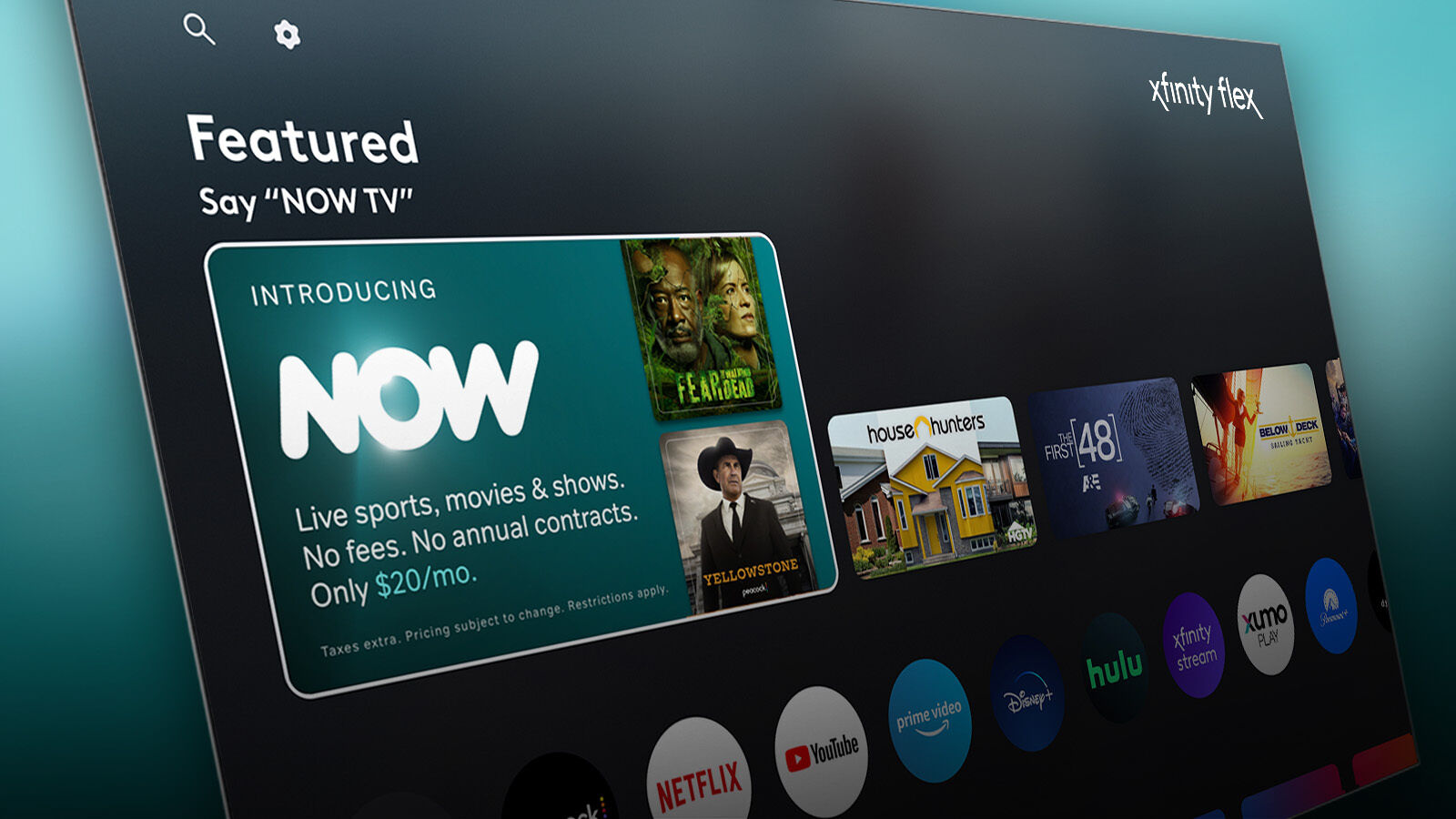
NOW TV is an Xfinity streaming package that includes live TV channels and Peacock Premium.
If you have NOW TV, Peacock Premium is included as part of the package. This can be a useful choice if you want a lower-cost live-TV option along with access to Peacock movies, original shows, sports, and entertainment.
NOW TV may include:
- Live TV channels
- Peacock Premium
- Entertainment channels
- News channels
- Sports-related programming
- On-demand content
The exact channel lineup and pricing can vary, so review your current Xfinity package before making changes.
StreamSaver and NOW StreamSaver Customers
Xfinity also offers streaming bundles, including StreamSaver and NOW StreamSaver. These bundles can include Peacock Premium alongside other popular streaming services.
Depending on the bundle, you may receive access to:
- Peacock Premium
- Netflix
- Apple TV
- Additional streaming features
- Upgrade options for ad-free plans
StreamSaver is not the same as getting Peacock completely free through an internet promotion. You are paying for a bundle, but the combined price may cost less than subscribing to each service separately.
If you already pay for Netflix, Apple TV, and Peacock, a StreamSaver package may be worth comparing with your current monthly subscriptions.
How Do You Check if Peacock Is Included With Your Xfinity Plan?
The easiest way to check is through your Xfinity account. Do not sign up for a new Peacock subscription before you confirm whether you already have an eligible offer.
Use these steps:
- Sign in to your Xfinity account.
- Open your account overview or services page.
- Look for Peacock Premium, rewards, promotions, or streaming offers.
- Check whether an activation banner appears.
- Read the offer terms carefully.
- Confirm whether the benefit is permanent, promotional, or tied to a specific plan.
- Activate Peacock through the Xfinity link or prompt.
You may also see your Peacock offer in:
- The Xfinity mobile app
- The Xfinity Rewards dashboard
- An Xfinity email
- Your Xfinity TV box
- The Xfinity Stream app
- Your Xfinity account notifications
If you cannot find an offer, contact Xfinity customer support or use the chat option in your account. Ask them whether your specific plan includes Peacock Premium and whether the benefit has an end date.
How Do You Activate Peacock Premium Through Xfinity?
If your plan includes Peacock Premium, you usually need to activate it. It may not appear automatically in the Peacock app just because you have eligible Xfinity service.
The activation process is usually straightforward.
- Sign in to your Xfinity account.
- Find the Peacock Premium offer.
- Select the activation option.
- Confirm the email address you want to use for Peacock.
- Create a Peacock account or sign in to an existing Peacock account.
- Complete the activation steps.
- Open the Peacock app or Peacock website.
- Confirm that your account shows Peacock Premium access.
After you activate, check your Peacock account settings. Your plan should show Peacock Premium rather than a free or inactive account.
If you have an Xfinity X1 TV Box or Xumo Stream Box, you may be able to activate Peacock directly through your TV screen. Follow the on-screen instructions, then confirm the email address connected to your Peacock account.
Do not create several Peacock accounts by accident. Use one email address that you can access easily. That will make it easier to manage your plan, password, billing, and device logins later.
What Happens if You Already Pay for Peacock?
If you already pay for Peacock and then become eligible for Peacock Premium through Xfinity, your next step depends on how you originally subscribed.
You may have signed up for Peacock through:
- Peacock’s website
- Apple App Store
- Google Play
- Roku
- Amazon
- Xfinity
- A cable or internet promotion
- A streaming bundle
Before activating your Xfinity offer, check your Peacock billing page. Look for the service that is charging you.
If Peacock bills you directly, you may need to cancel your existing plan before switching to the Xfinity benefit. If Apple, Roku, Google Play, Amazon, or another platform bills you, you may need to manage the subscription through that platform.
Do not cancel your current subscription until you know that your Xfinity Peacock Premium offer is active. Otherwise, you may lose access temporarily.
A safe process is:
- Check where you are billed for Peacock.
- Confirm that you qualify for the Xfinity offer.
- Activate Peacock through Xfinity.
- Sign in to Peacock and confirm your plan.
- Cancel the old paid subscription only after the Xfinity benefit is active.
- Keep a record of your cancellation confirmation.
This helps you avoid paying twice for the same Peacock Premium plan.
Can You Upgrade From Peacock Premium to Peacock Premium Plus?
Yes, you may be able to upgrade from Peacock Premium to Peacock Premium Plus, but the upgrade terms can depend on how you receive Peacock.
Peacock Premium Plus is the higher-tier plan. It may give you fewer ads on many on-demand shows and movies. It can also include extra features, depending on the current Peacock plan terms.
If you receive Peacock Premium through an Xfinity reward, Gigabit Internet promotion, NOW TV, or another eligible offer, you may have an option to pay the difference to upgrade to Premium Plus.
However, some promotions and bundles have different upgrade rules. You should check your Xfinity or Peacock account before making changes.
When you compare the plans, consider how you watch.
Peacock Premium may be enough if you mainly use Peacock for:
- NFL games
- Premier League matches
- WWE events
- Live channels
- News
- Reality TV
- Bravo shows
- Sports coverage
- Occasional movies
Premium Plus may make more sense if you watch many on-demand series and movies and want fewer ad breaks.
Keep in mind that live programming can still include commercials even with Premium Plus.
Does Peacock With Xfinity Include Live Sports?
Peacock Premium can include access to a wide range of live sports, but the specific sports available depend on current broadcast rights and event schedules.
Peacock is known for sports content such as:
- Sunday Night Football
- Selected NFL games
- NFL playoff coverage
- Premier League soccer
- WWE events
- WWE Raw and other WWE programming
- Big Ten sports
- Golf
- NASCAR
- IndyCar
- Olympic coverage
- Track and field
- Rugby
- Figure skating
- Cycling
- College sports
- International sports events
Not every event is available with every Peacock plan. Some content may require Peacock Premium. Some sports events may be available only in certain locations. Others may be subject to blackout rules, local broadcast rights, or device restrictions.
Before a major game, check the Peacock schedule. You should confirm:
- Whether the event is live on Peacock
- Whether Peacock Premium is required
- What time the event starts
- Whether the event is available in your location
- Whether you need to use a specific device
- Whether a replay will be available later
If you are using Peacock for NFL football, remember that it does not show every NFL game. It is most closely associated with Sunday Night Football and selected NFL events. Your local CBS, FOX, NBC, ABC, ESPN, NFL Network, Amazon Prime Video, or other broadcaster may carry different games.
Does Peacock Include Local NBC With Xfinity?
Peacock Premium and Peacock Premium Plus do not always offer the same local NBC access.
Peacock Premium gives you access to the main Peacock content library, live channels, sports, movies, originals, and TV shows. But it may not include your live local NBC station.
Peacock Premium Plus may offer access to a live local NBC station in supported markets. Availability can depend on where you live and your local NBC affiliate.
If you want to watch your local NBC channel, check your Peacock account and location availability. Do not assume that Peacock Premium includes the same live local station you would receive through cable, satellite, or an over-the-air antenna.
If your goal is to watch local NBC programming without cable, an HD antenna may also be a useful option. It can bring in local NBC broadcasts if you are within range of the station.
Can You Watch Peacock on Xfinity X1?
Yes. You can watch Peacock on many Xfinity X1 TV Boxes.
If you have an eligible Xfinity plan, you may be able to activate Peacock through the X1 interface. You can search for Peacock using the Xfinity Voice Remote or open the Peacock app from the apps menu.
To get started:
- Turn on your Xfinity X1 TV Box.
- Press the microphone button on the Xfinity Voice Remote.
- Say “Peacock.”
- Open the Peacock app.
- Sign in or activate your eligible offer.
- Start watching available Peacock content.
You may also be able to manage Peacock through your Xfinity account rather than the TV box. If activation does not work through the TV, check your email, Xfinity app, or online account.
Your device may need a software update before the Peacock app appears. Restarting the TV box can also help if an app is not loading correctly.
Can You Watch Peacock on Flex or Xumo Stream Box?
Yes. Peacock is available on supported Xfinity streaming devices, including Flex and Xumo Stream Box devices.
You can open the Peacock app, sign in with your account, and watch available content. If your Xfinity plan includes Peacock Premium, make sure you activate the offer first.
Your streaming device may show Peacock as an app tile or allow you to find it through voice search.
For example, you may say:
“Open Peacock.”
“Find Sunday Night Football.”
“Show Premier League games.”
“Search for The Traitors.”
“Play WWE.”
The device makes access easier, but it does not automatically give you free Peacock Premium. Your account still needs to be eligible through your Xfinity plan, Xfinity Rewards status, NOW TV package, or StreamSaver bundle.
What Happens When Your Xfinity Peacock Offer Ends?
Some Xfinity Peacock offers are permanent only while you remain eligible. Others are promotional and expire after a set period.
For example, Gigabit Internet customers may receive Peacock Premium for a limited number of months. After the offer ends, you may need to pay the current Peacock Premium monthly price if you want to continue.
Your Peacock account may send you an email before the offer ends. Xfinity may also show an account message or billing notification.
When the offer ends, you can choose to:
- Pay for Peacock Premium directly
- Upgrade to Peacock Premium Plus
- Cancel Peacock
- Change your Xfinity bundle
- Check whether you qualify through Xfinity Rewards
- Use another Xfinity promotion if available
- Wait for a future Peacock promotion
Read the terms when you activate. Look for phrases such as:
- “For 24 months”
- “Limited-time offer”
- “While eligible”
- “With qualifying service”
- “Offer may change”
- “Taxes may apply”
- “Valid for new or existing customers”
Knowing the end date can help you avoid surprise charges.
Why Might Peacock Not Be Free on Your Xfinity Account?
If Peacock does not appear as included in your account, there may be a simple reason.
You may not qualify if:
- Your internet plan is below the required speed tier
- You do not have an eligible Gigabit plan
- Your promotional period ended
- Your Xfinity Rewards tier is not Platinum or Diamond
- You are not enrolled in an eligible offer
- You have a different Xfinity package
- Your Peacock account uses a different email address
- Your current Peacock subscription is billed through another platform
- Your account has not completed activation
- You recently changed your Xfinity plan
- Your service is in a location where the offer differs
Start by checking your account email address. If you activated Peacock with one email address but later signed in with another, Peacock may look like it is asking you to subscribe again.
If you are sure you qualify but Peacock still shows a payment screen, sign out and try the activation process again through Xfinity. If that does not work, contact Xfinity support and ask them to confirm the benefit on your account.
How to Manage Your Peacock Subscription Through Xfinity
You can often manage your Peacock access through your Xfinity account, the Peacock website, or the platform that originally billed you.
Your account page may let you:
- Check your Peacock plan
- Confirm your billing source
- Activate an eligible offer
- Upgrade to Premium Plus
- Cancel a paid upgrade
- Change your email address
- Manage devices
- Update your password
- Review account status
- Check promotional end dates
If you receive Peacock Premium through Xfinity, you may need to manage your plan through Xfinity instead of Peacock directly.
If you pay Peacock through Apple, Roku, Google Play, Amazon, or another provider, you may need to cancel or change the subscription through that provider’s account settings.
Always check the billing source before canceling. This prevents you from canceling the wrong plan or losing access unexpectedly.
How to Keep Your Peacock Account Secure
Your Peacock account may seem less important than your email or bank account, but it can still contain personal information, viewing history, device details, and billing information.
Use basic account security habits:
- Create a unique Peacock password.
- Do not reuse your Xfinity, email, or bank password.
- Use a password manager to store your login securely.
- Protect your Xfinity account with a strong password.
- Turn on two-factor authentication where it is available.
- Do not share your password with people outside your household.
- Remove devices you no longer use.
- Watch for phishing emails that claim your subscription has expired.
- Sign in through the official Peacock or Xfinity app.
- Never enter your password after clicking a suspicious email link.
If you receive an email saying Peacock will cancel your account, do not click the link right away. Open the Peacock app or Xfinity website directly and check your account status.
Frequently Asked Questions About Peacock and Xfinity
Is Peacock free for all Xfinity customers?
No. Peacock Premium is not included for every Xfinity customer. Your eligibility depends on your plan, internet speed, Xfinity Rewards tier, NOW TV package, StreamSaver bundle, or promotional offer.
Is Peacock Premium included with Xfinity Gigabit Internet?
It may be. Eligible Xfinity customers with 1 Gig Internet speed or faster may receive Peacock Premium for a limited promotional period. Check your Xfinity account for the current offer and activation details.
Do Xfinity Rewards members get Peacock for free?
Platinum and Diamond Xfinity Rewards members may be eligible for Peacock Premium at no extra cost. You usually need to activate the offer through your Xfinity Rewards account.
Is Peacock included with NOW TV?
Yes. NOW TV includes Peacock Premium as part of its package. The exact plan terms, pricing, channels, and availability can change, so check your current NOW TV offer.
Can you upgrade Xfinity Peacock to Premium Plus?
Yes, you may be able to upgrade from Peacock Premium to Peacock Premium Plus by paying the difference. Your upgrade options depend on how you receive Peacock through Xfinity.
Why is Peacock asking for payment if you have Xfinity?
You may not have an eligible plan, your promotion may have ended, you may need to activate the benefit, or you may be using a different Peacock email address from the one linked to your Xfinity offer.
Does Peacock include every NFL game?
No. Peacock does not include every live NFL game. It offers Sunday Night Football and selected NFL events, but other games may appear on CBS, FOX, ESPN, NFL Network, Amazon Prime Video, Netflix, or other broadcasters.
Final Thoughts on Peacock With Xfinity
Peacock can be included with Xfinity, but it is not automatically free for everyone. Your access depends on your Xfinity Internet plan, Gigabit speed tier, Xfinity Rewards level, NOW TV package, StreamSaver bundle, and current promotions.
Before paying for Peacock separately, check your Xfinity account. You may already qualify for Peacock Premium at no extra cost or through a bundle you are already paying for.
If you are eligible, activate the offer with the right email address, confirm that Peacock Premium is active, and cancel any duplicate subscription only after your new access is working.
You May Also Like
 Internet
DISH vs Optimum vs Hughesnet: Which Is Better for Internet, TV, and Gaming?
 Computers & PC Games
How to Reduce Ping: 8 Fixes That Actually Help (PC, PS5, and Xbox)
 Internet
Is Tachus (Ezee Fiber) Internet a Good Provider? Complete Review & Plans
 Internet
Wi-Fi Connected but No Internet? Find the Cause and Fix It
 Internet
Is 1000 Mbps Good for Gaming? What 1000 Mbps Internet Speed Really Means
 Internet